-=: Project Doccumentation :=-
Project Title | Personnel
| Course, School, Date | Disclaimer
Abstract | Introduction
| Planning | Design | Implementation
| Future Enhancement/Maintenence
Conclusions | References
| User's Manual & Installation Guide
BACK TO HOME
Project title: Project 2 (PHE Features)
BACK TO TOP
Personnel (alphabetical order):
Coffey, Jason Edward
Lim, Pey Lian
Nelson, Michael Chad
BACK TO TOP
Course, School, Date: CS499-001, University
of Kentucky, Spring 2002
BACK TO TOP
Disclaimer:
This project has been designed and implemented as
a part of the requirements for CS499 Senior Design Project for Spring 2002
semester.
© University of Kentucky, 2002
While the authors make every effort to deliver a high
quality product, we do not guarantee that our products are free from defects.
Our software is provided "as is," and you use the software at your own
risk. We make no warranties as to performance, merchantability, fitness
for a particular purpose, or any other warranties whether expressed or
implied.
No oral or written communication from or information
provided by the authors or the University of Kentucky shall create a warranty.
Under no circumstances shall the authors or the University of Kentucky
be liable for direct, indirect, special, incidental, or consequential damages
resulting from the use, misuse, or inability to use this software, even
if the authors or the University of Kentucky have been advised of the possibility
of such damages.
BACK TO TOP
Abstract:
This project adds features to the workstation version of the phenylalanine
(phe) milligram tracker (PHETracker). PHETracker is a program designed
to track the phenylalanine (phe) milligram content of everyday food items
as listed by the U.S. Department of Agriculture (USDA), allowing phenylketonuria
(PKU) disease sufferers to monitor their diets as well as assists PKU researchers
to collect data. By adding these features, this program could be further
improved for data management and synchronization to the benefit of the
users.
BACK TO TOP
Introduction:
As mentioned, the workstation-based PHETracker tracks the phenylalanine
(phe) milligram content of everyday food items as listed by the USDA. This
product, developed to run on workstations, allows phenylketonuria (PKU)
disease sufferers to monitor their diets as well as assists PKU researchers
to collect valuable data about the disease. However, this program needs
improvement on several aspects like graphic user interfaces (GUIs) and
synchronization with personal digital assistants (PDAs).
Thus we will be undertaking the task of upgrading the available program
to improve or add these features. This upgrade is essential as a better
GUI makes the program more compatible with users who could come from various
computer literacy levels. Moreover, the synchronization feature would make
it a breeze for those who need consistency of data both in their desktop
and PDAs.
This project will be done according to specifications as agreed by Dr.
Jane Hayes (our customer). It is divided into three phases, as follow:
PHASE I:
Implement changes (if not already implemented) to the existing program
already running on the desktop:
- Change all names to "PHETracker"
- Allow for Calories to be displayed for each food
- Allow the user of the PHE software the ability
to add a new entry to the database
PHASE II:
Coordinate with the two subgroups of Group 1 for synchronizing their
PDA (Windows CE and Palm OS) versions with our desktop version by using
HotSync and implementation based on a common USDA database. Probability
of utilizing XML. The purpose of this is to synchronize the database on
both sides. For instance, the favorite food list and the change in phe
intake amount.
PHASE III:
Implementation of wireless query (from PDA to workstation) and new database
entry by PDA utilities. However, this phase will only be done if there
were sufficient time left after the completion of Phase I and Phase II.
BACK TO TOP
Planning:
This project is aimed to modify the existing program to meet the specifications
as mentioned in Introduction . Thus the scope of this
project will be changing related names in the program to "PHETracker",
allow the display of calories on its GUI (Graphical User Interface) and
enable the user to add a database entry. These would be done first. In
addition, there will collaboration between our group and the two subgroups
in Group 1 (1a and 1b) for database synchronization implementation via
HotSync between PDA and workstation. The database used will be the sample
USDA-based database provided by previous programmers. In case of time limitation,
implementation of wireless query from PDA to workstation and database entry
by PDA will be abandoned. Hence this project will be only bound by implementation
of these functionalities. Also, users are assumed to have some basic knowledge
of workstation and PDA usage, and how to run the program.
Effort and size estimation for this project is done via two methods,
namely the Feature Point (FP) analysis and the Line of Code (LOC) estimation.
They are as stated below:
|
FP estimation:
Number of user inputs
|
12 x 4 = 48
|
|
Number of user outputs
|
8 x 5 = 40
|
|
Number of user inquiries
|
2 x 4 = 8
|
|
Number of files
|
8 x 7 = 56
|
|
Number of external interfaces
|
4 x 7 = 28
|
|
Algorithms
|
6 x 2 = 12
|
|
COUNT TOTAL
|
192
|
|
Complexity multiplier
|
0.75
|
|
Feature points
|
144
|
|
144 x 0.25 p-m / FP
|
36 p-m
|
|
Errors per FP (thousand lines of
code)
|
100
|
|
Defects per FP
|
10
|
|
Costs per FP
|
free
|
|
Pages of documentation per FP
|
2
|
|
FP per person-month
|
5
|
|
LOC estimation:
Lines of code
|
600
|
|
Errors per KLOC (thousand lines
of code)
|
100
|
|
Defects per KLOC
|
10
|
|
Costs per KLOC
|
free
|
|
Page of documentation per KLOC
|
5
|
|
Errors / person-month
|
50
|
|
LOC per person-month
|
100
|
|
Costs / page of documentation
|
free
|
|
Functions
|
Estimated LOC
|
LOC/pm
|
Costs/LOC
|
Costs
|
Effort (months)
|
|
GUIs
|
50
|
25
|
free
|
free
|
0.25
|
|
Processes
|
150
|
50
|
free
|
free
|
0.50
|
|
Database
|
100
|
50
|
free
|
free
|
0.25
|
|
Syncing
|
300
|
100
|
free
|
free
|
1.00
|
|
TOTAL
|
600
|
|
|
free
|
2.00
|
The project is scheduled to be like the following:
| Date |
Expected Results |
|
Jan 24, 2002
|
Assignment of group and project by Dr. Paul Piwowarski. |
|
Feb 7, 2002
|
Done with setting up CS499 Project 2 homepage (abstract). |
|
Feb 19, 2002
|
Meet with Prof. Piwowarski after class. |
|
Feb 22, 2002
|
Get approval from Dr. Hayes. |
|
Mar 7, 2002
|
Midterm examination. |
|
Mar 8, 2002
|
Deadline for LOC and FP estimation. |
|
Mar 9-17, 2002
|
SPRING BREAK!!! |
|
Mar 21, 2002
|
Midterm project review/presentation to class.
Schedule design review with Prof. Piwowarski. |
|
Mar 28, 2002
|
Design review with Prof. Piwowarski.
(Design review documentation would be available online 24 hours
prior to presentation.) |
|
Apr 10, 2002
|
Code review with Prof. Piwowarski. |
|
Apr 18, 2002
|
Final class presentation. |
|
Apr 30, 2002
|
Final presentation to instructor. Hand in everything. |
|
May 1, 2002
|
Deadline for delivering completed project. |
Milestones of the project are as below:
| Date |
Activities |
|
Jan 24, 2002
|
Project 2 group is formed, with the objective of the project
assigned by Dr. Paul Piwowarski. |
|
Jan 29, 2002
|
First meeting with Dr. Jane Hayes (primary customer), where the
initial customer description is given. |
|
Jan 31, 2002
|
Project homepage created. |
|
Feb 5, 2002
|
Group meeting to discuss about homepage setup and rough member
assignments. |
|
Feb 6, 2002
|
Project homepage updated. |
|
Feb 11, 2002
|
Pey-Lian and Chad discussed and tested several versions
of project codes available.
Dilemma between Java and C++ versions. |
|
Feb 12, 2002
|
Set up a team email. Project homepage updated. Scheduled
meeting on 2/14 after class.
Jason will contact Project 1 team. |
|
Feb 14, 2002
|
Attempt to contact Dr. Jane Hayes for further customer description
of the project. |
|
Feb 18, 2002
|
Received preliminary reply from Dr. Hayes.
Project homepage updated. |
|
Feb 19, 2002
|
Meet with Prof. Piwowarski after class to discuss about the project.
Group meeting to discuss about the reply to Dr. Hayes, and project
design and documentation.
Also, group members will report progress and decide which source
code to use. |
|
Feb 20, 2002
|
Approval by Dr. Hayes. |
|
Feb 21, 2002
|
Meet with Group 1 to discuss about synchronization issues. |
|
Feb 23, 2002
|
Group meeting to decide which source code to use.
Choices gone down to either Program 2 or Program 4. Awaiting
further info from Hayes. |
|
Feb 24, 2002
|
Project homepage updated. A link to project documentation is
added but still under construction. |
|
Feb 26, 2002
|
Group meeting to discuss about project design and documentation. |
|
Feb 27, 2002
|
Project homepage updated. Added abstract and introduction to
documentation.
Got some information from Group 1 concerning synchronization.
Group meeting. Most likely will choose Program 4 to work on.
However need to meet with Nareshkumar for a demonstration on
how to use it. Waiting for his reply.
Discussed about using the MSACCESS database from USDA website.
Will estimate LOC and FP upon Program 4 demo. Preliminary LOC
~ 500 to 600 lines (?) |
|
Mar 6, 2002
|
Met with Naresh for Program 4 demonstration. Useful
info provided:
1) A usable version of MSAccess database already available in
Related
Downloads . (Under "Palmdata")
2) However application cannot run in microlabs as a new database
driver needs to be added.
3) To run it on CSLab, the MSAccess database needs to be converted
to Oracle
(needs special permission from CSLab administrator).
4) Thus Program 4 is best run on PCs that supports MSAccess.
Since most regular consumers use PCs with
MSWindows OS, this assumption should not be a big problem.
5) To add a calory display, programmer(s) just need to refer
existing codes.
6) Also, the much needed admin and user login names and passwords
are provided.
7) However, Phase II needs to be constructed from scratch as
Program 4 doesn't support that feature at all.
8) For further info, Naresh can be contacted via email and phone
number that are previously given.
While trying to run Program 4 on a PC after the meeting, some
errors are encountered (missing GUIs).
Will look at it further to fix the problem.
Estimations for FP and LOC are constructed. |
|
Mar 7, 2002
|
Submitted FP and LOC estimation to Prof. Piwowarski.
Project homepage updated, with FP and LOC added here
. |
|
Mar 18, 2002
|
Met to prepare slides for Midterm Presentation. Took
some screenshots too. |
|
Mar 19, 2002
|
Requested CSLab database access from Dr. Piwowarski.
Project homepage updated. Some documentation added. |
|
Mar 20, 2002
|
Rehearsed Midterm Presentation and made neccessary
changes to the slides.
Project homepage updated. Slides
uploaded. Design review documentation (under
construction) uploaded. |
|
Mar 21, 2002
|
Gave Midterm Presentation in class.
Scheduled a time for design review with Dr. Piwowarski.
Updated project homepage. |
|
Mar 24, 2002
|
Met to prepare design review and discussed about Oracle database
access via CSLab.
Might use a dummy database instead if have to manually enter
data into Oracle -> will discuss with Dr. Hayes.
Did some Phase I codings and tried accessing Oracle via CSLab. |
|
Mar 24-26, 2002
|
Prepared design review documentation.
Coding attempt to enable the existing program to access Oracle
database instead of MSAccess. |
Mar 27, 2002
|
Updated project homepage.
Rescheduled design review presentation with Dr. Piwowarski.
Uploaded completed documentation
for design review and informed Dr. Piwowarski about it. |
|
Mar 28, 2002
|
Met with Dr. Piwarski for design review. |
|
Apr 2, 2002
|
Contacted Dr. Hayes for query about platform of our project.
It will be developed on Windows.
However if that fails, it will be developed on CSLab instead,
putting the Windows platform a future enhancement.
Drew data flow diagram . |
|
Apr 3, 2002
|
Updated project homepage. Non-HTML links (screenshots,
data flow diagram etc.) moved to Related
Materials .
Added some more stuff to documentation
, including the data flow diagram. |
|
Apr 4, 2002
|
Met to discuss about coding and preparing code review.
Jason will contact Group 1, while Chad and Pey-Lian will complete
Phase I coding. |
|
Apr 4-8, 2002
|
Did Phase I coding on Windows OS successfully. Also
fixed some existing bugs.
Put codes on CSLab for public access and informed Dr. Piwowarski
(for code review).
Attempted coordination with Group 1. |
|
Apr 10, 2002
|
Met with Dr. Piwowarski for code review.
His comments: Should standardize internal documentation and begin
aHotSyncccording to agreed interface.
Updated project homepage. Added a link to Install
Toolkit for Java (might be useful later) under Related
Materials .
Added stuff to documentation
. |
|
Apr 13-14, 2002
|
Internal documentation added to existing and modified
source codes. |
|
Apr 15, 2002
|
New login-dependent menu items added to HotSync menu. |
|
Apr 17, 2002
|
Met to prepare final class presentation, and discussed
about HotSync implementation.
Apparently Group 1 (CE) has cooked something up. More intergroup
communication needed. |
|
Apr 18, 2002
|
Did final presentation to class. Updated Dr. Hayes
with current project status.
Updated project homepage. Added final
presentation slides to Related Materials
. |
|
Apr 22, 2002
|
Met with Group 1 (CE) to discuss about HotSync
interface.
Scheduled final presentation to Dr. Piwowarski together with
Group 1 (CE). Dr. Hayes was invited too. |
|
Apr 23, 2002
|
Updated project homepage. Added more stuff and a little
modifications to documentation . |
|
Apr 24-28, 2002
|
Implemented HotSync interface between Windows workstation
and CE PDA. |
|
Apr 29, 2002
|
Met to discuss implemented HotSync interface, debug
program and distribute workload to finalize project.
Met with Group 1 (CE) for test execution of HotSync.
Updated project homepage for one last time. Completed documentation
.
Answered Dr. Hayes' queries about this
project. The link to the answers is also accessible under Related
Materials . |
|
Apr 30, 2002
|
Final project presentation to Dr. Piwowarski (2:30pm)
together with Group 1 (CE).
Hand in all project materials. |
Since the chosen program to be upgraded is written in Java, platforms
should not be an issue as Java is a platform-independent program. However
this project will only be fully tested in Windows, thus its functionalities
in other environments are not guaranteed. The tools to be used are the
Java compiler and runtime environment (JDK v1.3) available at http://java.sun.com
. Other nonprogramming tools also include HTML editors like Netscape Composer
to maintain the project homepage accessible at http://www.geocities.com/cs499pr2/
. As for the database access, primary access via Java ODBC to MSAccess
database would be attempted. If this should fail, access to Oracle database
would be used instead.
BACK TO TOP
Design:
The design of this project is as mentioned in the design review with
our instructor, Dr. Piwowarski.
As mentioned in previous sections, this workstation-based program tracks
the phe content of everyday food items as listed by the USDA. It is developed
to run on all platforms and our group will be responsible for updates for
the next version on the workstation. These include:
· correcting syntax and
visual mistakes
· updating the graphic
user interface (GUI) to display more nutritional information
Also included is the addition of new features:
· the ability for users
to add new foods as they become available
· the ability to synchronize
with personal digital assistants (PDA’s) containing a similar version of
the same program
We will be upgrading the available program to improve or add these
features. This new version will make the program to be more compatible
with users who could come from various computer literacy levels. It also
allows the user the convenience of easy synchronicity with the PDA version
available in both PalmOS and PocketPC formats.
Consistent with the planning and the available original program, the
upgrades will be written in Java. Thus operating systems should not be
an issue. However the design will be focused on running the program on
Windows, as required by our customer, Dr. Hayes. The database access method
will be via MSAccess.
User scenarios with accompanying screenshots are as follow:
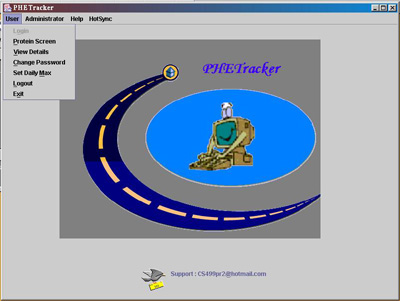 |
This screenshot is of the PHETracker
with the user menu selected. When the user menu is selected you are able
to do the following once you login:
· View the protein screen
to see the protein amounts of various foods.
· View the details of
food consumed as well as protein and calorie consumptions for given days.
· Change the password
of the particular user that is logged in.
· Update the daily max
if it has changed from the previous day.
· Logout so that a new
user has the opportunity to log in. |
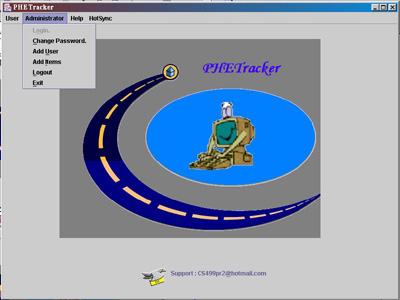 |
This screenshot is of our PHETracker
with the administrator menu selected. When the administrator menu is selected
you are able to do the following once you log in:
· Change the password
of the administrator from the one that is currently being used.
· Add a new user to
the system giving them some sort of login with a default password that
can be later changed by the user.
· The administrator
has power over adding new items to the database.
|
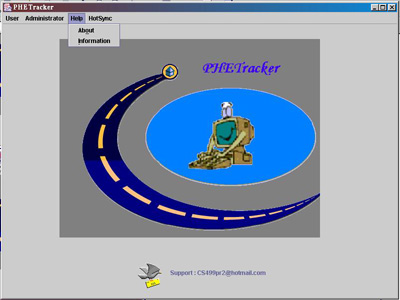 |
This screenshot is of our PHETracker
with the Help menu selected. The help menu gives the user some basic background
information on our program as well as it gives information about the groups
that have worked on this
program and updated the program. |
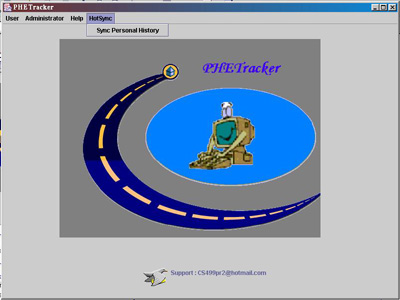 |
This screenshot shows our PHETracker
when the HotSync menu is selected. When the user has their PDA ready for
a HotSync the sync button is pressed connecting the PDA to the workstation.
During the HotSync, the PDA sends the workstation
a flat file with all the updates that have been made since the user last
used the workstation. The workstation then uses this information
to make the necessary updates to the food budget, etc.
The PDA sends queries to the workstation in order
to get new favorites to add to the limited database loaded onto a PDA.
The PDA also sends new food updates to the workstation
which the administrator must authorize before the update can be made to
the permanent database. |
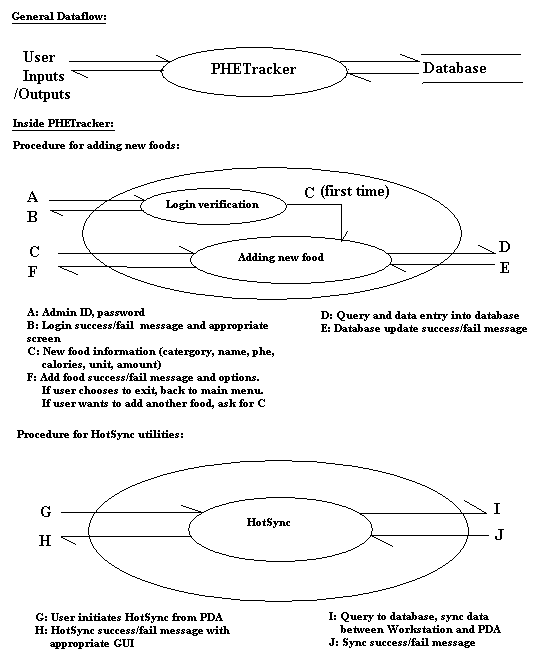
Module descriptions and data flow are as follow:
Procedure for Adding New Foods:
*This module is disabled until the admin login
is used.
If user logs in as admin{ Show menu }
if admin selects add_item{ show input screen
}
…
user inputs nutritional data in GUI screen
presses OK
…
connect to database via ODBC
perform query
insert into table (data input by user)
display message verifying update complete
ask user to add another or exit |
Procedures for HotSync Utilities:
User places PDA in cradle,
presses HotSync button on cradle
For PalmOS:
Palm automatically updates previously selected
databases selected.
Those with newer time stamps replace older versions.
For WinCE:
Windows automatically updates folders previously
selected.
Those files in folders with newer time stamps
replace older versions.
For both: the files in question will be
flat files that are
delimited text files. These will then either
be converted
for use for the workstation or they will be the
files in use. |
In short, this project will be done according to specifications as agreed
by our customer, Dr. Hayes. We will implement changes (if not already implemented)
to the existing program for the desktop. In addition, we will coordinate
with the two subgroups of Group 1 (1a and 1b) for database synchronization
of PDA (Windows CE and Palm OS) versions with ours by using HotSync, with
the probability of utilizing flat text files.
However, the optional feature for a wireless query from PDA to workstation
will not be implemented due to time constraint. Originally, these stages
of implementation were divided into phases. But now due to unforeseen problems
of running the existing program (GUI will not appear on Windows, and usernames
will not appear on some screens) and database access, time has been wasted.
Hence instead of doing them in clearly divided phases, we will just work
as situation allows.
BACK TO TOP
Implementation:
After the code review with Dr. Piwowarski, standard internal documentation
is added for modified/added classes or methods of the program. For
instance, pre/post conditions, change markers et cetera are added. The
markers tagged uniquely and their history documented internally for easier
reference in case of future enhancement by other programmers.
Before the implementation of customer specifications, several bugs in
the existing program had to be fixed first. A point in case is the GUI
bug where screens would not appear and menus would not drop down. In addition,
there was problem displaying the username in the Change Password screen.
However these bugs have been fixed successfully by logical manipulation
on the existing codes. The program also tends to freeze if the user executes
the database separately with MSAccess at the same time. This can be avoided
by not accessing the database with MSAccess separately while running PHETracker.
Due to time constraint, Phase III will be abadoned completely. With
the same reason too, we will not be implementing our customer's extra requests
of full USDA database access and installation script, which are not specified
in the original agreement.
Besides that, due to unforseen problems on the Group 1b (Palm OS) side,
HotSync attempt between our group and theirs is abandoned. Instead we will
focus on getting the sync-ing part done between Windows workstation (our
group) and Windows CE (Group 1a). Even then, Group 1a has their own predicaments
too. Hence the HotSync will only involve us getting an updated version
of the user's daily history (not detailed history) from them in the form
of a flat text file. This will result in inconsistency of detailed user
history and overall user history on our program after HotSync, but it will
not affect the user's safety as his/her total PHE consumption will still
be updated.
The upgraded program, albeit working properly in normal circumstances,
still has several restrictions and limitations. For one, administrator
has only one uncustomizable username. In addition, all usernames and passwords
can be viewed easily in the MSAccess database, which is not very good for
individual privacy. In addition, its GUI where user selects food to consume
is not updated until the user presses OK, which could be annoying but poses
no harm to user's health. However these are not fixed as they are not included
in the agreed customer specifications.
Besides, as mentioned, this program is only tested with a small sample
database provided by the original programmers and only in the Windows operating
system, hence successful execution with full USDA database or other environments
are not guaranteed. Since the sample database is not as complete and specific
as the real USDA version, entering exact calorie values into the former
is futile and estimating a rough value might pose danger to the user's
life. Thus until the full USDA database is implemented, where the exact
calorie values are already provided, we assume a dummy calorie value of
"100" to all food types for testing purpose. Of course this value is not
real and cannot be used by an actual user.
As for HotSync's limitations, it is currently implemented to synchronize
only with the CE version of PHETracker. It is assumed that the user only
does HotSync once a day (at the end of the day) and the synchronized file
is disposed on the CE side after the HotSync. Also, since workstation-to-CE
synchronization is not available, it is assumed that the user is aware
of his/her total consumption for that day already on workstation as he/she
uses the PDA version. Another limitation is that we assume all CE users
who wish to HotSync with our program are using the same program developed
by Group 1, where the file involved in synchronization is named "history.txt".
Added features are tested under both administrator and regular user
modes. So far it works to our satisfaction, with known bugs and limitations
reported above. Initial testing of our program's HotSync interface gave
satisfactory result, with limitations also reported above. Test execution
to synchronize the user's history file between workstation and CE failed
but it was due to a third external program that manages file-swapping between
them. Apparently, the third program was not compatible with the CE device
Group 1 was using. Despite that we believe the HotSync interface on our
part would not encounter serious problem had the third program worked fine.
BACK TO TOP
Future Enhancements/Maintenance:
It is obvious that this program is still under an early development
stage. Thus it is natural for the program to require further upgrades and
modifications. Future enhancements for the product that we feel necessary
after working with it include:
* Less buggy GUI that will update values in realtime
as user changes preferrences
* Implementation of full USDA database access
* Preventing usernames and passwords from public
access
* HotSync with Palm OS version of PHETracker
* More HotSync functions with Windows CE version
of PHETracker : Sync detailed user history, sync on Windows CE side
* Wireless queries from PDAs (perhaps via Internet)
* Wireless synchronization with PDAs (perhaps via
Internet)
* Automatic online database update
* Installation script (Useful material: Install
Toolkit for Java at http://www.alphaworks.ibm.com/tech/installtoolkit
)
For maintenance, besides filling up the existing Help menu with useful
instructions, there should be some kind of product feedback/support for
users too. For example, a product webpage where users can access online
help, download needed materials like the most recent USDA food database
or patches to the program, and report found bugs. Besides that, users could
also use the help of staff support via hotline or email.
BACK TO TOP
Conclusions:
Through this project, we are exposed to the knowledge of the disease
phenylketonuria (PKU) that we never knew existed, and honored to realize
that we are participating in helping the sufferers to a better life. We
also have the chance to experience what we should expect and what to be
expected from us in the real world of computer science. We found that team
work and dedication are important. We begin to cherish the existent of
documentations in a program after experiencing difficulties trying to modify
someone else's codes. Support from previous programmer(s) is really helpful
too in understanding the existing codes. Another invaluable experience
that we have picked up is coordinating with Group 1 for HotSync implementation,
where we learn that communication skills are essential too for programmers.
On the technical part, we have realized that we underestimated the effort
needed to complete this project, especially in the lines-of-code aspect.
Along the way, we have picked up some new programming skills and methods
from previous programmers and between team members. Unlike previous programming
courses, time spent in documentations and such is actually a lot more than
coding itself. Having a customer is a new thing for us too.
In short, this project can be deemed a fair success as we have tried
our best to implement the customer's specifications although unforseen
circumstances, which occurred in our group and also partnering groups,
have put some limitations and shortcomings on it. However the experience
that we have learnt in the process is something more invaluable than the
success itself.
BACK TO TOP
References (alphabetical order):
* CS499 course webpage (
http://www.cs.uky.edu/~paulp/CS499index.html )
* Information on PDAs (
http://selab.netlab.uky.edu/PDAHELP/pdahelp.html )
* Java homepage (http://java.sun.com/
)
* Java How to Program, 4th Edition, Deitel &
Deitel, Prentice Hall, 2002.
* Naresh Kumar, original programmer, [email protected]
* PHE Customer description (
http://cs.uky.edu/~paulp/CS499PHE3.htm )
* PHETracker Brief Description (
http://cs.uky.edu/~paulp/CS499prjPHE.htm )
* Original program used for modification (Program
4 at http://selab.netlab.uky.edu/check.html
)
* USDA Nutrient Data Laboratory (
http://www.nal.usda.gov/fnic/foodcomp/ )
BACK TO TOP
User's manual and installation guide:
Parts list (source codes of the program):
* addi.java (Inserts new values into the food
database)
* AddItems.java (Gets new values from the user to
be inserted into the existing food database)
* addu.java (Inserts new users into the user database)
* AddUser.java (Inserts new values into the user
database)
* CusrPass.java (Changes user password)
* EntryScreen.java (Builds the entry screen to the
program)
* HistoryDialog.java (Displays the history of food
consumed to the user for a given day)
* Hotsync.java (Gathers input from a HotSync with
PDA and synchronizes the input with program database)
* PassScreen.java (Checks that a username and password
entered are located in the user database)
* PrintPages.java (Prints the user consumption details
on a hardcopy via a printer)
* Protein.java (Inserts new values into the food
database)
* SetMax.java (Allows the user to set a new daily
max for amount of protein consumed)
* validating.java (Checks the username and password
entered to see if it is contained within the user database)
* ViewDetails.java (Displays the protein consumption
details to the user)
* WhatCanIEatDialog.java (Gives the user
some idea of what they can eat with the amount of protein remaining)
Instructions to compile and run:
Our program has been compiled and tested using JDK version 1.3. The
main class is in EntryScreen.java and thus it is used to execute the program.
Before executing the program, the following one-time setup has to be followed:
* Unzip PHETracker.zip to the directory C:/Program
Files/PHETracker/ or any directory you prefer.
* Sets up a new MSAccess ODBC connection to CS650.mdb
in the directory above.
ODBC can be accessed by clicking
My Computer -> Control Panel -> ODBC
* Make sure JDK 1.3 is installed in the computer.
* Open "autoexec.bat" with NotePad, append "set
path=C:\(wherever you installed the JDK)\bin;" to it and save the file.
* Make shortcut to MSDOS. It is suggested to name
the shortcut "PHETracker". Right click on the shortcut, select Properties
and then the Program tab.
Enter "C:\COMMAND.COM" in the
"cmd line" text field
Then enter "C:\(wherever you unzip
PHETracker.zip to)" (including the quotation marks) in the "working" text
field.
* Double-click the MSDOS shortcut.
* At the prompt, enter "javac *.java" and wait for
a few seconds. When the prompt reappears, the program is ready to run!
Then to run the program:
* Double-click on the MSDOS shortcut mentioned above.
Or if you are already at the prompt, go to the next step.
* At the prompt, type "java EntryScreen" and the
program will be up and running
* Upon exiting the program, close the MSDOS window
or type "exit" at the prompt.
* Help on how to use the program is not available
as it is not provided by previous programmers and also not included in
our project specifications.
However, the menus are more or
less self-explainatory.
BACK TO TOP
BACK TO HOME