A.R.T. Tutorial
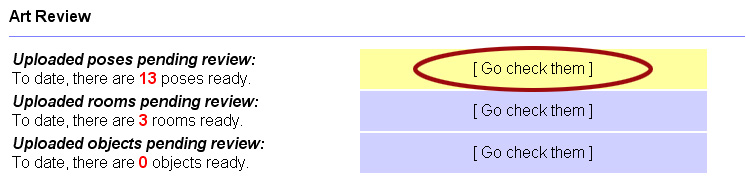
Now you will be in the pose reviewer. We've already looked at how to do a basic review on poses, now we will look at how to change the species type, in the case the pose isn't properly labeled. Here we have the poses again filtered by name, and left the defualt species filter on. When checking the poses, you will notice most poses are correctly labled, but a few many not be, or maybe borderline.
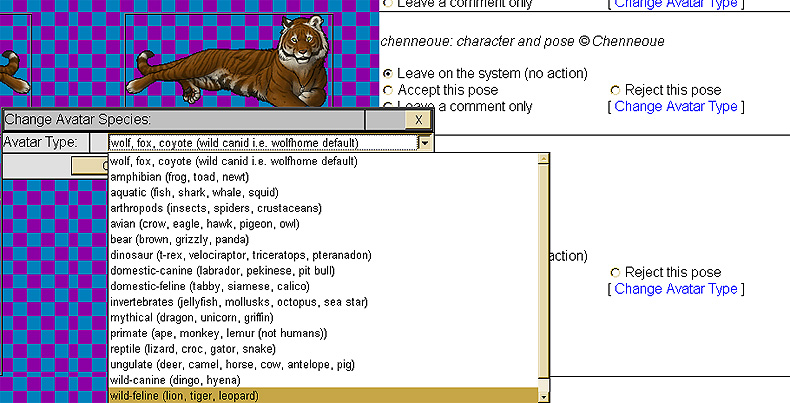
Here is an example of an improperly labled pose. Notice on the left side of the pose, under the names and dates, there isn't a defined species. This is because the pose was uploaded under the Wolfhome default set. The user may have simply forgotten to change the species. No need to worry. To change it, find the "[Change Avatar Type]" on the right side of the pose.

Once you click on that link, a seperate small window will pop up. Now you need to find the correct species lable to put on this pose. The pose is clearly a tiger, so this will need to be labled wild-feline. To do this, click the drop down menu and scroll to you find the desired species group. Once you find it, click the species desired, and click ok on the small window. This will reload the entire page. Now the pose will be properly labeled.
Please be aware when changing a species label, any other poses that had actions pending will be lost. You need to do species changes seperate from other actions (leaving comments, accepting, and to-be rejected), and they have to be done singley. This can be time consuming, but generally there are not many to change. If for some reason, you are unable to change the label, simple reject pose asking the user to relabel, and then notify UnderDog of the bug.
Once the species label is changed it should look like this:

Also, sometimes users do not know which species to label them under and will leave it on the default setting, or mislable. Regardless of the reason, the pose needs to be properly relabled. If you are uncertain what the pose is, or what species it should be labled under, leave a comment! Once one can be agreed upon, the lable can be changed. If this discussion takes a while, a Delay NG may need to be sent.
Please remember, that in order for a pose to be in the Wolhome default set, the pose must be of an approprate canine species (wolf, coyote, hyeina, fox etc), or a majority of one of those species (like 80% wolf). Again, if you are uncertain, please leave a comment so that the ART memebers can decide on what to do with the pose.
Now that you now know how to adjust species labeling, please check out the next tuturial.
Other tutorials:
Basic pose review
Changing species label
Revoking and adjusting species on an accepted
pose
Rooms
Room Objects
Art Theft
Sending a NG
Banning a user, or uping a ban
IP work ups
Putting it all together on the forum
Admin tools are by and belong to Wunderwood, LLC, pose examples © Chenneoue, content of this page is strictly for training and reference material for the Administration team of WolfHome.com
Last updated: August 2009