<<BACKxxxxxxxx xx xx |
|
Having problems?
Go to the "Basics" page
|
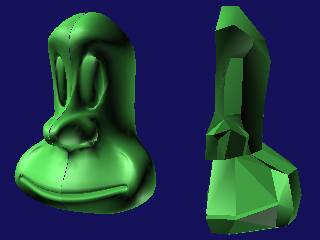
Here I have
made a bevel for the mouth in "Edge" mode. look for a button
in the sub object section with a grey triangle with red edges. then
go down to bevel where it is in poly mode.This will make two edges from
one and make a triangle at the end so that the surface will still work
(the rules are, four point and three point surfaces only!!). Then I
have extruded the new polys backwards in poly mode to make the mouth
cavity. When you start and stop an extrude or bevel, you create a new
end face each time. Here I extruded a bit, then stopped, then I bevelled
the new end face and expanded it at the end to make the mouth shape
more natural. I have also manipulated the eye sockets in vertex mode
to elongate them.
|
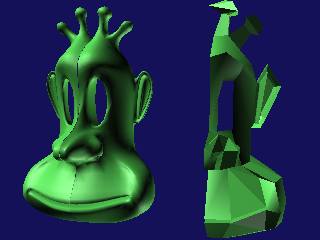 |
Here I'm really
getting into the detail. Once again I'm just using all the tools we have
already explored. I have deleted the face at the back of the eye socket
to make fitting an eye less painful. The ear is a bit tricky so leave it
until I've showed you how to do the fingernails later on. |
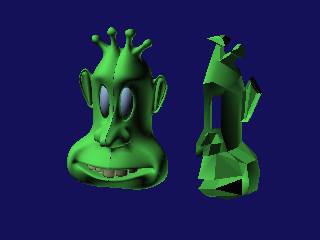 |
The mouth is
more refined here and I have also moved the vertices around to make it open
a bit to accomodate the teeth I have made. I have also made an eyeball out
of a squashed sphere. |
|
|
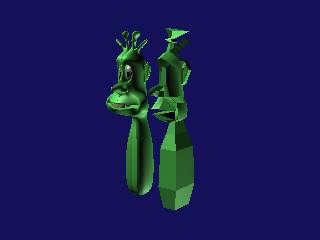
Right! Now we
have got the head prety much how we want it, we can go ahead and create
the body. As you can see from the picture, I have just extruded and bevelled
the body from a poly under the head. only use one poly to start the body
off from. If you have any internal faces the mesh smooth will go mental
on you.Dont forget to delete your facing polys as you go! |
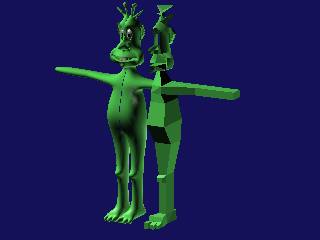 |
Now we just extrude and bevel the arms and legs from the body. You will
be able to tell from the divisions in the Master object roughly where I
started and re-started my bevels and extrudes. I have also made a start
on the toes by using "Cut" on the forward poly of the foot and
then a bevel on the newly made polys. |
|
|