
Ten Tips For Web Designers (cont'd)
#5 Navigation redundancy
is good redundancy
In most cases, redundancy only causes confusion in user interfaces. However, in the case of information architectures, providing multiple paths to a target can actually improve usability (see Jakob Nielsen's article "Reduce Redundancy" at Alertbox for more info). Such is the case with website navigation. Given the lack of spatial dependencies as compared to traditional media (e.g. books rely on spatial relationships; people can find the start of the book at the left , and the end of the book at the right , unless they're Japanese), websites must provide many forms of navigation to their readers to help them cope.
The general assumption is that users are idiots. An average webpage reader isn't really that dumb; however, he acts like one, simply because, given that his primary goal is to acquire information effectively and efficiently, he navigates his way to the desired information using the least amount of brainpower possible.
By providing multiple paths, a web designer helps his audience reach wherever they want to go, however they want to get there. Other than direct links, web designers can include:
- a main navigation bar
- For instance, the main navigation bar on this site can be found at the left margin. It contains links to all the major sections of the site for easy access.
- related links / post-article navigation
- After reading an article, readers want to know the best way to find more articles. The related links section can be found at the bottom of every page in this site.
- site search
- One of the first things that people look for in a site is "the little box where I can type what I'm looking for". Obviously, this site doesn't have search capabilities, but I would've included one if I had access to the technology.
- cookie crumbs
- Like the little cookie crumbs that Hansel and Gretel dropped in order to find their way home, delineation of site heirarchy leading to a particular page (if the site uses a tree heirarchy) in increasing specificity gives readers options as to the next article that they want to read and how related it is to the current article. The top line of every page on this site is a form of cookie crumbs (despite its brevity due to the shallowness of my site heirarchy).
When presenting major navigation options, a web designer should present at most five options for the reader to choose from. Too many options leave readers confused because of "information overload"; in such instances, the site heirarchy may be too shallow.
In addition, the web designer must tailor his site heirarchy or search engine such that it takes at most three clicks or page changes before a reader finds the article that he wants. Too many pages leading to the relevant article encourages garden-pathing and confusion; if the article is buried too deep such that the reader can't find it immediately, the web designer risks losing his readers.
Five options, three clicks. Easier said than done, but definitely possible.
#4 Make splash pages that matter
Too many times have I seen "flashy" (^_^) splash pages that do not serve any real purpose except to delay me from acquiring the information that I needed. Splash pages refer to website home pages that offers a lot of eye-candy but little in the way of content. I have nothing against splash pages, if they are used correctly. However, useless splash pages annoy readers because they incur additional download time. To avoid this, a web designer must make his splash page serve the following functions:
- Splash pages must convey the intent and content of the site. Like with any other home page, first impressions give the site its identity.
- Splash pages must introduce the site's design elements, such as color and typography. These provide the foundation for design continuity in the minds of the readers.
- Splash pages must introduce navigation elements as well as the logic of the site's interface. Readers will appreciate splash pages that help rather than hinder them from accessing the information that they need.
In other words, a front page with only a big and meaningless graphic is a big no-no.
#3 Shapes mean something
For so long, the Web has been dominated by one shape, the rectangle. Visual artists have long known that the rectangle conveys regularity, order, solidity, and safety. However, rectangles also suggest containment, at times to a fault. This can constrain a reader's experience and diminish his appreciation for the site.
In this site, I have experimented with many ways to deal with this tyranny of rectangular borders. My primary goal here is to promote whitespace, the space between elements that gives the eyes a moment to relax and absorb information. I must balance this whitespace with proximity, a spatial relationship that relates the distance of every element from each other such that elements under one cohesive idea are grouped together.
Too little distance leads to high proximity yet little whitespace, producing tight, but visually busy and annoying pages. More distance increases whitespace, decreases proximity, and gives rise to confusion; in the readers' minds, an icon that is a full screen away from a textbite aren't related, even though they may actually point to the same page.
To increase whitespace without sacrificing visual organization, I used, among others, the following techniques:
- Transparent boxes
- Some of the headers here use transparent boxes. They have a definite rectangular shape, but the image of the background as seen through them disrupts the containment and suggests freedom from constraint.
- Generous margins
- To keep the navigation and content elements distinct, I used relatively generous margins.
- Other shapes in graphics
- My all time favorite shape in images is the circle, a feminine shape that suggests wholeness, community and continuity. Even more important, an inscribed circle within a normally square graphic produces much needed whitespace at the corners.
- Transparent GiFs
- Freeform shapes in graphics mean nothing if the graphics are bounded by borders. In addition to setting my image borders to zero, I also used transparent GiFs so that the actual site background will integrate with the image itself.
#2 Proofread your work
Too many designers forget to have their body copy edited, leaving misspellings and grammatical errors in its wake. Remember that the main idea of any website is expressed through words; when words mean nothing, the site itself loses depth and significance. For instance, I'm sure many of you have seen sites that use "it's" as a possessive adjective; I assure you that there is no such thing. If you can't proofread your work, hire an editor (that's what writers like me are for, he he ^_^).
#1 Assume nothing
The last tip, and, definitely, the most important.
Given that the browser's primary use is for conveying information, not for visual display, a browser is free to present the information in any manner it sees fit. Therefore, no matter how visually appealing the visual design for a website is, there's always someone out there who will break it. That reader will turn off his browser's image rendering capabilities, view the pages in a black and white monitor, use an ancient browser that only understands HTML 1.0, and run his browser on a Mac. The chances of the aforementioned case may seem like one to a million, highly improbable, but it is certainly not impossible.
I, for one, do that. (^_^)
To the web designers who have the arrogance to think that they have absolute control over their pages, all I can say is: With my browser I will break your design and turn it into crap. I will make your wonderful dynamic HTML display look as if Hurricane Andrew sat on it for three days, simply by telling my browser to force my stylesheet on it. Let's see how "cool" and "cute" your design is using my colors, my fonts, and my screen display (my version of the Opera browser can enlarge or reduce a rendered page to different sizes). The best part is, I can laugh at those designers' faces even as they cry over bludgeoned designs that took them months to complete.
The solution recommended by the World Wide Web Consortium is to separate the content from the presentation. My web pages are essentially mere content, plain information presented in a logical fashion, with very little traces of presentation info (I still have reservations about this philosophy for replaced elements such as images, given buggy browser support). Nearly all my presentation rules are stored in a stylesheet, thereby making my pages render logically regardless of presentation capabilities.
Having tested my browsers under different settings, I would like to show you the results using screen-captured images.
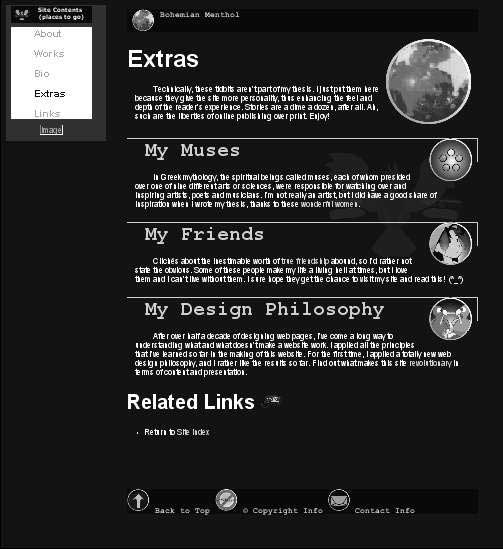
My site, in black and white. Note that, in the absence of hue (saturation equals zero), the only clue visitors have as to which are links and which aren't are tonal gradations in brightness. Also note that my Java applet is turned off. So much for cutesy graphics. (^_^)
If you're observant, you'll see in the picture that the original title of this article was
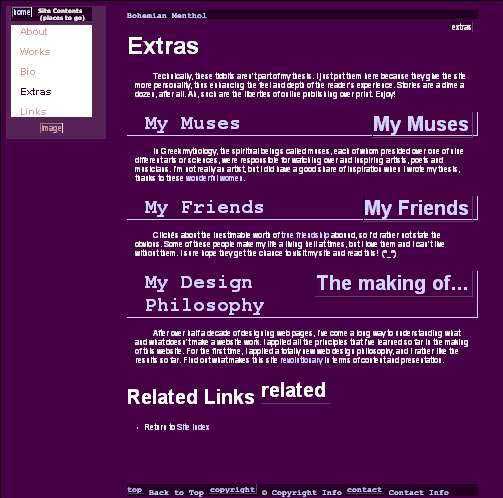
My site without images. As you can see, I specified the ALT attribute in my images so that their content will still be accessible. In addition, I also provide accessibility to my blind readers who use screen-reading programs to view my pages. As designer David Siegel of Web Page Design For Designers would say: "All pictures, diced pictures and graphic text should have an alt tag. Leaving them out is, at best, lazy and at worst, illegal!"
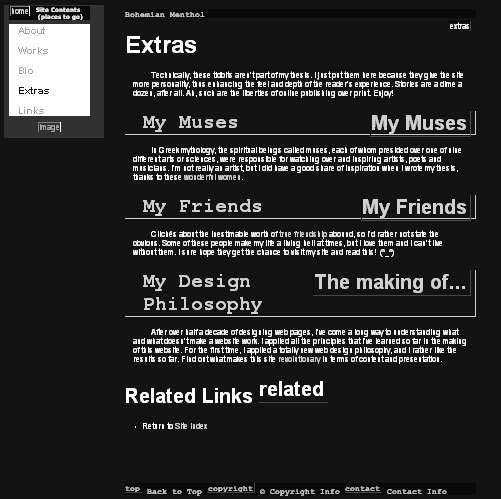
Upping the ante, here's what my site would look like on a black and white monitor without images. The look is quite different, but there's nothing that I can do about it. After all,
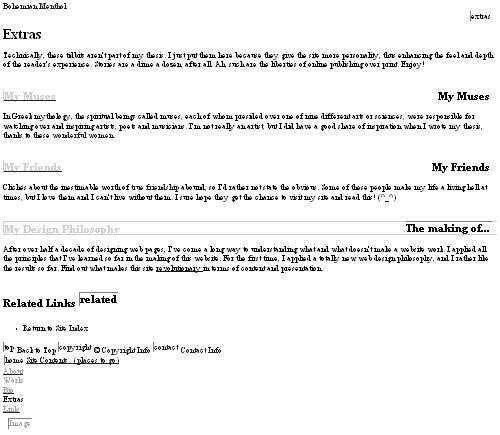
My site on the worst display settings available. Since the structure of the document is not tied up with its presentation, the page still renders in a logical fashion despite the lack of colors and other eye-candy. Even if it ain't pretty, the reader can still get the necessary information from it, and that's what counts. Every time a haughty designer who doesn't know how to separate content and presentation shows me his work, I zap it through these settings and voila! His website collapses like a house of cards. Fortunately, mine doesn't, because it still renders logically; readers can still obtain the information that they want based on the site's structure.
My advice to so-called web designers who consciously refuse to consider display settings other than their own despite the risk: If you want absolute control, take your work to print media. The web is not for you.

Finis
Related Links 
- Review the previous five design tips
- Ten Tips For Web Designers - part one of two
- Ten Tips For Web Designers - part two of two
- Check out more Site Extras
- Return to Site Index
 Back to Top
  © Copyright Info
  Contact Info
  About
About