


The SGI Sirius is a video frame buffer that resides in your workstation. It facilitates input and output of video in various formats, including NTSC, PAL, 525- and 625-line RGB, D1, and D2. If you use the Sirius in these various formats, create a configuration entry for each format.
Single frame and streaming video capture and recording is possible using the built-in V-LAN.
To use SGI Sirius with Alias|Wavefront software, you must have Sirius 1.1 or higher installed on your workstation.
You must specify the video input node using SGI's vcp utility prior to using an Alias|Wavefront application. A control called Default In, located at the top of the panel under Device Controls, lets you select between the two digital inputs and the analog input. We recommend that you choose Digital Video 2, then select File Save(TM)Current Settings.
Alias|Wavefront does not currently support streaming video from a disk array. The amount of streaming video is a function of your system's RAM.
Streaming video is available only when controlling your VTR with the VideoMedia V-LAN control system. This feature cannot be used with devices that are controlled by RS-232 or Ethernet. These devices include digital disk recorders and laser disk recorders, which typically do not benefit from streaming video.
As an example, assume that you have an ONYX with 128 Mbytes RAM. Only about 64 Mbytes is really available for streaming video. (UNIX and your applications use at least 64 Mbytes.) This is sufficient to hold approximately 1.5 seconds of video (45 frames of NTSC, 1.4 Mbytes each; 37 frames of PAL, 1.7 Mbytes each). (See figure 3.)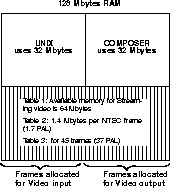
Figure 3 Memory allocation example for streaming video with 128 Mbytes RAM
Video input and output are allocated separately. You specify how memory is to be allocated using the stream statement in the device's definition. You can divide the input and output in any way that you want. With 45 frames, you might choose to allocate 15 frames for capture (input) and 30 frames for recording (output). You can also have separate definitions that allocate memory differently. See "Examples of allocating memory for different applications" on page 314.
device frame buffer name
          server_name server
          server_id socket
          server_host host
          defn
                    format format
                    stream in out
                    trigger type
                    vlan_node node
                    preroll preroll
          enddefn
enddevice
device frame buffer name
The name is the name that you want to assign to this device, for example, Sirius.
server_name server
The server is the name of the executable that controls the Sirius. It resides in the product_bin. The server should be fbdsirius for the Sirius. (If you relocate the server executable, or if the server is running on a different host than your application, you must specify the server as a full UNIX pathname.)
server_id socket
The socket is the socket number through which your application communicates with the Sirius server process. This number must be unique to your UNIX system for each defined device and (Alias|Wavefront and non-Alias|Wavefront) server process. If you are defining multiple Sirius frame buffer configurations for the same board, you must use the same socket number for each.
server_host host
The host is the name of the workstation in which your Sirius resides. This can be the workstation which is executing your application, or another workstation which is connected to your workstation using Ethernet. If you are using one workstation for your application and another for the Sirius, you must install your application on both machines. The host can be localhost if the Sirius is connected to your workstation.
format format
The format indicates whether your Sirius is operating in NTSC or PAL video. If this line is omitted, NTSC is used by default.
stream in out
stream off
The in and out values specify the number of frames allocated for streaming video. The total number of frames available for in and out depends upon the amount of available RAM on your workstation. (See "Streaming video" on page 312 and "Examples of allocating memory for different applications" on page 314.)
If streaming video is not used, specify off.
trigger type
If the streaming video feature is used, you must specify the trigger type as internal. Streaming video is only available when controlling your VTR with V-LAN. You must set trigger type to none when using devices that are controlled via RS232 or Ethernet, such as disk recorders.
vlan_node node | none
The node is the unique V-LAN identification number which your V-LAN receiver recognizes. If this line is omitted, a node number of 1 is used. Valid node numbers range from 1-32. If you are not using V-LAN, specify none.
preroll preroll | none
The preroll indicates the duration of the pre-roll and post-roll time for edits. It must be specified in standard SMPTE timecode format, enclosed in double quotes. For NTSC output, it is suggested that "00:00:05:00" be used. For PAL output, it is suggested that "00:00:07:00" be used. When accessing an Abekas video disk, it is suggested that "00:00:00:15" be used, regardless of the video format. If this line is omitted, "00:00:05:00" is used by default.
If you are not using the Sirius V-LAN, specify none.
If you have multiple receivers connected to your V-LAN network, it is best to create multiple configuration entries. Create one per receiver, with unique names and node numbers, so that they can be easily referenced.
The following examples show how you would change the device definition to accommodate different applications.
In this example, all the free memory is allocated for output.
format ntsc
stream 0 300
trigger internal
Vlan_node 1
preroll "00:00:05:00"
In this example, streaming video is turned off because a non-V-LAN controlled VTR is being used.
VTR Accom WSD, Digital Disk Recorder
Application Rotoscoping (video capture and recording)
format pal
stream off
trigger none
Vlan_node none
preroll none
In this example, all the free memory is allocated for input.
format ntsc
stream 130 0
trigger internal
Vlan_node 2
preroll "00:00:05:00"
In this example, the free memory is allocated equally for input and output.
Application Rotoscoping (video capture and record)
format pal
stream 230 230
trigger internal
Vlan_node 1
preroll "00:00:00:15"