


Any module with special parameter settings needs to be able to write these settings to a text stream and also read them back. A block of text which describes the parameter settings of a module is called the module's text definition. Text definitions are used not only when pipeline files are stored and retrieved, but also when you choose Edit... in a module's menu: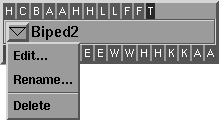
The primary methods which implement text definitions are Write() and ParseStatement(). The Write() method is easier to program. As a pipeline file is stored, each module's Write() method is called once to write out the module's entire text definition. When you select Edit... in a module's menu, the module's Write() method is called to generate the text to be edited. The Write() method is declared as:
virtual void Write(ostream& os);
The Write() method writes out all of the module's parameters in a line by line fashion using the given ostream parameter. This is very straightforward using standard C++ capabilities.
The following example shows a module using the Write() method to implement the text definitions of two float fields named scale and offset:
void ExampleModule::Write(ostream& os)
{
	os << "Scale " << scale << endl;
	os << "Offset " << offset << endl;
}
The lines of text written in Write() should not be indented and should follow a convention of beginning each line with a keyword followed by one or more arguments all separated by spaces.
| Each line written by Write() needs to be read back in by the method ParseStatement() which is described next. |
As a pipeline file is retrieved, each module's ParseStatement() method will be called once for every line of text that makes up its text definition. ParseStatement() is also called for each line of text you enter in the module text editor.
| ParseStatement() is different from Write() in that it is called once for every line in the text definition whereas Write() is called once to write out the whole text definition. |
The ParseStatement() method is declared as:
virtual void ParseStatement(int count, char** args);
This syntax is intentionally similar to the declaration of main() in C++ programs that have command-line arguments. This is because the practice of using a keyword followed by arguments separated by spaces in the line of a text definition is similar to UNIX command syntax conventions.
ParseStatement() tends to be a little more complicated than Write() because it must sort out the different keywords, check parameter counts, verify legal argument values, and sometimes post error messages to inform you of mistakes.
The example Write() method shown above appears as follows if written with ParseStatement():
void
ExampleModule::ParseStatement(int count, char** args)
{
		if (count == 2 && strcasecmp("Offset", args[0]) == 0)
		{
				offset = atof(args[1]);
		}
else if (count == 2 && strcasecmp("Scale", args[0]) == 0)
		{
				scale = atof(args[1]);
		}
		else
		{
Error("Keyword %s is unknown or has incorrect arguments.\n",
args[0]);
	}
}
For most instances of the above ExampleModule, ParseStatement() is called twice as the text definition is read: once for the line beginning with the keyword offset and once for the one beginning with scale.
The library function atof() is used in the above example to convert the text values to floating point values. The strcasecmp() function identifies keyword matches while ignoring the case of characters.
| Both Scale and scale are accepted as keywords. |
Sometimes it is useful to know when a text definition is about to be parsed and also when it is finished. The method PreRead() is called just before a text definition is read and PostRead() is called when it is finished. This is useful when a module accumulates a list of parameters. For instance, a module can create its inlets based on its text definition. For every line in the text definition with the keyword Inlet, the module creates a new module inlet. During PreRead(), the module can initialize a count variable and prepare a dynamic list to accumulate the inlet names. In PostRead(), the module processes the list, and actually creates the inlets specified.