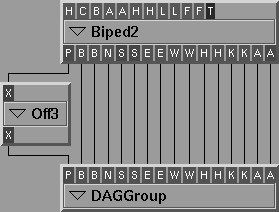
A pipeline is constructed by creating new modules and then connecting outlets of some modules to inlets of others.
To read the online help about a plugin:
A UNIX shell opens displaying the online help information requested.
To create and add a module to the pipeline:
The module appears in the pipeline field.
| Double-clicking any of the list items is the same as using the Use Module button. |
| Always drag from outlet to inlet to connect modules. |
While you are dragging the rubber band line, if the cursor passes over an inlet of another module and the types of the inlet and outlet are compatible, the inlet shows its full name. If you release the mouse button at this point, it connects the inlet and the outlet.
Outlets can be connected to more than one inlet, but an inlet can be connected to only one outlet.
To attach an outlet to a second inlet click on the outlet port again and drag to an inlet. The original connection remains intact.
Once connected, the modules appear as follows:
Most compatible modules (such as the AFOB driver and the BIPED2 filter) have matching names. Because of this, if you hold down the Shift key while connecting the first inlet/outlet pair, all the inlets and outlets are matched and linked, even if they are not in order.
| Inlets and outlets have specific data types, and since not all data types are compatible, some outlet types cannot be connected to some inlet types. |
To break a connection between two modules, click on the inlet part of the connection and drag the connection away from the inlet. You can then connect to a different inlet, or remove the connection altogether.
Keyboard shortcuts are provided to connect modules with many inlets and outlets.