|

|
-
1
-
Select
Polygon Edit > Polyset > Explode or click its icon.
-
The system prompts:
-
Select polyset to explode or enter chunk
size (currently 1).
>
|
Note:
|
You can select or deselect polysets in the same manner as
with the Polyset Pick tool.
|
-
The "chunk size" refers to the number of connected
polygons that this tool attempts to place in each new
polyset that is created. You can adjust the chunk size at
any time by typing a new value at the keyboard.
-
2
-
Select the polysets you want to explode. The system prompts:
-
Select polysets to explode. Click GO to
execute or enter new chunk size (currently
1):
-
3
-
Once polysets have been selected, click the Go
button to explode the polyset. The system displays the message:
-
Exploding polyset Polyset...
-
Exploding polyset Polyset...Done
If the explode operation is successful, new polysets created from each source polyset are grouped under a single DAG node and displayed as "compressed" (several nodes represented by a single box) in the SBD window.
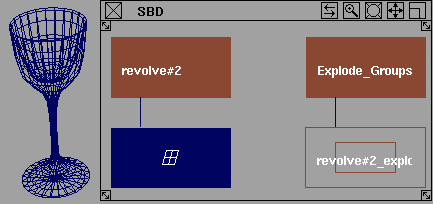
If the explode is successful for more than one selected polyset, each group of exploded polysets will be grouped under another DAG node.
>
|
Note:
|
The explode operation is not executed on a polyset if the
chuck size is equal to or greater than the number of
polygons in the polyset.
|
|
|
Any newly created polyset "chunk" has rotation and scale
pivots located at the centre of its bounding box.
|
|


