|
|
Polygon Edit palette
> Polyset > Combine
Polygons
|
Combining and Creating a Polyset
|
|
|
|
|
|
|

|
Combine Polygons copies all picked polysets and any polygons that have all vertices picked, and combines them into one new polyset.
How to Use
|
|
Selecting geometry with this
tool is a little different than
with Extract polygons. Both
polysets and polygon
vertices can be selected:
|
-
1
-
Select Polygon Edit > Polyset > Combine polygons
or click this icon.
-
The system prompts:
-
Select vertices or polygons to combine.
|
|
Click an edge of a polyset, or
draw a pick box around only
edges (no vertices) to select
or deselect one or more
polysets.
|
-
2
-
Select all the vertices of the polygons to combine. The system prompts:
-
Select/deselect vertices of polygons to
combine. Click on GO to execute extract.
-
|
|
Click a vertex, or draw a
pick box around any vertices
to select or deselect one or
more vertices.
|
>
|
Note:
|
You can select vertices the same way as with the Pick Vertex
tool (which allows you to select by vertex or by polygon). If
an entire polyset is selected, all of its polygons are selected
for combining. An individual polygon is selected by
selecting all the vertices that make up that polygon.
|
-
3
-
Once vertices or polysets have been selected, click Go
to perform the combine operation.
Once combined, all polygons of every selected polyset and all individually selected polygons are copied into one new polyset. The original polysets remain unchanged.
Polygon Combine Options
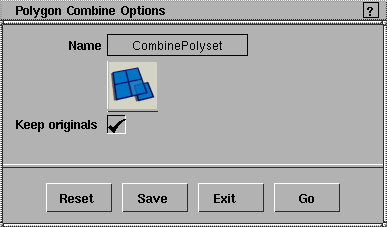
Keep Originals
- ON - creates the new polyset, leave the original polygons.
- OFF - creates the new polyset and delete the original polygons.
|


