|
|
Polygons palette >
Stitch curves
|
Stitching NURBS Curves
|
|
|
|
|
|
|

|
Stitch curves creates a triangle mesh between two NURBS curves, including curves, curves on surface, or surface isoparms. Once the two curves have been selected, a triangular stitch is generated and the density, (or the number of polygons) of the stitch can be interactively adjusted using the mouse or the keyboard.
How to Use
|
|
If you make a mistake, you
can deselect the first curve
by clicking on it again. This
lets you select another curve
to be the first curve in your
stitch.
|
-
1
-
Select Stitch curves from the Polygons menu, or click this icon.
-
The system prompts:
-
Select first curve for curve stitching.
|
|
If you make a mistake when
you select the second curve,
select Del active from the
Delete menu to delete the
active polygonal stitch and
start again.
|
-
2
-
Once selected, the system prompts:
-
Select second curve for curve stitching OR
select last curve to undo selection.
|
|
|
-
3
-
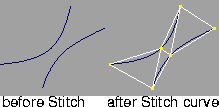
Click to select the second curve. When both curves have been selected, a triangular stitch of polygons is generated between them and this new polyset is displayed as active.
Changing the Density of the Stitch
The prompt line displays Stitch curves statistics which are updated when you adjust the density. For example, the following is displayed for the above illustration.
(4 polygons) Enter new stitch criteria (prec1,
prec2, offset):
You can adjust the density of the stitch using one of the following methods.
Using the Mouse
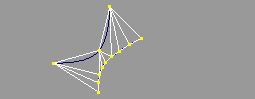
Click and drag the left mouse button to adjust the polygonal density (number of vertices generated) along the first selected curve.
Click and drag the middle mouse button to adjust the polygonal density along the second selected curve.
|
|
|
Example
The side example shows what happens when you click and drag with the left mouse button along the first curve.
Using the Keyboard
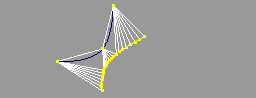
You can also use the keyboard to assign curve precisions to each of the selected curves to specify the polygonal density of the entire stitch. Curve precisions for Stitch curves
are integer values from 1 to 129 -a value of 1 generating the smallest number of vertices along a curve and a value of 129 generating the largest. A curve precision value of zero means "do not change".
|
|
|
Example
The side example shows what happens when you type the number 12 at the prompt:
>
|
Note:
|
Adjusting curve precisions on curves for
Stitch curves does
not affect the actual precision of the curve (which can be
adjusted using Curve Edit > Curve precision); the curve
precisions are restored to values prior to using the Stitch
curves
tool.
|
|
|
If a selected curve is a degree 1 curve you will not be able to
adjust its precision.
|
Stitch offset and curve Direction
Click and drag the right mouse button or type a third value at the prompt line to adjust the stitch offset. This offset is the
|
|
Changing the stitch offset is
useful on closed curves
where you want to make
some adjustments so that the
stitch aligns a little better
along the curves. If only one
of the curves is closed, it is
helpful to always select the
closed curve as the second
curve for the stitch.
|
number of vertices along the second selected curve to start stitching to, from the first vertex generated along the first selected curve.
An offset of zero will start stitching to the first vertex of the second curve. A zero offset is the default, and if keyboard input is used and a third value (for offset) is not entered, a zero offset is assumed.
|
|
Stitch vertices are generated
in the direction of each
curve, so if the two selected
curves are in opposing
directions the stitch will be
`twisted'. If this occurs, use
Edit > Undo to eliminate the
twisted stitch, select Object
Edit > Reverse > Reverse
direction, select one of the
curves to change its
direction, select the Stitch
curves tool, then try
stitching the two curves
again.
|
Vertex texture coordinates in a curve stitch
- Texture T values are constant for vertices generated along each curve with a value of 0.0 for T along the first curve and a value of 1.0 for T along the second curve.
- Vertices along the curve stitch are assigned texture S values from 0.0, for the first vertex generated on each curve, to 1.0, for the last vertex generated on each curve.
|
|
In some cases an appropriate
offset can compensate for
curves with opposing
directions to create a non-
twisted stitch.
|
|


