|
|
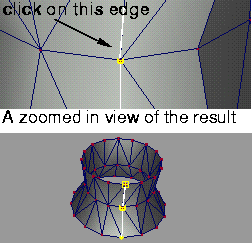
If the left mouse button is used, the system attempts to create a degree 1 curve by starting with the edge selected, then extending the curve by following connected edges that have equal S, T (parametric or texture coordinate) slopes.
On surfaces that were created using a Surface tool, the curve effectively spans the surface. The side example shows what happens when you select Extract curve and click on an edge in a polygonal revolved surface (the polygonal curve becomes individually pickable).
>
|
Note:
|
This method of edge extension may not work for all polyset
data, particularly where the data has been imported from an
external source, or if new texture data has been projected
onto the polyset.
|
|


