Polygon Edit palette > Split > Flip quad- split

Flipping Split Quad Edges


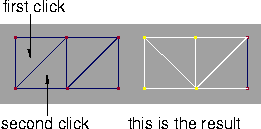
Flip quad-split creates an inverse orientation of an edge that splits a quadrilateral into two triangles.

How to Use

1
Select Polygon Edit > Split > Flip quad-split or click this icon.
The system prompts:
Select first triangle of quad pair to re- split.
2
Click to select the first triangle. The system prompts:
Select second triangle of quad pair to re- split.
3
Click to select the second triangle.
The selected triangles are changed to split the quad in the opposite orientation:


Copyright © 1998, Alias|Wavefront, a division of Silicon Graphics Limited. All rights reserved. Please send questions or comments regarding the documentation to:
[email protected]