Earlier, you learned that modeling involved creating curves that are used to generate surfaces. Advanced modeling principles start with the same premise but require that you consider new issues such as high degree curves and surface continuity.
For more information, see NURBS Modelling in Alias.
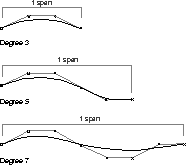
With high degree curves and surfaces, you can build a single span piece of geometry using more CVs. This lets you make the span more complex without increasing the density of the geometry. High degree geometry gives you more inflections than degree 3 geometry, thereby letting you create more complex shapes more easily. High degree curves also offer better control over curvature because more information is contained in each span.
When modeling a shape, it is often better to create many surfaces that meet at their edges than to create a single surface. To ensure that these neighboring surfaces have a clear relationship to each other, several Alias tools let you set up and maintain surface continuity along the surface edges.
Alias gives you the ability to establish and edit the continuity at edges where two surfaces meet or at the ends where two curves meet. Ultimately, establishing continuity lets you combine several surfaces so they appear as one "continuous" surface. The three types of continuity that are used in Alias are as follows:
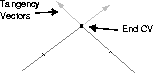
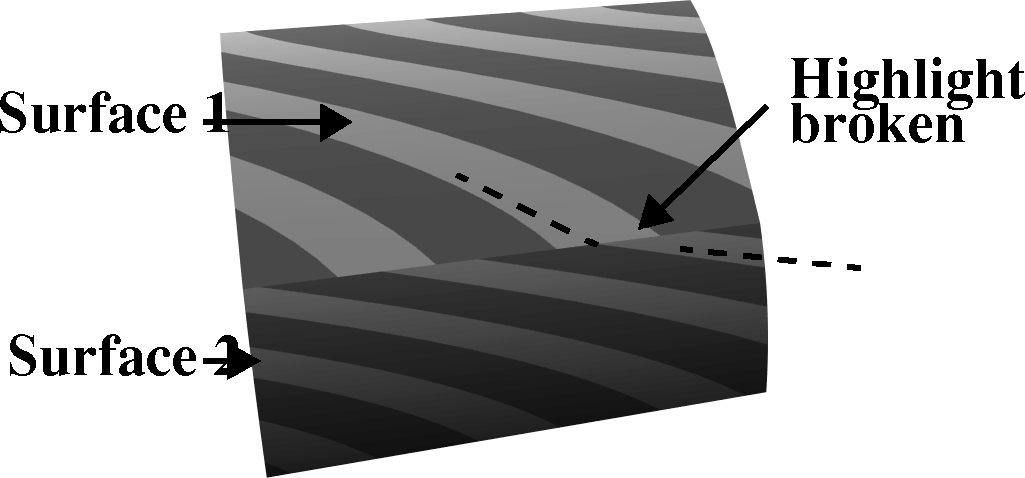
Positional continuity is found when curves or surfaces are touching at their edges. Positional continuity is achieved when the end CV of one curve (or edge of a surface) shares the same position as the end CV of an other curve (or edge of an other surface).
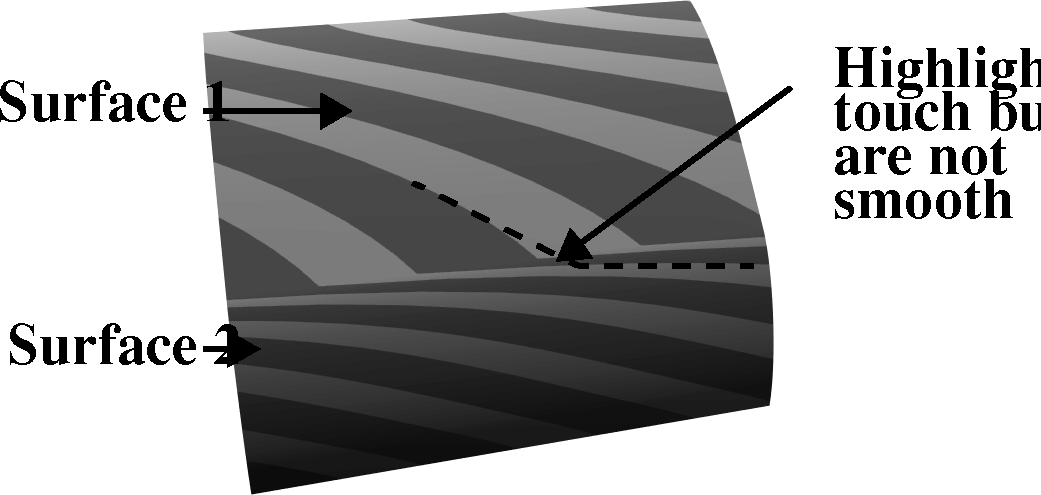
In the resulting surfaces, positional continuity causes surface highlights to break at the surfaced edge. This continuity type can be used where such a highlight break is required.
If you intend to export your model to a CAD program, it may be vital that positional continuity be maintained for all surface conditions. Models being produced for stereolithography must at a minimum be positionally continuous.
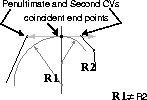
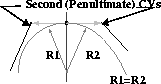
Tangent continuity is found when curves or surfaces have positional continuity and, at the same time, their tangents match at their common point (curves) or edge (surfaces). A tangency condition exists when the second last (penultimate) CV is in line with both the second CV of the adjacent curve or surface, and the coincident end points. With tangent continuity, the radius of the two curves or surfaces where they meet are not necessarily equal.
The highlights that result from a condition of tangency touch at their ends in a sharp manner. This condition displays a clear change in curvature as the radius changes.
An example of tangent continuity is when an arc meets a straight line. The final connection shows the two surfaces as distinct shapes, but a clean highlight exists between them.
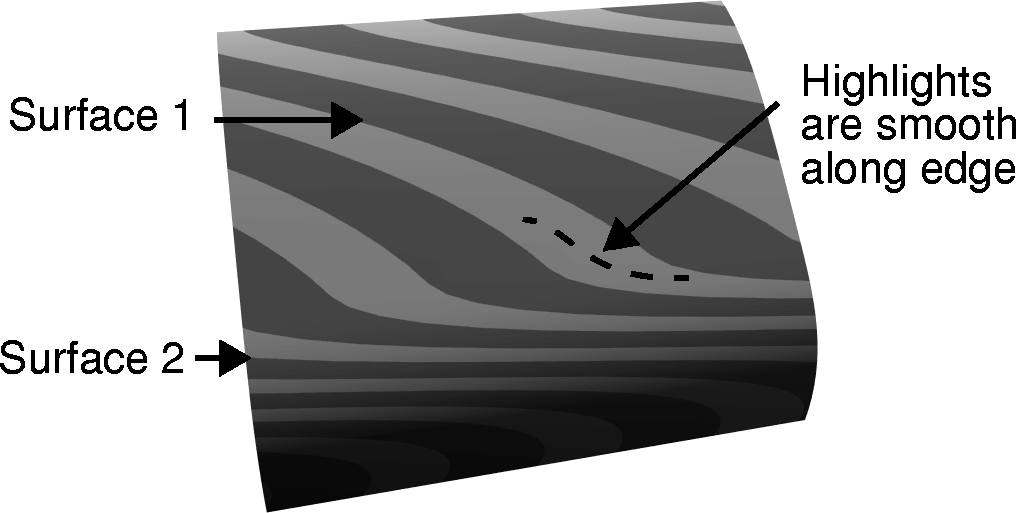
Curvature continuity is found when the curves or surfaces have tangent continuity and the radius of the two sides are equal. The technical definition of curvature is "a value inverse to the radius." This means that the tighter the curve (smaller radius), the higher the curvature. In order for a surface to be truly continuous, curvature continuity is the preferred condition, since it maintains the incline of the adjoining curves or surfaces.
Since the radii are equal, the highlights on the surface blend in a smooth manner that gives them the appearance of being one surface.
Curvature continuity is important for surface connections that need to result in a smoothly blended surface. For instance, a body panel of a car requires curvature continuity to form a surface that results in clean flowing highlights.
When building models that use continuity at their edges, you must know which tools are capable of creating and maintaining continuity and which tools are not. When using tools that utilize continuity, certain steps are required while curves are being made. Then the proper surfacing tool must be chosen.
When modeling with Alias, some surface tools do not provide continuity, but are used to establish core surfaces from which other surfaces may be constructed. All basic modeling tools, such as Boundary, Extrude, Skin and Revolve can be used to create this type of surface. These tools cannot provide continuous surfaces with neighboring geometry because they have no continuity capabilities.
Advanced tools such as Square, N-sided, Birail and Curve Network are needed since they are capable of creating and maintaining continuity. It is important to note that these advanced tools can also be used to create non-continuous surfaces. In this case the continuity features of the tools are not used.
When you begin to create surfaces with continuity, it is very important that the curves used to generate the surfaces meet with the same level of continuity that you want in the surface connections. For instance, if you want two surfaces to meet with tangency, you must create the curves belonging to the second surface so they meet the first surface with tangency continuity.
Two tools that help you set up curves with the desired level of continuity are Project Tangent and Align. Each of these tools enables you to create the conditions necessary to make sure that curves have the desired level of continuity.
Alias provides several high-end surfacing tools offering special controls to refine the resulting surface. Most of these tools can then be used to maintain continuity with neighboring surfaces.
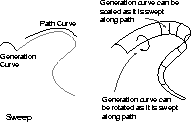
Swept is similar to the Extrude tool but includes more sophisticated controls. Swept lets you rotate and/or scale the generation curve as it is swept along the path curve. The Swept tool is not capable of creating continuity at its edges.
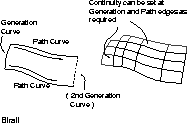
The Birail tool lets you sweep either one, two or more Generation curves along two Path curves that each control the shape of the final surface. The Birail controls affect how the Generation curve reacts as it moves along the Path curves. The Birail tool is capable of maintaining continuity at all of its edges.
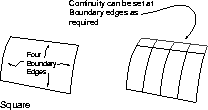
Square is similar to the Boundary tool except that it can maintain continuity along all four of its boundary edges. Four edges are required to use the Square tool.
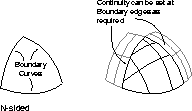
The N-sided tool is an advanced Boundary tool that deals with multi-sided regions. The N-sided tool defines a region bounded by one to eight intersecting curves, and at the same time creates a larger four-sided region that is trimmed back to maintain edge continuity.
Curve networks are created using a separate toolbox that contains several Curve network tools.
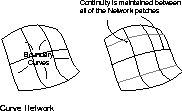
A curve network is built by creating a mesh of curves that all intersect and maintain some level of continuity when they meet end to end. The curve network tools are then used to create a series of surfaces that all maintain continuity with each other. The remaining curve network tools can then be used to edit continuity at specific boundary conditions or to add or remove curves from the network. You can also apply Sculpt curves to the network to influence the shape of the network with one or more external curves.
In earlier lessons, you learned how to modify surfaces using such tools as trim, fillet, and round. Alias now includes the ability to stitch surfaces that meet with at least positional continuity into shells. Shells are combined surfaces that form a single topology.
The main purpose of shells is to perform Boolean operations that let you modify a shell with either another shell or a single surface. The only rule is that the modifying shell or surface must intersect the other shell completely.
If you want to use several neighboring surfaces as a single shape, you must stitch them before performing a Boolean operation. The three Boolean operations are as follows:
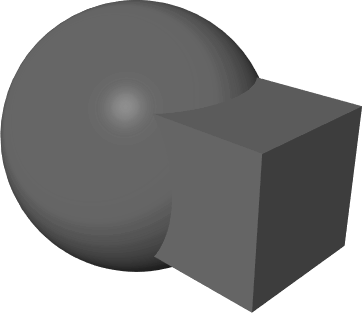
Union - This operation takes a shell and adds to it a second shell or a surface. The outer surface of the combined shape becomes the new topology of the resulting shell.
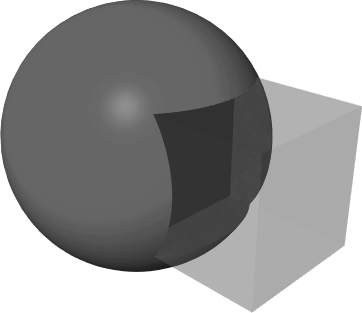
Subtract - This operation takes a shell and subtracts a second shell or a surface from it. The new topology consists of the original shell minus the subtracted object.
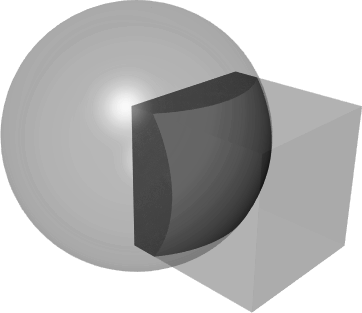
Intersect - This operation takes a shell and finds the intersection between this shell and another shell or surface. The new topology defines the volume of intersection.
Once a Boolean operation has been performed, the resulting shell can be unstitched into trimmed surfaces. These surfaces can then be modified using Trim or Round functions and later re-stitched.
Advanced modeling requires that you consider alternative surfacing strategies and issues related to curve and surface continuity. Understanding these issues will help you control the quality of your Alias surfaces.