Although Alias uses NURBS geometry primarily, there are times when you want to work with a different type of geometry known as polygons. Polygons display surfaces as meshes of flat pieces that can be manipulated at various levels.
The simplicity of polygons makes them well suited to 3D video game modeling and other tasks where complex NURBS surfaces are not required. If you need a more detailed polygonal mesh, you can use Alias to build models with NURBS surfaces, and then convert these surfaces to polygons.
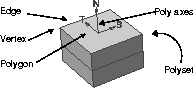
A polygon is a flat piece of geometry defined by three or more vertices. These vertices are similar to the CVs on a NURBS surface. The lines that connect vertices are known as edges. Edges are similar to hulls on a NURBS surface. Once three or more edges define a closed area, you have a polygon.
To create complex shapes, many polygons can be combined into polygonal meshes known as Polysets. In a polyset, vertices are often shared by two or more polygons to be more efficient. Polysets can be rendered as either flat geometry, or with smooth edges. The ability to render a polyset smoothly can be set in the Render Stats window.
Every polygon has its own axis lines that define its Normal direction (N) and two planar axes (S, T) that are analogous to the UV directions on a NURBS surface. These axes can be used to edit the polygons.
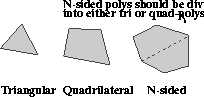
The two main polygon types are the triangular and the quadrilateral. The triangular polygon is the simpler of the two, defined by three vertices, while a quadrilateral polygon is defined by four vertices. It is important to know which polygon type you are using, because some video game systems prefer one polygon type over the other.
While there is no N-sided polygon tool in Alias, this polygon type sometimes results from other modeling and editing actions. In these cases, you must Insert edges to divide the polygon into either quadrilateral or triangular polygons. Most gaming systems can't handle N-sided polygons.
When creating a polygonal model in Alias, there are several approaches you can take. You can create a model using Alias' NURBS-based tools, then convert it into polygons, or you can build the model one polygon at a time. The approach you take is based on how much control you want over polygon count and what kind of surface complexity you are trying to achieve. There are four methods you can use when working with polygons in Alias.
Polygon modeling tools - Alias includes many polygon creation tools that let you draw polygons and then extrude them into 3D forms. These polygon tools let you work one polygon at a time and allow you to shape and form the resulting polysets very easily.
Toggle Polygon mode - In the Alias Construction options, you can set all modeling tools so they create polyset surfaces instead of NURBS surfaces. This gives you access to various surfacing tools that create more sophisticated shapes more quickly. You can then use the Create polygons tool to control the polygon count on the resulting surfaces.
Converting NURBS surfaces - In some cases, you may want to build a NURBS-based model and then at a later date convert it into polysets. You can do this with the Create Polygons tool. Designers may also want to use this approach when testing the tessellation of a model that is to be exported for stereolithography. By converting to polygons, you can evaluate the quality of the surface intersections.
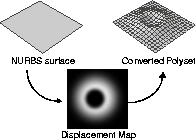
Another powerful way of converting models is to apply a displacement map to the NURBS surface before conversion. The displacement map causes the surface to render with a clear sense of relief based on the areas of black and grey in the image. When the polyset is created, the displacement information from the map is taken into account and the resulting polyset displays the appropriate sense of 3D relief.
Importing DXF/OBJ files - In some cases, you will need to work with polygonal models that come from another 3D package. In this case, you can import the model and then start working with it using the Alias polygon tools.
One important tool when importing polygonal geometry is the Polygon reduction tool that helps you reduce the polygon count on a complex model. This can give you a simpler starting point when editing the model.
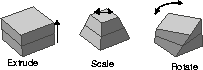
Editing polysets involves the ability to pick and transform vertices, polygons and polysets. Polygons have their own editing tools that let you edit a polygon based on its own local poly axes. You can also use the Pick CV tool, and move the vertices in XYZ coordinate space. This ability to edit polygons in either their local poly axes or XYZ coordinate space gives you a lot of flexibility for editing your Polysets. A Vertex Info window can also be called up to determine and edit world space coordinates and set texture coordinates in ST space.
Other polygonal editing tools include tools for cleaning up models. You can remove and insert vertices and edges, merge vertices that share the same world space and flip the surface normals on any polygon. Alias even includes a Unify Normals tool to ensure that all normals in a polyset are pointed in the right direction.
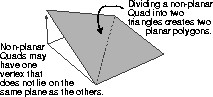
When working with quad polygons, it is possible to create a polygon where not all vertices lie in the same plane. In this case, you must either divide the polygon into triangular polygons (if your gaming system allows) or you must correct the planarity situation. Alias includes a Highlight non-planar tool that lets you check for this condition.
Polygons offer a very versatile set of modeling tools that you can use in place of, or in conjunction with, NURBS-based geometry. If you are in video game development, these tools will be crucial to your work. Other animators and designers will also find that these tools can offer a viable alternative to NURBS modeling.