|
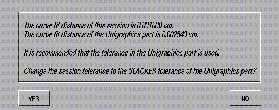
You are asked if you want to change the current Alias Curve Fit Distance Tolerance
to be the same as the Unigraphics Distance Tolerance
stored in the file.
>
|
Note:
|
If you change the current Alias Curve Fit Distance to a
smaller value using this process, geometry existing in the
Alias model prior to the import must be rebuilt to the new
smaller tolerance.
|
|
|
Otherwise, on re-export to Unigraphics, this geometry will
NOT conform to the new tolerance and Unigraphics may
have problems either importing or working with this
geometry.
|
Attribute Data
Once the unit and tolerance data has been read the Unigraphics Part Attribute Information window is displayed.
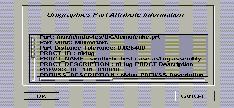
You can choose to process this file or cancel the import.
Unigraphics Import Options
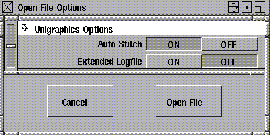
Extended Log File
This option controls the generation of a verbose log file. The log file is always produced. If you turn this option ON
, the log file includes detailed entity mappings, Info
, Error
and Warning
messages, and entity count tables. If you turn this option OFF
, then the terse form of the log file is generated. It contains Info
, Error
and Warning
messages, and entity count tables only.
Auto Stitch
If this option is ON, the geometry being imported is automatically stitched. The current tolerances are used to determine whether the incoming geometry meets the requirements of defining a shell in the Alias modeling environment.
Exporting a Unigraphics part file
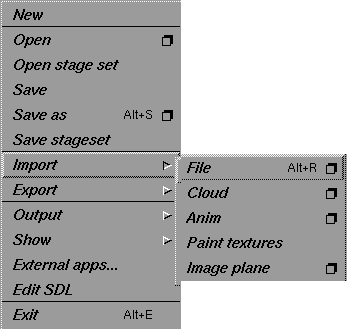
Export a Unigraphics part file from Alias for import into Unigraphics by selecting File > Save As or File > Export > Save Active
and selecting Unigraphics from the File Format popup window.
The filename extension .prt will be added to the specified filename on export. This file extension is required by Unigraphics. A log file containing details of the translation process is produced for both import and export.
Unigraphics Export Options
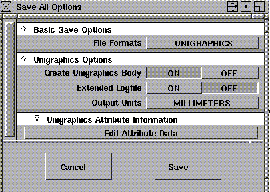
Create Unigraphics Body
If ON, Alias attempts to create a solid body or a sheet body, depending on whether the geometry describes a closed volume or not.
If OFF, Alias creates individual sheet bodies from each trim region in the shell. That is, there is no attempt made to sew the trim sheets together.
Extended Logfile
This option enables (ON) or disables (OFF) the generation of a verbose log file. The log file is always produced; however, if this option is enabled, the log file includes detailed Entity Mappings, Info, Error and Warning messages, and Entity Count tables.
Output Units
The units used for the export operation. The default is millimeters.
Edit Attribute Data
When you click on this field, the Unigraphics File Header Information
window is displayed. In this window, you can provide a short comment that might include a description of the model, the name of your organization, an authorization code, and your name as the author of the exported model. Entering information in this window is optional.
Unix Command Line Interface
The utilities UGToAl and AlToUG provide the Alias Unigrapics Direct Connect translation functionality at the Unix command line level. As in the interactive versions, these utilities produce either a brief or extended log file. The log file can also be displayed on the screen during translation.
UGToAl
This utility converts a Unigraphics part file to an Alias Wire File. To display the usage information, type the following in a Unix shell window:
UGToAl -h
The usage information will be printed as follows:
UGToAl Unigraphics file to Alias Wire file translator


Arguments:     [<options>] [ <infile> ] [<outfile> ]


Options:

        -s      Do not stitch the model on input:

                Default is to stitch

        -e      Echo Logfile to console

        -l      Extended Logfile


        Where:  <infile> is a Unigraphics file

                <outfile> is an Alias wire file
AlToUG
This utility converts an Alias Wire file to a Unigraphics part file. To display the usage information, type the following in a UNIX shell window:
AlToUG -h
The usage information will be printed as follows:
AlToUG Alias Wire file to Unigraphics translator


Arguments:       [ <options> ] [ <infile> ] [ <outfile> ]


Options:

       -b Do not create Unigraphics sheet or solid body

       -u Units to be output

                 1 = Millimeters

                 2 = Inches

       -e Echo Logfile to console

       -l Extended Logfile


Where:  <infile> is an Alias Wire file

        <outfile> is a Unigraphics file
Translation Log File
The translation log file is produced during both import and export of Unigraphics part files. This log file contains Entity Mappings, Entity Counts, and Information, Error, and Warning messages.
Interpreting the Import Log File
On import of a Unigraphics part file, a translation log file is created in the same directory as the Unigraphics part file. The file name of the log file is the same as that of the Unigraphics part file with the extension .unigraphics2alias added to it.
Short Log File
If you have chosen to use a short log file via the interface options, the log file will contain:
- the pathname of the imported Unigraphics part file and the name of the current Alias stage into which the Unigraphics part file is being imported.
- the contents of the Unigraphics part file. This is a table that documents the number of each type of Unigraphics entity in the file. This table includes all entities in the Unigraphics part file.
- any information, warning, or error messages that may occur during the translation.
If an error or problem occurs while processing an entity, the Unigraphics' entity's type name, user identifier name, and instance name are printed, followed by the error or warning message.
Here is an example of a short import log file:
      Unigraphics V14.0 to Alias Studio 9.0

              Translation Report


Unigraphics Filename: /usr/u/UG/bracket.prt

translated to

Alias Stage: bracketprt


Unigraphics to Alias Conversion Statistics

------------------------------------------

UG Type    Converted Type       Converted  Failed

-------    --------------       ---------  ------

Line          Curve                     7       0

Solid Body    Shell                     2       0

WCS           Construction Plane        1       0

Circle        Curve                     5       0

Cylindrical   Trimmed Surface           6       0

Conical       Trimmed Surface           5       0

Bounded Plane Trimmed Surface          29       0

Reference Set Set                       3       0

-------      --------------       ---------  ------

Total                                  58       0

****************** End of Report ******************
Extended Log File
If you have chosen to have an extended log file produced, then the log file will contain the same information as the short log file, with the addition of:
- the Detailed Entity Mapping Report
. This report contains a mapping description line for each entity processed.
The mapping description line in an extended import log file contains:
- the Unigraphics entity type name (e.g. BsplineSurface
)
- the Unigraphics entity's user id (e.g. WHEEL,
or <NONE
> if the entity does not have a name)
- the Unigraphics entity instance identifier
- the string converted to
, indicating that the following information pertains to the Alias entity
- the Alias entity type name (e.g. Trimmed Surface
)
- the Alias node name (e.g. WHEEL
or node#50
in the case of a Unigraphics entity name of <NONE
>).
Here is an example of an extended import log file:
Unigraphics V14.0 to Alias Studio 9.0

Translation Report

Unigraphics Filename: /usr/u/UG/bracket.prt

translated to Alias Stage: bracketprt


UG Type WCS, Name <NONE>, ID RMbracket.prt R0000002d00000001 is converted to Construction
Plane:construction

UG Info: Creating Part /usr/u/mdavies/UG/demo/bracket.prt

UG Type Line, Name <NONE>, ID RMbracket.prt R000000cb00000003 is converted to Curve:node#2

UG Type Line, Name <NONE>, ID RMbracket.prt R000000cc00000003 is converted to Curve:node#2

UG Type Line, Name <NONE>, ID RMbracket.prt R000000cd00000003 is converted to Curve:node#2

UG Type Line, Name <NONE>, ID RMbracket.prt R000000ce00000003 is converted to Curve:node#2

UG Type Line, Name <NONE>, ID RMbracket.prt R000000cf00000003 is converted to Curve:node#2

UG Type Line, Name <NONE>, ID RMbracket.prt R000000d000000003 is converted to Curve:node#2

UG Type Line, Name <NONE>, ID RMbracket.prt R000000d100000003 is converted to Curve:node#2

UG Type Circle, Name <NONE>, ID RMbracket.prt R000000d200000003 is converted to Curve:node#2

UG Type Circle, Name <NONE>, ID RMbracket.prt R000000d400000003 is converted to Curve:node#2

UG Type Circle, Name <NONE>, ID RMbracket.prt R000000d500000003 is converted to Curve:node#2

UG Type Circle, Name <NONE>, ID RMbracket.prt R000000d600000003 is converted to Curve:node#2

UG Type Circle, Name <NONE>, ID RMbracket.prt R000000d700000003 is converted to Curve:node#2

UG Type Conical Face, Name <NONE>, ID RMbracket.prt R0000004700000003 is converted to Trimmed
Surface:node#2

UG Type Bounded Plane, Name <NONE>, ID RMbracket.prt R0000004800000003 is converted to Trimmed
Surface:node#2

UG Type Bounded Plane, Name <NONE>, ID RMbracket.prt R0000004900000003 is converted to Trimmed
Surface:node#3

UG Type Cylindrical Face, Name <NONE>, ID RMbracket.prt R0000004a00000003 is converted to Trimmed
Surface:node#3

UG Type Solid Body, Name <NONE>, ID RMbracket.prt R0000004600000003 is converted to Shell:shell


UG Type Bounded Plane, Name <NONE>, ID RMbracket.prt R0000004f00000003 is converted to Trimmed
Surface:node#2

UG Type Bounded Plane, Name <NONE>, ID RMbracket.prt R0000005000000003 is converted to Trimmed
Surface:node#2

UG Type Cylindrical Face, Name <NONE>, ID RMbracket.prt R0000005100000003 is converted to Trimmed
Surface:node#2

UG Type Bounded Plane, Name <NONE>, ID RMbracket.prt R0000005200000003 is converted to Trimmed
Surface:node#3

UG Type Bounded Plane, Name <NONE>, ID RMbracket.prt R0000005300000003 is converted to Trimmed
Surface:node#3

UG Type Bounded Plane, Name <NONE>, ID RMbracket.prt R0000005400000003 is converted to Trimmed
Surface:node#3

UG Type Bounded Plane, Name <NONE>, ID RMbracket.prt R0000005500000003 is converted to Trimmed
Surface:node#3

UG Type Bounded Plane, Name <NONE>, ID RMbracket.prt R0000005600000003 is converted to Trimmed
Surface:node#3

UG Type Bounded Plane, Name <NONE>, ID RMbracket.prt R0000005700000003 is converted to Trimmed
Surface:node#3

UG Type Conical Face, Name <NONE>, ID RMbracket.prt R0000005800000003 is converted to Trimmed
Surface:node#4

UG Type Conical Face, Name <NONE>, ID RMbracket.prt R0000005900000003 is converted to Trimmed
Surface:node#5

UG Type Bounded Plane, Name <NONE>, ID RMbracket.prt R0000005a00000003 is converted to Trimmed
Surface:node#6

UG Type Bounded Plane, Name <NONE>, ID RMbracket.prt R0000005b00000003 is converted to Trimmed
Surface:node#7

UG Type Conical Face, Name <NONE>, ID RMbracket.prt R0000005c00000003 is converted to Trimmed
Surface:node#8

UG Type Conical Face, Name <NONE>, ID RMbracket.prt R0000005d00000003 is converted to Trimmed
Surface:node#9

UG Type Bounded Plane, Name <NONE>, ID RMbracket.prt R0000005e00000003 is converted to Trimmed
Surface:node#10

UG Type Bounded Plane, Name <NONE>, ID RMbracket.prt R0000005f00000003 is converted to Trimmed
Surface:node#11

UG Type Bounded Plane, Name <NONE>, ID RMbracket.prt R0000006000000003 is converted to Trimmed
Surface:node#12

UG Type Bounded Plane, Name <NONE>, ID RMbracket.prt R0000006100000003 is converted to Trimmed
Surface:node#13

UG Type Bounded Plane, Name <NONE>, ID RMbracket.prt R0000006200000003 is converted to Trimmed
Surface:node#14

UG Type Bounded Plane, Name <NONE>, ID RMbracket.prt R0000006300000003 is converted to Trimmed
Surface:node#15

UG Type Bounded Plane, Name <NONE>, ID RMbracket.prt R0000006400000003 is converted to Trimmed
Surface:node#15

UG Type Bounded Plane, Name <NONE>, ID RMbracket.prt R0000006500000003 is converted to Trimmed
Surface:node#15

UG Type Bounded Plane, Name <NONE>, ID RMbracket.prt R0000006600000003 is converted to Trimmed
Surface:node#15

UG Type Bounded Plane, Name <NONE>, ID RMbracket.prt R0000006700000003 is converted to Trimmed
Surface:node#15

UG Type Bounded Plane, Name <NONE>, ID RMbracket.prt R0000006800000003 is converted to Trimmed
Surface:node#15

UG Type Bounded Plane, Name <NONE>, ID RMbracket.prt R0000006900000003 is converted to Trimmed
Surface:node#15

UG Type Cylindrical Face, Name <NONE>, ID RMbracket.prt R0000006a00000003 is converted to Trimmed
Surface:node#15

UG Type Bounded Plane, Name <NONE>, ID RMbracket.prt R0000006b00000003 is converted to Trimmed
Surface:node#16

UG Type Cylindrical Face, Name <NONE>, ID RMbracket.prt R0000006c00000003 is converted to Trimmed
Surface:node#17

UG Type Bounded Plane, Name <NONE>, ID RMbracket.prt R0000006d00000003 is converted to Trimmed
Surface:node#18

UG Type Cylindrical Face, Name <NONE>, ID RMbracket.prt R0000006e00000003 is converted to Trimmed
Surface:node#19

UG Type Bounded Plane, Name <NONE>, ID RMbracket.prt R0000006f00000003 is converted to Trimmed
Surface:node#20

UG Type Cylindrical Face, Name <NONE>, ID RMbracket.prt R0000007000000003 is converted to Trimmed
Surface:node#21

UG Type Bounded Plane, Name <NONE>, ID RMbracket.prt R0000007100000003 is converted to Trimmed
Surface:node#22

UG Type Bounded Plane, Name <NONE>, ID RMbracket.prt R0000007200000003 is converted to Trimmed
Surface:node#23

UG Type Solid Body, Name <NONE>, ID RMbracket.prt R0000004e00000003 is converted to Shell:shell


UG Info: Created Reference Set Empty

UG Type Reference Set, Name Empty, ID RMbracket.prt R0000003700000001 is converted to Set:Empty


UG Info: Created Reference Set ID11890-C6

UG Info: Added _NONE_#13 to Alias Set ID11890-C6

UG Type Reference Set, Name ID11890-C6, ID RMbracket.prt R000000d900000003 is converted to
Set:STEPID11890-C6

UG Info: Created Reference Set ID11900-C2

UG Info: Added _NONE_ to Alias Set ID11900-C2

UG Info: Added _NONE_#2 to Alias Set ID11900-C2

UG Info: Added _NONE_#3 to Alias Set ID11900-C2

UG Info: Added _NONE_#4 to Alias Set ID11900-C2

UG Info: Added _NONE_#5 to Alias Set ID11900-C2

UG Info: Added _NONE_#6 to Alias Set ID11900-C2

UG Info: Added _NONE_#7 to Alias Set ID11900-C2

UG Info: Added _NONE_#8 to Alias Set ID11900-C2

UG Info: Added _NONE_#9 to Alias Set ID11900-C2

UG Info: Added _NONE_#10 to Alias Set ID11900-C2

UG Info: Added _NONE_#11 to Alias Set ID11900-C2

UG Type Reference Set, Name ID11900-C2, ID RMbracket.prt R000000db00000003 is converted to
Set:ID11900-C2


Unigraphics to Alias Conversion Statistics

------------------------------------------

UG Type        Converted Type    Converted  Failed

-------        --------------    ---------  ------

Line           Curve               7          0

Solid Body     Shell               2          0

WCS            Construction Plane  1          0

Circle         Curve               5          0

Cylindrical    Trimmed Surface     6          0

Conical        Trimmed Surface     5          0

Bounded Plane  Trimmed Surface     29         0

Reference Set  Set                 3          0


-------        --------------    --------- ------

Total                              58         0


****************** End of Report******************
Interpreting the Export Log File
On export of a Unigraphics file, a translation log file is created in the same directory as the Unigraphics file. The file name of the log file is the same as the Unigraphics file with the extension .alias2unigraphics added to it.
Short Log File
If you have chosen to have a short log file via the interface options, the log file will contain:
- the name of the current Alias stage from which the model was exported (or the name of the Alias Wire file if the command line interface was used) and the pathname of the exported Unigraphics file
- any Information, Warning, or Error messages that may occur during the translation
- a table that documents the number of each type of Alias entity converted or not converted to a Unigraphics entity.
If an error or problem occurs while processing an entity, the Alias entity's type name and node name are printed, followed by the error or warning message.
Here is an example of a short export log file:
Alias Studio 9.0 to Unigraphics V14.0 Translation Report

Alias Stage: beetle_layout25 translated to Unigraphics Filename: /usr/u/UG/beetle.prt


UG Info: surface xshell#10 is C1 discontinuous

UG Info: surface xshell#11 is detached from xshell#10 because of C1 discontinuities in parent


UG Warning: Item xshell#11 is on the Default Layer this is mapped to layer 1 in Unigraphics

UG Info: surface xshell#12 is detached from xshell#10 because of C1 discontinuities in parent


UG Warning: Item xshell#12 is on the Default Layer this is mapped to layer 1 in Unigraphics

UG Warning: Item shell is on the Default Layer this is mapped to layer 1 in Unigraphics

Warning: One or more surfaces in the Alias model being exported have internal tangent breaks.


Alias to Unigraphics Conversion Statistics


------------------------------------------

Type            Converted Type     Converted  Failed

-------         --------------     ---------  ------

Surface         Sheet Body             8        0

Trimmed Surface Sheet Body             3        0

Shell           Solid Body             1        0

-------         --------------     ---------  ------

Total                                 12        0


****************** End of Report ***************
Extended Log File
If you have chosen to have an extended log file produced, then the log file will contain the same information as the short log file with the addition of:
- the Detailed Entity Mapping Report. This report contains a mapping description line for each entity processed.
Here is an example of an extended export log file:
Alias Studio 9.0 to Unigraphics V14.0 Translation Report

Alias Stage: beetle_layout25 translated to Unigraphics Filename: /usr/u/UG/beetle.prt


UG Info: Curve Fit Distance = 0.005000 cm

UG Info: Continuity Angle = 0.100000 deg

UG Info: Check Points = 10


Node Surface, XSHELL converted to Sheet Body ID = RMbeetle.prt R0000003b00000001

UG Info: surface xshell#10 is C1 discontinuous

Node Surface, XSHELL#11 converted to Sheet Body ID = RMbeetle.prt R0000004100000001

UG Info: surface xshell#11 is detached from xshell#10

because of C1 discontinuities in parent


UG Warning: Item xshell#11 is on the Default Layer this is mapped to layer 1 in Unigraphics

Node Surface, XSHELL#12 converted to Sheet Body ID = RMbeetle.prt R0000004700000001

UG Info: surface xshell#12 is detached from xshell#10

because of C1 discontinuities in parent


UG Warning: Item xshell#12 is on the Default Layer this is mapped to layer 1 in Unigraphics

Node Trimmed Surface, XSHELL#9 converted to Sheet Body ID = RMbeetle.prt R0000005500000001

Node Trimmed Surface, XSHELL#8 converted to Sheet Body ID = RMbeetle.prt R0000005f00000001

Node Trimmed Surface, XSHELL#7 converted to Sheet Body ID = RMbeetle.prt R0000006900000001

Node Surface, XSHELL#6 converted to Sheet Body ID = RMbeetle.prt R0000006f00000001

Node Surface, XSHELL#5 converted to Sheet Body ID = RMbeetle.prt R0000007500000001

Node Surface, XSHELL#4 converted to Sheet Body ID = RMbeetle.prt R0000007b00000001

Node Surface, XSHELL#3 converted to Sheet Body ID = RMbeetle.prt R0000008100000001

Node Surface, XSHELL#2 converted to Sheet Body ID = RMbeetle.prt R0000008700000001

Node Shell, SHELL converted to Solid Body ID = CMbeetle.prt C0000006000000001

UG Warning: Item shell is on the Default Layer this is mapped to layer 1 in Unigraphics

Warning: One or more surfaces in the Alias model being exported have internal tangent breaks.


Alias to Unigraphics Conversion Statistics


------------------------------------------

Type            Converted Type     Converted  Failed

-------         --------------     ---------  ------

Surface         Sheet Body             8        0

Trimmed Surface Sheet Body             3        0

Shell           Solid Body             1        0

-------         --------------     ---------  ------

Total                                 12        0


****************** End of Report ***************
Debugging a Unigraphics translation session
If the log file identifies an error during translation between Alias and Unigraphics in either direction, you can trace the information in the error message back to the problem geometry. In some cases once the piece of geometry has been isolated, the nature of the problem will be visually obvious and you will need only to delete or manually fix the surface in question.
Supported Unigraphics Geometry and Data Mapping
|