|
Use this tool to clean up
your model by searching for
and deleting any DAG
nodes that contain no model
information.
|
Deletes null (dangling) DAG nodes that have no objects linked to them. It also deletes empty animation clusters.
Some functions that produce null DAG nodes and empty clusters include:
- Delete > Del objects and Delete > Del active
- Edit > Group
and
Edit > Ungroup
You can identify null DAG nodes in either of the following ways:
- In the SBD window, they appear as brown rectangles with nothing appearing underneath them.
- In the Information window (Windows > Information > Information window), they have no Geometry section.
|
|
For more information on
clusters, see the Animating in
Alias manual.
|
You can identify empty clusters in either of the following ways:
- In the SBD window, pick the node above the cluster. If no other node or geometry box is highlighted with a pale blue rectangle drawn inside it, the cluster is empty.
- In the Cluster Editor
(Windows > Edit > Clusters).
>
|
Note:
|
Null DAG nodes are not deleted if they are either animated,
skeleton joint nodes, or construction plane nodes.
|
How to Use
-
1
-
Select Delete > Del null nodes-
 to specify whether you want to delete null nodes or empty clusters, and then click Go. to specify whether you want to delete null nodes or empty clusters, and then click Go.
-
2
-
A confirmation box is displayed asking if you want to proceed.
-
To go ahead with the deletion, click YES or type the letter
y. The entire DAG is scanned and any null DAG nodes or
empty clusters are discarded.
(No action is taken if you click NO or type the letter n.)
Del Null Options
Select Delete > Del null nodes- to display the Del Null Options window.
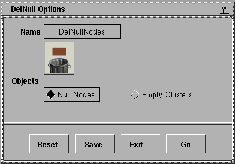
By default, Null Nodes
is selected (and clusters are not affected).
If you select Empty Clusters instead, all empty clusters are deleted.
|


