 Previous Page |
~Lesson 3~ Page 2 |
 Next Page |
| ||
Previous Page |
~Lesson 3~ Page 2 |
Next Page |
| ||
The computer comes pre-programmed with many different file types so that it knows which application to use with which file name extension. Here is a small sample of the extensions and file types known to the computer:
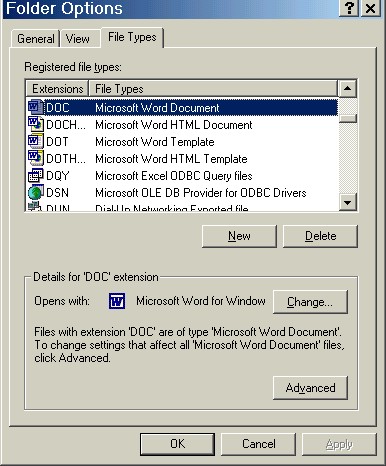
Changing file name extensions can be dangerous. Changing the extension of a file name also changes the file's type. For instance, say you created a Microsoft Word document that included different font colors, pictures, and other special Word features. If you save that document as the Microsoft Word file type, an extension of ".doc" will be automatically added to the file name (whether or not that extension can be seen in the file name, it is there).

Every time that document is opened, it will be opened by Microsoft Word. And as long as that document is opened by an application that can read Word documents, it will look pretty much like you created it.
However, if you change the file name extension of that Word document to something else, it will not look like the document you created. For example, if you change the ".doc" extension to ".txt," the computer may open that document using Notepad instead. Your document would not look the same and may even contain errors. And if you completely remove the file name extension, or change it to something the computer does not recognize, you will not be able to open the file at all.
In summary, whether or not the file name extension is showing when you look at a file's icon on the screen, that file does have an extension and that file name extension is what tells the computer what kind of a file it is and which program is needed to open that file. If the file name extension is removed or changed, the computer will probably not be able to open that file correctly anymore.
Previous Page |
Next Page |