Page 11 - SmartShapes Technology

Step 1: Visio Solutions

1. Visio 2000 contains solutions. And these solutions provide a "total package" for your drawing, which will include the drawing page, all sized and ready to go, as well as the necessary shapes and styles. It may involve a template and stencils but it always will contain "Shapes" � using SmartShapes technology.

Step 2: Shapes consist of formulas

2. Each Visio shape contains a collection of formulas representing the shape's dimensions and behavior. Shapes come either as prepackaged entities that you can eventually modify to your needs or you can create your own unique set of shapes and formulas to represent objects found in your specific environment.

Step 3: A suite of shapes - Stencils
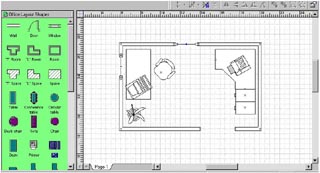
3. As mentioned before, a solution consists of, at the very least, shapes. However, very seldom will a solution contain only one shape. A collection of these shapes that will pertain to a particular type of drawing are gathered into what is called a Stencil.

Step 4: Master Shapes

4. The The shapes mentioned in Step 3 are referred to as Masters within the Stencil. These masters are then dragged to a drawing page and becomes instances or copies of the master.

Proceed to the Next Page!

Return to the Previous Page!

Hosted by www.Geocities.ws

1