www.geocities.com/garffreak
Using the GRAPH and TABLE

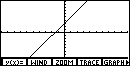
The graph is what makes the graphing calculator so great...no plotting points! In order to graph an equation, the equation must be in "y=" form. (y=2x+3 is ok, but x+3y=2 is NOT)
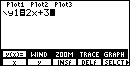
To start the graph, press the [GRAPH] button. To start a graph, choose "y(x)=", or [F1]. You are now in the equation editor. Let's enter the equation y=2x+3. The y= part is already there, just type in 2x+3.
<< Previous Lesson • Next Lesson >>
TI-86 Page
Main Homepage