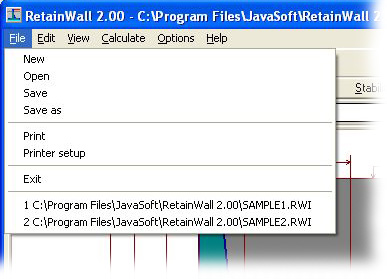
Shortcut: Alt-F
File menu contains the following sub menus.
New Allows you to create a new RetainWall
calculation. Blank title as well as
undefined dimensions, unit system, loads, properties and reinforcement bar
information are shown. You will be reminded if you have not save the
current calculation. Shortcut: Alt-F Alt-N; Toolbar:
Open Allows you to open a RetainWall file that has been previously saved. A RetainWall file stores title, dimensions, unit system, loads, properties and
reinforcement bar information. You will be reminded if you have not save the
current calculation. Shortcut: Alt-F Alt-O.
Save Allows you to save the current RetainWall
into a disk file. A RetainWall file
stores title, dimensions, unit system, loads, properties and reinforcement bar
information. Shortcut: Alt-F Alt-S; Toolbar:
Save as Allows
you to save an open RetainWall file to another file name and/or
location. Shortcut: Alt-F Alt-V.
Print Allows you to print the current RetainWall
calculation report. A Print window
will shown to select which frames to print. Shortcut: Alt-F Alt-P; Toolbar: ; See also: Printing.
Printer setup Allows you make change the printer
or make changes to the printer setup. Shortcut: Alt-F Alt-R; See also: Printing.
Exit Allows you to exit RetainWall calculation. You will be reminded if you have
not save the current calculation. Shortcut: Alt-F Alt-X.
Recent file list Allows you to open a recently open RetainWall file from the list. You will be
reminded if you have not save the current calculation. Shortcut: Alt-F Alt-(1
to 4).