

What Is HTML?
HTML is used in describing web page
-
HTML stands for Hyper Text Markup Language
-
HTML is a markup language
-
A markup language is a set of markup tags
-
The tags describe document
content
-
HTML documents contain HTML tags and
plain text
-
HTML documents are also called web
pages
HTML Tags
HTML markup tags are usually called HTML tags
-
HTML tags are keywords (tag names) surrounded by angle
brackets like
<html>
-
HTML tags normally come
in pairs like
<b> and </b>
-
The first tag in a pair is the start
tag, the
second tag is the end
tag
-
The end tag is written like the start tag, with a forward
slash before
the tag name
-
Start and end tags are also called opening
tags and closing
tags
<tagname>content</tagname>
HTML Elements
"HTML tags" and "HTML elements" are often used to describe the same
thing.
But strictly speaking, an HTML element is everything between the start
tag and the end tag, including the tags:
HTML Element:
<p>This is a paragraph.</p>
HTML Page Structure
Below is a visualization of an HTML page structure:
<html>
<body>
<h1>This a heading</h1>
<p>This is a paragraph.</p>
<p>This is another paragraph.</p>
</body>
</html>
Step 1: Start Notepad
To start Notepad go to:
Start
All Programs
Accessories
Notepad
Step 2: Edit Your HTML with Notepad
Type your HTML code into your Notepad:
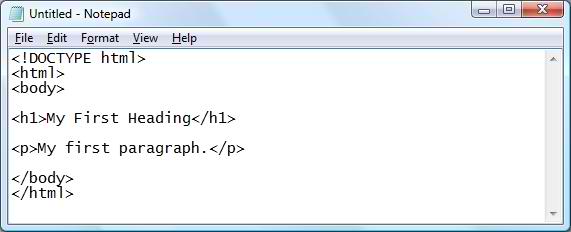
Select Save
as.. in
Notepad's file menu.
When you save an HTML file, you can use either the .htm or the .html
file extension. There is no difference, it is entirely up to you.
Save the file in a folder that is easy to remember, like w3schools.
Step 4: Run the HTML in Your Browser
Start your web browser and open your html file from the File, Open menu,
or just browse the folder and double-click your HTML file.
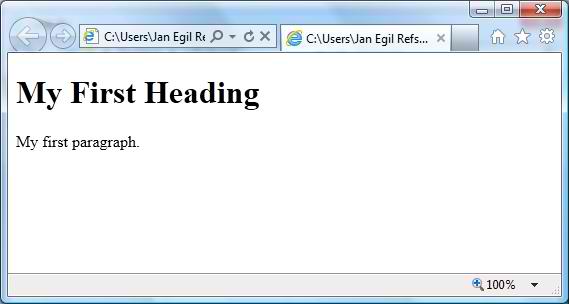
The result should look much like this:
HTML Headings
HTML headings are defined with the <h1> to <h6> tags.
Example
<h1>This
is a heading</h1>
<h2>This is a heading</h2>
<h3>This is a heading</h3>
HTML Paragraphs
HTML paragraphs are defined with the <p> tag.
Example
<p>This is a paragraph.</p>
<p>This is another paragraph.</p>
HTML Links
HTML links are defined with the <a> tag.
Example
<a href="http://www.w3schools.com">This is a link</a>
Note: The
link address is specified in the href attribute.
(You will learn about attributes in a later
chapter of this tutorial).
HTML Images
HTML images are defined with the <img> tag.
Example
<img src="w3schools.jpg" alt="W3Schools.com" width="104" height="142">


[email protected]