

7b.] Take the next two-digit number and input them into the second group in the .desc file, and don't forget to do that with the third set also.




|
|
|
|
|
|
|
|
|
|
|
|
|
|
|
|
|
|
|
|
|
|
|
|
|
|
|
|
|
|
| How to Upload and change your wallpapers and Ringtones for the LG vx 4600 cell phone! | |||||||||||||||||||||||||||||
|
|||||||||||||||||||||||||||||
| Page 4 | |||||||||||||||||||||||||||||
|
|||||||||||||||||||||||||||||
| Walkthrough | |||||||||||||||||||||||||||||
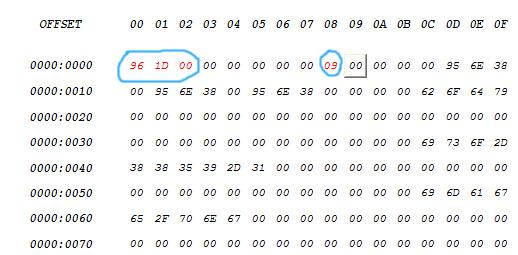
| 7.] The next step is to create the .desc file which is necessary to make your wallpaper work properly. Now open up the Hackman editor and open up the .desc file you've managed to download and unzip. | |||||||||||||||||||||||||||||
|
|||||||||||||||||||||||||||||
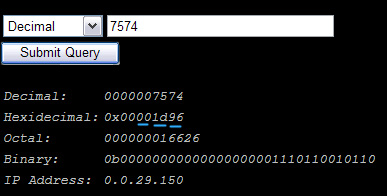
| 7a.] Here's where the hex-editor with the file size comes into play. Take the last 2 numbers from the website (underlined in blue, in the previous image) and type that number into the first section in the left side of the .desc file. 7b.] Take the next two-digit number and input them into the second group in the .desc file, and don't forget to do that with the third set also. |
|||||||||||||||||||||||||||||
|
|||||||||||||||||||||||||||||
| 8.] In order to have more than 1 custom wallpaper, you will need to change the number at offset 08, so count up all the wallpapers you have already (in my case it's 8) and put the next number up into slot 09 | |
||||||||||||||||||||||||||||
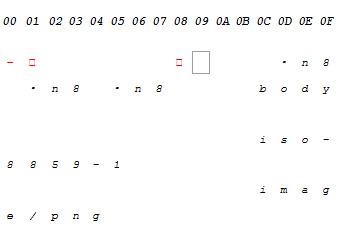
| 9.] Now if you used a .png file, you will not have to change anything else. However, if you used a .jpg or .gif you will have to change the portion from in the image that has that indicated. | |||||||||||||||||||||||||||||
|
|||||||||||||||||||||||||||||
|
|||||||||||||||||||||||||||||
|
|||||||||||||||||||||||||||||
|
|||||||||||||||||||||||||||||
|
|||||||||||||||||||||||||||||
| [email protected] | |||||||||||||||||||||||||||||