

Then browse to the picture you want to use and right click on the file, click "rename". and rename it as BODY. This file cannot have a file extension (such as .jpg) so the renaming is easiest done by chaning the viewing settings in your computer.





|
|
|
|
|
|
|
|
|
|
|
|
|
|
|
|
|
|
|
|
|
|
|
|
|
|
|
|
|
|
|
|
| How to Upload and change your wallpapers and Ringtones for the LG vx 4600 cell phone! | |||||||||||||||||||||||||||||||
|
|||||||||||||||||||||||||||||||
| Page 3 | |||||||||||||||||||||||||||||||
|
|||||||||||||||||||||||||||||||
| Walkthrough | |||||||||||||||||||||||||||||||
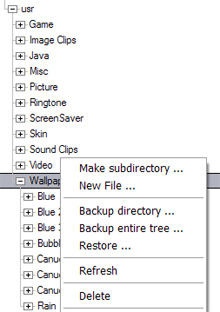
| 4.] From here you will go down to the bottom and "Right-click" on the Wallpapers. | 4a.] Choose "Make subdirectory..." and type on the name of the file you will be uploading | ||||||||||||||||||||||||||||||
| 4b.] Next, right click on the folder you just created, and choose "New file..." Then browse to the picture you want to use and right click on the file, click "rename". and rename it as BODY. This file cannot have a file extension (such as .jpg) so the renaming is easiest done by chaning the viewing settings in your computer. |
|||||||||||||||||||||||||||||||
|
|||||||||||||||||||||||||||||||
| 5.] Once the picture has been renamed and uploaded, take particular note of the size of the image. | |||||||||||||||||||||||||||||||
|
|||||||||||||||||||||||||||||||
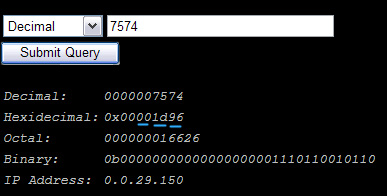
| 6.] In this demo, the photo is 7418 bytes, so use the calculator and add 156 to whatever the size of the picture is. | |||||||||||||||||||||||||||||||
|
|||||||||||||||||||||||||||||||
| 6a.] The total is 7574, so type the number into the Hexadecimal converter (that you've already opened up)! | |||||||||||||||||||||||||||||||
|
|||||||||||||||||||||||||||||||
|
|||||||||||||||||||||||||||||||
|
|||||||||||||||||||||||||||||||
|
|||||||||||||||||||||||||||||||
|
|||||||||||||||||||||||||||||||
| [email protected] | |||||||||||||||||||||||||||||||