
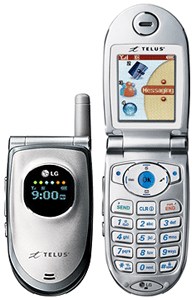

1a.] Also, set if you have version 0.7.14 or later, set the phone type to the LGvx4600 (Telus Mobility)




|
|
|
|
|
|
|
|
|
|
|
|
|
|
|
|
|
|
|
|
|
|
|
|
|
|
|
|
|
|
|
| How to Upload and change your wallpapers and Ringtones for the LG vx 4600 cell phone! | ||||||||||||||||||||||||||||||
|
||||||||||||||||||||||||||||||
| Page 2 | ||||||||||||||||||||||||||||||
|
||||||||||||||||||||||||||||||
| Walkthrough | ||||||||||||||||||||||||||||||
| Once all the software has been downloaded and properly installed, connect your phone to the computer using the data cable. | ||||||||||||||||||||||||||||||
| 1.] Open up Bitpim and go to "Edit" > "Settings" > and set the COM port to the one your phone is connected to (trial and error works if you are unsure, however "auto" mode generally works best. 1a.] Also, set if you have version 0.7.14 or later, set the phone type to the LGvx4600 (Telus Mobility) |
||||||||||||||||||||||||||||||
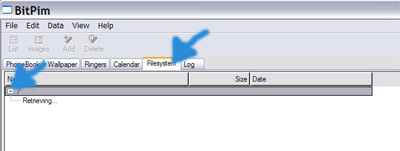
| 2.] Now click on the filesystem tab, and click the "+" | ||||||||||||||||||||||||||||||
|
||||||||||||||||||||||||||||||
|
||||||||||||||||||||||||||||||
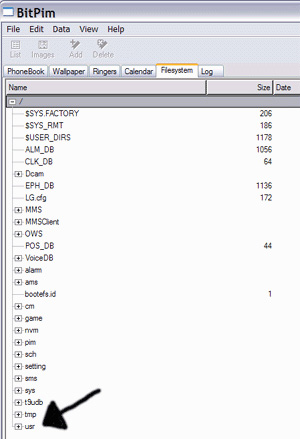
| 3.] Go down to the bottom of the filesystem window and click on "usr". It will expand and show you all the different sections that help you to personalize your phone. | ||||||||||||||||||||||||||||||
|
||||||||||||||||||||||||||||||
|
||||||||||||||||||||||||||||||
|
||||||||||||||||||||||||||||||
|
||||||||||||||||||||||||||||||
|
||||||||||||||||||||||||||||||
| [email protected] | ||||||||||||||||||||||||||||||