SBC is a two pass process, this means that you have to encode the same thing twice. The first encode will use the highest bitrate setting, the result will be analyzed to see if that particular part really needs to use that many bits, and form a database as of which frame gets how many bits.
Make sure your video is loaded, and apply all filters that you need to add now, such as Vobsub and logo.
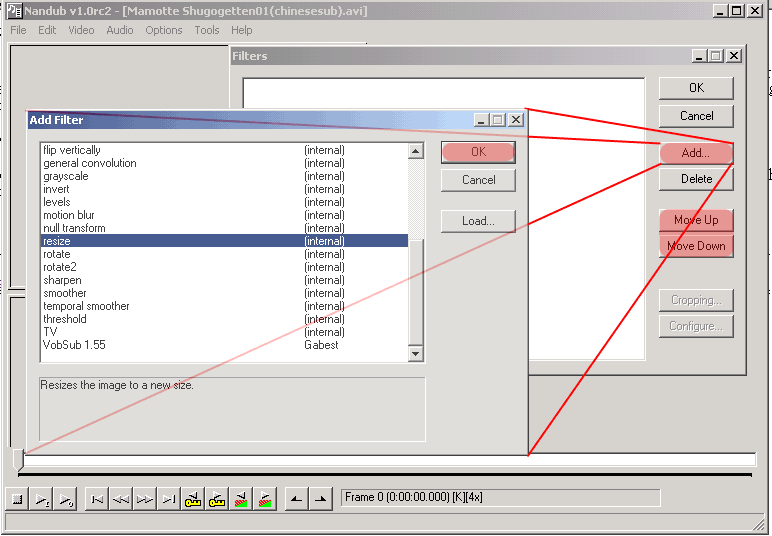
For VCD rips, the resize filter will be explained in detail, becuause there are some problems with many VCD rips regarding the picture, go to video menu, make sure its at full processing mode, and then choose filters. In the filters window click add and choose resize by double clicking on it:
And then you will see this screen to configure the resize filter, it seems to me that 352x240 is what people use so I will go by that, usually to achieve a 4:3 aspect ratio the resolution should be 320x240. Use precise bicubic filter mode. Click ok afterward.
In a lot of mpeg(VCD) sources, there are black bars or some weird static bar at the edge of the screen, we will remove them now. At the filter screen, choose resize filter and click on Cropping (on the picture above its grayed out but after you highlight a filter it will be chooseable):
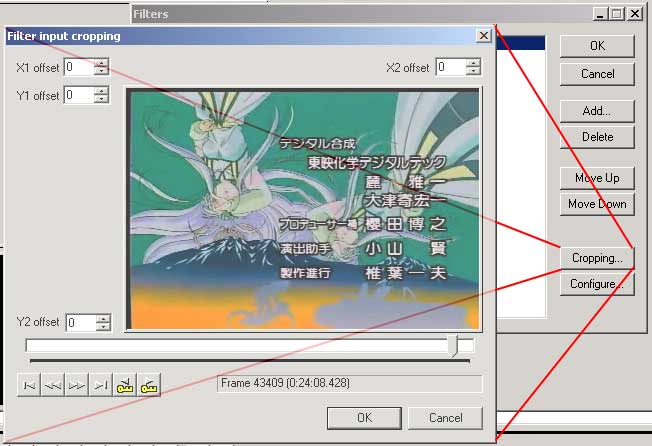
After that choose some part of the video where the screen is very bright so that you can see the black bar clearly, the use the arrows around the picture to crop away the black bar or any bad looking part of the picture, such as the swishing effect at the bottom once you are done click ok:
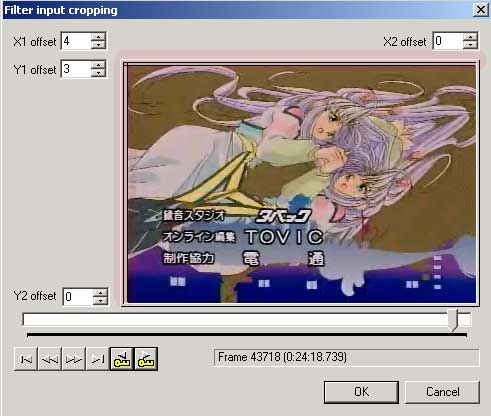
Do you notice the highlighted part that were removed? Now click ok until you get out to the main Nandub interface, and drag the bar a bit. See the difference?

Now go to File menu and choose First pass or press F8 for shortcut, the program will ask you to save a stat file somewhere. The analyzed result from the first pass will be stored there. It will be about 3 MB for a episode that is about 22 minutes. You don't need any space to store the temporary video file at this time. It will take some times depending on how many filter you added and your picture resolution, for my P3 700 laptop to encode the above video it will take 23 minutes. After the first pass is done, go on to second pass, where is actual encoding to a file is done.
| �@ | Next-> |
|
| �@ |

 <- Back