
MSM-Workstation Tutorial (part 3/5)
Window Main Menu
We’ve been talking about menus since the very beginning of this series on MSM-Workstation. Today we revisit this topic and offer some tips on making working with menus easier.
When working with menus we can have a number of objects which do practically the same thing. They are:
- Objects on the window area, such as buttons. When clicked they do something.
- Menus. These are found on top and may perform some action as a button.
- Toolbars. These normally have iconized representations of menus.
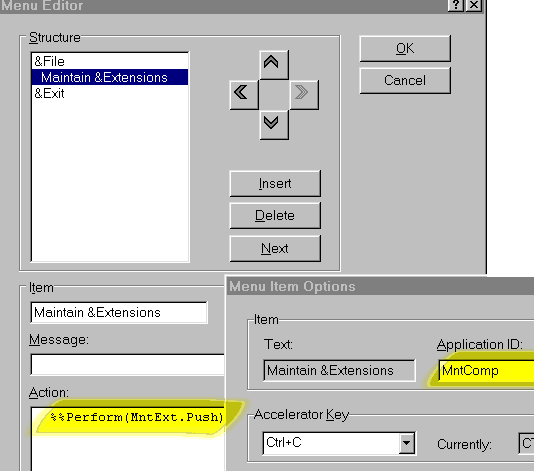
Therefore in reality a particular something may be called up from various places. As developers we do not want to code the same thing three times (think about maintaining the stuff). One method of tackling this is to place (for example, in Common Code) a routine or function and call it up from the various locations. The method we present here is the %%Perform macro method. When the menu item is selected we trigger a button press event. This is the same as pressing the button. The
%%Perform can also be used in other events. For example, a close button can be made to trigger a save event. In eCheques, the DCS Run button Finalize, offers to print and create the necessary output files using this method.
MSM-Workstation also provides various macros (all of which have MWAPI equivalents) that allow one to %%Disable and %%Enable components. A pre defined macro called %%EnableMenu can be used to do the same for menu items. The syntax is %%EnableMenu(<AppId> ,<value>). This macro handles both enabling and disabling of menus. If you supply a <value> of 1 (TRUE) it is enabled, a <value> of 0 disables it.
If you take a peek at the diagram on top, we have highlighted the application ID for this menu. Replace <AppId> with this name.
Window — CommonCode
; Changes the title colour of MenuTitle
ColorTitle N Colour,I
%%Get(MenuTitle.ForeColor,Colour)
F I=1:1:3 D
.S $P(Colour,",",I)=($P(Colour,",",I)+111*I)
.S:$P(Colour,",",I)>65535 $P(Colour,",",I)=$R(100)
.Q
%%Set(MenuTitle.ForeColor,Colour)
Q
The routine above changes the color of the Title. Color is made up of Red,Green,Blue each ranging from 0 to 64k. This gives an astonishing number of colors but on many displays (e.g. 256 colors) minor increments will not reflect on the monitor.
StopTimer %%Set(Timer1.Active,0)
%%Hide(@%%CurrWin.)
Q
StartTimer %%Show(@%%CurrWin.)
%%Set(Timer1.Active,1)
%%SetFocus(@%%CurrWin.)
Q
Besides stopping and starting the timer, our two routines also hide and show the current window. Observe how we use the MSM defined macro %%CurrWin and indirection to reference the window.
Routine StartTimer also uses the %%SetFocus macro to force the menu into visibility. You may encounter a situation in which your user will click on an object other than your application. When you maintain extension window closes, focus will not return to the main menu. This addresses this scenario.
Window — Create
N OutParam,SizeW,PosL,WinW
D INFO^%mdlcnse(.OutParam)
%%Set(MenuTitle.Title,OutParam("APPNAME"))
%%Get(MenuTitle.SizeWidth,SizeW)
%%Get(MenuTitle.PosLeft,PosL)
%%Get(..SizeWidth,WinW)
I WinW<(PosL+SizeW) D
.S WinW=PosL+SizeW
.%%Set(..SizeWidth,WinW)
.D JustifyW^%ViEg1(%%CurrWin,$G(ViEWsets("PosJustifyH"),"C")
,$G(ViEWsets("PosJustifyV"),"C"))
.Q
S SizeW=WinW-PosL
%%Set(MenuTitle.SizeWidth,SizeW)
The chunk above arranges the window so that it is will display correctly irrelevant of Windows 95 display changes. Observe how we set the title of the text box TITLE so that it reads from the information from the EXE.
Control Exit — Push
%%Return
Control MntExt — Push
Do StopTimer
%%DoWin(MntExt)
Do StartTimer
Control Timer1 — timer
Do ColorTitle
Window MntExt
Window — CommonCode
Init S (cExt,cName,cDept)=""
; The variable ExtChg is set to 1 when Extension is modified.
; This is because when the object after it (Name) is enabled, focus jumps to the Close
object
; In order to keep order, Close.gotFocus will adjust focus to the "correct"
object.
S (ExtChg)=0
%%SetVar(cExt)
%%SetVar(cName)
%%SetVar(cDept)
%%Disable(MntExt.Save)
%%Disable(MntExt.Clear)
%%Disable(MntExt.Delete)
%%Disable(MntExt.Name)
%%Disable(MntExt.Dept)
%%Set(..Message,"")
D InitExt
Q
When %%Disabling and %%Enabling objects, focus transfers to the next enabled object if there is one available. In our case we start off with only two objects enabled, the Extension and the Close button. The ExtChg flag variable, will become TRUE whenever a value is entered in the extension field.
Try changing the %%Set(..Message null string and observe what happens. This can prove useful to display additional information about a record.
; Reads any existing entries into Array, displays them and highlights the first entry
InitExt N Array,Key,I
%%Enable(MntExt.Ext)
S Key="",I=1
F S Key=$O(^|"MWMdb"|EXT(Key))
Q:Key="" S Array(I)=Key,I=I+1
%%ResetChoice(Ext,Array)
K Array
%%SetSel(Ext,Array)
%%SetFocus(MntExt.Ext)
Q
Do you recall the moniker, MWMdb? When we want to refer to a global residing on a particular database (be it local, remote or in memory) you should add the moniker. The ^GLB format will attempt to access a global in your application. These are read only and are normally used when you have a list of constants.
UpdScrn N Buf,I
S Buf=$$ExtLd^MWMLIB(cExt)
S cName=$P(Buf,"#",1),cDept=$p(Buf,"#",2)
%%Enable(MntExt.Name)
%%Enable(MntExt.Dept)
%%Enable(MntExt.Clear)
%%Enable(MntExt.Save)
%%Enable(MntExt.Delete)
%%SetVar(cExt)
%%SetVar(cName)
%%SetVar(cDept)
%%Disable(MntExt.Ext)
Q
You can store procedures and functions within library routines. These must be packaged into your application. Reference them as you would a normal library.
While on the issue of libraries, note that MSM-Workstation does not incorporate in the EXE file all the %Routines that are actually available. This reasoning is more than justified because in the majority of occasions many of the %Routines are not used, so why increase the size of the EXE? In the System Browser, besides your development database, you have a %%App area under System. If your exe will call up an application listed here you must include it in your application.
If while testing within MSM-Workstation everything works fine, while the EXE stops at the point it is invoking %routines, this could be your problem.
Window — Create
D Init
Window — Destroy
;Kill all variables used within module
K cExt,cName,cDept,ExtChg
K Array
In this window, we permanently associate M variables to certain objects. Killing off the variables that are no longer needed when the window is being destroyed helps encapsulate your application even more.
Control Clear — Push
N Changed,Buf
S Buf=$$ExtLd^MWMLIB(cExt)
S Changed=0
S:$P(Buf,"#",1)'=cName Changed=1
S:$P(Buf,"#",2)'=cDept Changed=1
I Changed I $$YN^%msgbox("Are you sure?","Clear")="N" D Q
.%%NotOK
.Q
Do Init
Demonstrates has-record-been-changed logic.
Control Close — Push
I cExt'="" I $$YN^%msgbox("Are you sure?","Exit
Program")="N" Q
%%Return
Control Close — gotFocus
;This object gets focus when a valid entry is typed into
;Ext. The enabled (next) object is Name. This procedure
;corrects this visual problem.
I ExtChg D Q
.S ExtChg=0
.%%SetFocus(MntExt.Name)
.Q
A few paragraphs above we mentioned the ExtChg flag variable. Here is the position at which it is evaluated. When a valid extension is typed in, even though Name and Department are %%Enabled and one attempts to %%SetFocus on Name (the desired next object), focus would already have been pre-set and jumps to (in our case) Close. As we want the visual aspect to be correct, we have enabled an event for close so that when it gains focus it repositions itself correctly.
| Chris Bonnici email: [email protected] |
