
What is eCheques
eCheques is your electronic cheque book. Today more and more organisations and people are moving towards making secure payments in the least possible time and with the least possible paperwork (it's all part of electronic banking).
With eCheques, you fill in your electronic cheques and send them to your bank using either a modem or a diskette. As the internet becomes an accepted medium to transmit data you will be able to use eCheques to send your payments this way.
In a nut shell, eCheques allows you to have up to 99 accounts (with various banks). Each account will have regular payees (which may be common to different accounts). At the simplest level, whenever pay time is due, all you have to do is click a button, fill in the payment date and type in the amounts next to the payees. Another button and all the necessary letters and output files are outputted for transmission. All special requests, such as archiving or password protection, are handled automatically by eCheques.
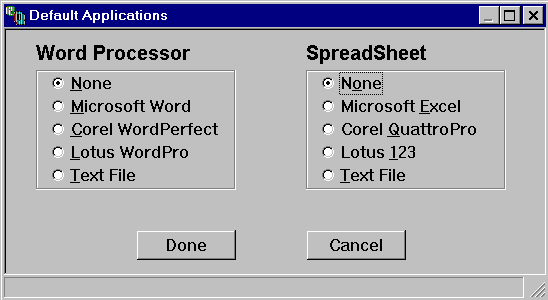
eCheques automatically detects and works with the following word processors and spreadsheets: Microsoft Word, Corel WordPerfect, Lotus Word Pro, Microsoft Excel, Corel Quattro Pro and Lotus 123 or text files. You can also output data to text files. The word processors are used to generate bank authorisation letters, while you can export payment runs to any of the spreadsheets. All files created by eCheques are automatically saved and easy to identify.
Using the fully customisable report generator, you can print or reprint any payment run at any time.
In a nutshell, that's all to eCheques.
Security
Access to eCheques is only via a password which can be changed at any time by the authorised user. A highly efficient multi-user bullet proof database provides an efficient and secure environment on which to operate.
Supported Banks
eCheques currently supports the following banks. Any bank wishing to
be included in eCheques should contact the CBSoft on [email protected].
CBSoft considers all request by organisations wishing to use this product
with their financial institution. The final version of eCheques will have
a facility whereby it will be possible to import scripts for other banks
directly in eCheques.
|
|
|
| APS Bank Ltd | Malta |
| Bank of Valletta plc | Malta |
| Mid-Med Bank plc | Malta |
| Lombard Bank (Malta) Ltd | Malta |
Hardware and OS
Minimum: 80486 CPU, 66MHz computer running Windows 95, 8MB RamRecommended: Pentium, 90MHz (or equivalent) computer running Windows 95 or Windows 98, 16MB Ram
Installing eCheques
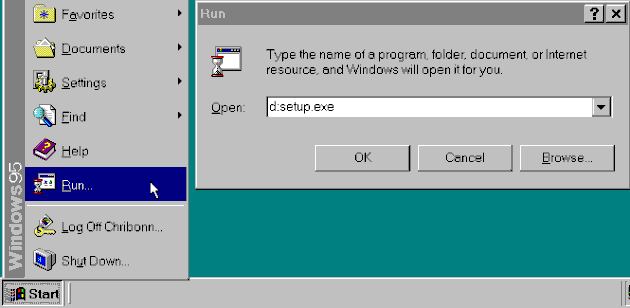

CD version: Place the CD in your computer and it should automatically load the installation program. If this does not work (many-a-times because it has been disabled in Windows) click on the start button, type <x:>setup.exe, where <x:> is your CD drive letter.
The installation process will request set up all the necessary files needed to successfully run eCheques. It will place in the start menu two icons, one called eCheques and the other called Generate Account.
First Time
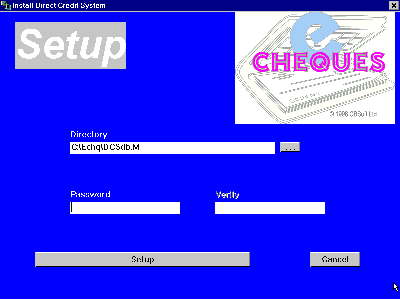 When you run
the program for the first time, you will be prompted to specify the path
to your database. By default, the database will be created in the same
directory you installed your program in and the default database name is
DCSdb.M. You can override these defaults. You supply the password at this
stage. The password is case sensitive. You will not be able to operate
eCheques if you forget this password!
When you run
the program for the first time, you will be prompted to specify the path
to your database. By default, the database will be created in the same
directory you installed your program in and the default database name is
DCSdb.M. You can override these defaults. You supply the password at this
stage. The password is case sensitive. You will not be able to operate
eCheques if you forget this password!
As soon as the installation in over, eCheques will determine what application programs are installed and allows you to choose the program you want to work with. See Default helper applications.
The first thing you must do is to provide at least one valid subscriber account. This is done through the Maintain Subscriber Accounts option. For more information go to the section Maintain Subscriber Accounts.
|
|
| Chris Bonnici
CBSoft Ltd email: [email protected]
|
