



|
Pronounced cash, a special high-speed storage mechanism. It can be either a
reserved section of main memory or an independent high-speed storage device.
Two types of caching are commonly used in personal computers: memory
caching and disk caching.
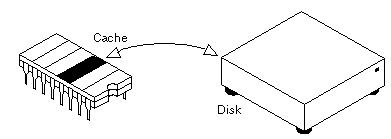
A memory cache, sometimes called a cache store or RAM cache, is a portion of memory made of high-speed static RAM (SRAM) instead of the slower and cheaper dynamic RAM (DRAM) used for main memory. Memory caching is effective because most programs access the same data or instructions over and over. By keeping as much of this information as possible in SRAM, the computer avoids accessing the slower DRAM. Some memory caches are built into the architecture of microprocessors. The Intel 80486 microprocessor, for example, contains an 8K memory cache, and the Pentium has a 16K cache. Such internal caches are often called Level 1 (L1) caches. Most modern PC's also come with external cache memory, called Level 2 (L2) caches. These caches sit between the CPU and the DRAM. Like L1 caches, L2 caches are composed of SRAM but they are much larger. Disk caching works under the same principle as memory caching, but instead of using high-speed SRAM, a disk cache uses conventional main memory. The most recently accessed data from the disk (as well as adjacent sectors) is stored in a memory buffer. When a program needs to access data from the disk, it first checks the disk cache to see if the data is there. Disk caching can dramatically improve the performance of applications, because accessing a byte of data in RAM can be thousands of times faster than accessing a byte on a hard disk. When data is found in the cache, it is called a cache hit, and the effectiveness of a cache is judged by its hit rate. Many cache systems use a technique known as smart caching, in which the system can recognize certain types of frequently used data. The strategies for determining which information should be kept in the cache constitute some of the more interesting problems in computer science.
The above is as found from Webopedia by performing a search for "cache."
Cache Files - These files are stored on your computer every time you visit a webpage.
This includes all images and pictures that you browsed on the web, all sound or video
files, and even all the webpage text. This may have even been accumulating ever since
you first began browsing the web! These files can be found by anyone who decides to
"snoop" on your PC, and they are easy to find and view. They also consume a large
amount of your disk space, and this will show at the top of the Complete Cleanup
window, identifying the number of files and the amount of space used. Complete
Cleanup also contains a "cache viewer" which you can use to browse through your
cache, and provides the option to clean up all the cache files on your system.
The above is found from
Complete Cleanup.
How I get rid of Cache files:
I suggest going to the above listed site and reading all
the things that are cleaned up with this program. It does a
real nice job and I like it and use it daily!
|
Security Links | Grafix Links | Interesting Links
E-Mail Me
Not responsible for the contents herein!
Links contained herein may or may not be functional.
Last Updated: October 20, 2003