
A simple variable

An array
Compiling vs. Interpreting - A compiled language is translated entirely from the form in which the programmer wrote it into a machine-readable form before it can be run. This translation is done by an application called a compiler. An interpreted language can be run the moment that it is written. It is run by an application called an interpreter, which translates the program one line at a time as it comes across the lines.
Variable - a small section of memory used to store a piece of data (such as x = 2). Variables can be collected into groups called arrays, in which all variables are referred to by the same name with an index (mx[0] = 4, mx[1] = 10.6, mx[2] = -30 etc.)
A simple variable |
An array |
Program instructions are called statements. Each statement carries out one action. Statements can be joined together to form blocks of statements, and blocks can be given names, which makes them functions. A function is like a super-statement - you call it, and it carries out a complex action involving several smaller statements.
An include library contains predefined statements and functions that can be used in programs. For instance, if you wanted a program to produce random numbers, you can almost always include a library of statements one of which will do the job for you.
Conditional statements are used in a program to make decisions: if (such-and-such a condition is true) then carry out some action. The action is not carried out if the condition is false. If statements can also include else clauses, specifying another action to be carried out if the condition fails (else = "otherwise"): if (such-and-such a condition is true) then carry out some action else carry out an alternative action.
Program statements can be collected together in loops that will execute several times, generally until some condition is met. Do-while loops test the condition at the start, execute the statements and then test it again (i.e. "as long as this condition is true, do these"). Do-until loops test the condition after executing the statements the first time (i.e. do the statements, then test the condition, and loop back if it fails).
For a guide to CGI and Server-Side Scripting, see General Topics - CGI and Server-Side Scripting
For a guide to JavaScript, see the guide on my main web site.
These are instructions in an HTML page that tell the server (rather than the client) to carry out some action (such as inserting headers/footers into a file or giving the results of a database query). Written in SGML rather than any CGI language like Perl. Generally, pages with SSIs have the extension .shtml or .shtm Web servers read the entire page file, make any changes based on the SSIs and then pass the amended file to the client. Most web servers can handle SSIs but you must make sure they are configured to do so.
For my guide to databases and connecting to them, see General topics - Databases.
For my guide to Cascading Style Sheets, see General topics - Cascading Style Sheets (CSS).
This is an addition to HTML that gives more control over pages such as
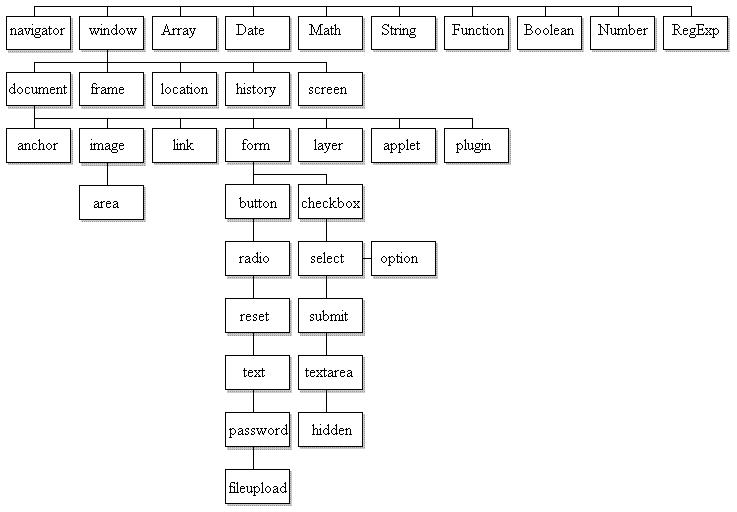
This is a standard recommended by the W3C which fits every single component of a web page (from a simple <input> element to the browser itself) into a tree structure.
It is an application programming interface (API) which is a set of commands, variables and functions that software developers can use to communicate with an underlying system. In this case, web page developers can use the standard DOM as an interface for their web pages to communicate with the browser. As such, it is vendor-neutral (not tied to any particular software) and platform-independent (should work with any browser)
However, many browser still can't cope with the DOM model, and if you have one of these on your machine, you may get an "Undefined object" error if you go to a page that makes use of DOM features. The following diagram shows the DOM structure and how different types of elements fit into it. Try clicking on the rectangles to learn a bit more about the elements.
You have three choices:
 You have full control over your hosting. You have more flexibility.
 Hosting equipment is expensive! It requires lots of time to set up. You must maintain the system continually yourself.
Relatively cheap - no need to purchase hardware or software. The ISP runs the whole show for you - no maintenance on your part! You must accept whatever off-the-shelf service the ISP provides. These services tend to be limited to simple database access, simple form handling, primitive CGI services etc. You have no control over security checks, firewall etc.
They offer more advanced services than an ISP (E-mail addressing, online payment, web and database management, and various non-web based services to help your business). This option is costly: bandwidth, database connectivity, bandwidth, security, customer support etc. are offered on a cost-per-service basis. Again, you have no control over security checks.
Hosting equipment is expensive! It requires lots of time to set up. You must maintain the system continually yourself.
Relatively cheap - no need to purchase hardware or software. The ISP runs the whole show for you - no maintenance on your part! You must accept whatever off-the-shelf service the ISP provides. These services tend to be limited to simple database access, simple form handling, primitive CGI services etc. You have no control over security checks, firewall etc.
They offer more advanced services than an ISP (E-mail addressing, online payment, web and database management, and various non-web based services to help your business). This option is costly: bandwidth, database connectivity, bandwidth, security, customer support etc. are offered on a cost-per-service basis. Again, you have no control over security checks.
Virtual server - Your site shares web space with many others on a server offered by ASP/ISP. A particularly good one is 1 & 1. This option is cheap but relatively inflexible.
Everything is running already, so just create the web site code.
You have no control over the system's configuration or level of security.
Dedicated hosting - The ASP/ISP gives you access to its own server.
Generally fairly cheap and easy. Most service providers already have ready-to-use system configurations. The site is up and running fairly quickly.
Limited to the services and hardware available from the service (e.g. what sort of firewall/proxy server do they have?) They may also have poor customer service and maintenance.
Co-location - The service provider gives you office space for your own server equipment. The most costly option, as you have all the work to do and equipment to buy. You are responsible for all maintenance and security.
 |
 |
 |