Cascading Style Sheets (CSS)
XHTML deprecates (forbids) the use of attributes in tags such as <font color="...">. Instead, you should define a style in either using internal commands or an external style sheet. Please note that older browsers can't handle style sheets or the <style> tags.
Internal style tags:
- Embedded. You can specify the style directly in the <head> ... </head> section of the web page between the <style> ... </style> tags:
<style>
h1 { color : red; font-family : arial; }
p { text-align: center; font-size : 14pt; }
</style>
Embedded styles apply to all the appropriate tags in a page unless a tag overrules them with an inline style. Speaking of which ...
- Inline. You can specify the style of a section of text by enclosing it within <span style="..."> ... </span> tags e.g.
<span style="background: yellow">This will appear on a yellow background</span>
This will appear on a yellow background
Alternatively, you can add the style="..." attribute to various tags directly, such as <input type="text" style="text-align : center"></input>.
External style sheets:
- Linked CSS. Your web page contains a tag that links the page to a CSS file:
<link rel="stylesheet" type="text/css" href="xxx.css" title="stylesheet" />
In this case, xxx.css is the external style sheet (note the .css extension).
- Imported CSS. The contents of an external stylesheet are imported into a page using a server-sided include into the <style> ... </style>. Effectively, this is the same as embedded styles (above) except that the data is stored in an external file and brought in when needed:
<style type="text/css">
@import url(xxx.css)
</style>
At the start of an imported style sheet, you should put the same line:
@import url(xxx.css)
h1 {font-size : 20pt; color : blue; }
p { text-align : center; }
Cascading Style Sheets (CSS)
A plain text file showing how each tag is to appear (colour, font size and face etc.) The two standards are CSS1 and CSS2 (has more features). The advantages of using CSS is consistency (all pages in a site can refer to the same CSS file) and ease of updating (to change the appearance of all pages, simply change the CSS file).
|
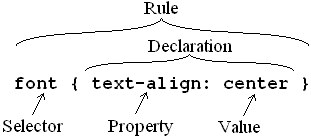
The tag name to be defined is called the selector. The rest of it (within curly brackets) is the declaration, consisting of the property which is assigned a value. The whole thing is called a rule.
Properties are separated from their values by colons (:) and a declaration can include several property + value combinations separated by semicolons (;).
|
 |
body
{ bgcolor : white; link : blue
}
h2
{ color : red; font-size : 20pt; font-family : times-new-roman
}
The line breaks are optional but are considered good practice.