General Topics - CGI and Server-Side Scripting
Server-side vs. Client-side script
Simple web pages are client-side scripts: The client requests them from the server, which sends them. The web browser on the client then reads the page and interprets it. The visitor has full access to the code (select "Source" from the "View" menu).
You may want operations to be hidden from the visitor, such as checking passwords or connecting to a database on the server. This requires a server-side script. This runs on the server, which only sends the result of the script to the client. This might also be used to detect which browser the client is using, to ensure that it gets the correct version of a web page. Server-side scripts also handle cookies.
Code is placed into files called applications Each application must be given execute permission (i.e. the server will let it be run as a program). Typical server-side script languages include PHP, Perl, C (or its newer version, C++), Java (or its Microsoft equivalent, C#), JavaScript and Visual Basic.
Some languages like JavaScript can be used both for server-side script and client-side script (code that runs on the client). Some browsers don't support client-side scripts, and users can disable client-side scripting in their browsers.
Common Gateway Interface (CGI)
Server-side scripting is usually done using a Common Gateway Interface (CGI) script. These are often placed in a special folder on the server called cgi or cgi-bin. These must be given execute permission in order to run. CGI scripts can be written in several different languages:
- Perl, a platform independent language. Can be downloaded free and legally. All Perl applications have a .pl extension.
- PHP Hypertext Processor. Newer than Perl. All PHP applications have a .php file extension.
- Active Server Pages (ASP)
. Works on microsoft systems and comes bundled with microsoft Internet Information Services (IIS). ASP pages are written in VBscript or JavaScript.
- .NET. Also for Microsoft systems only. Scripts are written in VBScript, VB (Visual Basic), C# (a newer version of Java)
- JavaServer Pages (JSP). Allows CGI scripts to be written in Java.
- Server-Side JavaScript (SSJS). Developed by Netscape, it allows server-side scripts to be written in JavaScript.
- ColdFusion - A CGI system designed by Macromedia to be very easy to use.
<?php
$envVars = array("HTTP_USER_AGENT");
foreach($envVars as $var)
{
print "
<html>
<title>A sample PHP script</title>
<body>
<div align="center"><h2>A sample PHP script</h2></div>
<p>
The browser you are using is <b>${$var}</b>.
</p>
</body>
</html>
";
}
?>
|
Hypertext Preprocessor (PHP)
This creates web pages dynamically (i.e. on the fly) and transmits them to the browser. PHP files have the extension .php
<?php tells the server that this is a PHP document that is to be executed. The print " statements copies its contents to the browser except that ${$var} represents a variable (in this case referring to the browser identity). The statement ends with "; a few lines later and everything between is the item to be printed.
|
Perl
This shows a simple Perl script. Note the first line, starting with #!, which shows the location of the Perl interpreter. This is almost always #!/usr/bin/perl. The other lines are almost all print statements (where /n represents carriage returns).
The title (between the <title> ... </title> tags) is stored as a variable called $title, and the contents of the page as another called $content. Comments start with ##.
The most common errors with Perl CGI scripts are getting the shebang line wrong, or forgetting to write the MIME type to the browser (the print "Content-type: text/html\n\n"; line).
|
|
#!/usr/bin/perl
$title = "Sample Perl Script";
$content = "This is a very simple Perl script!";
print "Content-type: text/html\n\n";
print "<html><head>\n";
print "<title>$title</title>\n";
print "</head>\n<body>\n";
## START HTML content
print "<h1>$title</h1>\n";
print "<p>$content</p>\n";
## END HTML CONTENT
print "</body></html>";
|
Active Server Pages (ASP)
Developed by Microsoft but now mainly superceded by .NET, ASP pages have a .asp extension and are written using VBScript (based loosely on the syntax of Visual Basic). Add VBScript to normal HTML pages by enclosing it within <% ... %>. The first line should be <%@ LANGUAGE=vbscript %> to indicate that the page contains ASP code.
C and C++
These are both compiled languages, C++ being the updated version of C, and much more widely used. They are procedural languages - rather than reacting to events such as button clicks (event-driven languages like JavaScript), they start at the top and work their way through.
C++ is C with object-oriented additions, but it is still procedural (in spite of the fact that the Site Development Foundations book says it isn't - don't bevlieve them!) Entities are represented by objects which contain properties and methods. The internal working of each object are hidden from the outside program ("abstraction"). Objects can be derived from others and inherit properties and method (i.e. the object rectangle is derived from another called polygon).
|
Java
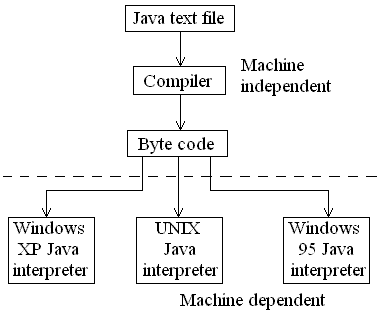
Java is a platform independent language used to create stand-alone applications and applets that are embedded in web pages. It is partially compiled and partially interpreted: You write Java code in a text file, then compile into a file of intermediate code called byte code. Byte code is independent of any browser. A different Java interpreter is then needed for each operating system to run the byte code.
C# is a version of Java produced by Microsoft. It is simpler to use and fits in well with the Windows operating systems because it is a Microsoft-specific language.
|
 |
This is a Microsoft compiled version of the BASIC language. It was developed for stand-alone applications to run under Windows, but is increasingly used for server-side scripting. It is supposed to be easy to use (base on screen objects such as windows and buttons) but lacks the power of C++ and Java.
VBScript
This is a Microsoft version of JavaScript, based loosely on the grammar of Visual Basic. Therefore client-side script written in VBSCript generally runs only on Internet Explorer. This problem doesn't happen with server-side VBSCript (as long as it runs on the server!) as the client only sees the result of the script, not the script itself.