Railroad Tycoon 2
The Second Century Expansion
Railroad Tycoon 2 Demo


What's New:
Railroad Tycoon II – The Second Century is an expansion pack for Railroad Tycoon II. Whereas the original RT2 focused primarily on the first century of railroads (from about 1829 – 1929), RT2-TSC focuses on the second century (1930-2030) and beyond, featuring scenarios from the World War II era, the modern post-war era, and even a bit about the future direction of the world and the railroad's role in it. RT2-TSC adds a host of new features, including: Campaign – The new campaign is 18 scenarios long, split into 3 chapters, covering the World War II era, the boom years from 1950 to 1990, and the final chapter delves into a speculative future of an enormous railway supported project, and what happens when it goes wrong…Free Standing Scenarios – Over a dozen non-campaign scenarios that can be played in any order. Most can be played as either single player or multi-player maps. Some of these scenarios are modified versions of maps included in the campaign, and some are entirely new. A few cover fictitious lands with some highly unorthodox geography. Varied Scenario Goals – Whereas most of the scenarios in the original RT2 focused on making money for yourself or your company, many of the scenarios in RT2–TSC focus on operational goals. Financial wizardry alone will not ensure victory in RT2-TSC, you'll have to push your trains to the limit under harsh war-time and disaster recovery conditions. Metra – Several scenarios is RT2-TSC focus on the operations of metra systems within a single metropolitan area. Most of the largest cities of the world have either below ground subways, above ground metras (sometimes called light rail), or a combination of both. Building a line to haul commuters from downtown to the suburbs is a far different proposition from hauling coal from Wyoming to Chicago. Industries – A number of new industries, including a distillery, munitions plant, armaments factory, military depot and barracks and been added. Also, a number of more modern industries seldom seen in the original RT2 (such as the nuclear plant) play a prominent role in RT2-TSC.Trains – Several new engines have been added, including the E412 Brenner, and a modern steam train (being built today) the DB18 201. Interface Adjustments, Balancing – A variety of small adjustments to the interface and a bit of rebalancing of some of the cargo values. Video, Music, and Graphics – All new video for the new campaign, all new music, and a variety of new graphics
Cargo Type Differences – The traditional cargo production chain is replaced with a special metra production chain. Buildings are broadly divided into 4 classes
Residential – Townhouses and regular houses
Commercial – Office and retail buildings
Industrial – Basically, everything else (i.e. Steel mills, bakeries, coal mines, etc.)
Airport – One of a kind building – note, only the terminal processes cargoes – the airport runways are for show only.
All buildings of the same class supply and demand the same types of commuters, though some will supply or demand a higher amount than others within the same class. (i.e. Townhouses produce more than regular houses)
Traditional cargoes (steel, lumber, passengers, etc.) are not used – the only type of cargo available is commuters, though there are actually 4 types of commuters. The types are based on where the commuters want to go, and can be differentiated by the color of the commuter car: yellow for residential, green for commercial, red for industrial, and blue for airport. In general, residential areas are in the suburbs, and generate loads of industrial and commercial commuters – people who need to go to the factory areas or downtown offices to work, then return home. In addition, commuters need to go from commercial and residential areas to the airport and back.
Automatic Cargo Types – The 4 types of commuters only indicate where they want to go. All 4 types can, of course ride in the same type of commuter car. Therefore, when you set up your train on the train detail screen, only one type of car, a commuter car with a gray stripe, is available to you. When the train reaches a station, whatever commuters are waiting will board automatically, if and only if the train is bound for a station with the appropriate type of demand (i.e. – Passengers wanting to go to the airport will not get on a train bound for downtown with no airport stop.) Also, the demand level at the destination station must be above 0. So you can't expect to haul commuters from all around the suburbs to a single factory – the demand at that factory will quickly drop to 0, and commuters will no longer board your trains.
Limited Station Buildings – A much more limited selection of station buildings is available. You'll still need roundhouses for engine maintenance and a few of the other buildings, but warehouses, post offices, and such are disabled.
Faster Cargo Deterioration – Commuters want speedy service. They won't wait at your stations for long. You'll need a steady supply of trains or they'll find other means of transportation.
Interface ChangesA number of small changes have been made to the game's interface. Some of these changes have already been available in updated versions of the original game available on the internet (versions 1.02 to 1.05) and some are brand new with RT2-TSC. Track Laying – Several new methods of laying track are now available to choose from:
Free Form – This is the same method as in the original RT2, allowing you to drag and drop long sections of track, with the computer figuring out the best route. Straight Line – This also allows you to drag and drop sections of any length, however, the track will only stretch in a straight line. If an obstacle is in the way, the track will not be laid. Use this method to override the computer's normal tendency to bend track around hills and valleys.Piece at a Time – For complete control, lay down a piece at a time. You do the pathfinding instead of the computer. The downside is that this method is slow, but for short sections of track, it can be ideal.
Cargo Deposing – In the original RT2, if a train delivers a cargo to a station that does not demand that cargo, the cargo is sold for a pittance. There is also no way to transfer a load from one engine to another. RT2-TSC adds more control of how cargoes are delivered to stations, allowing you to store the cargo at an intermediate station and pick it up with a different engine. This can be especially useful in mountainous situations, allowing you to use a slow, mountain geared engine such as a Shay to go into the hills and fetch cargoes, then deposit them at a nearby depot in the plains to be picked up for a long flat haul by a more conventional, faster engine.
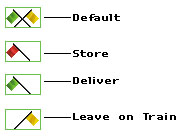
On the train detail screen, at each stop in a train's route, a flags indicate what should be done with at that station with any cargo that is not demanded (any cargo the station DOES demand is automatically sold off). There are 4 options:
Default – This is the same method as was used in RT2. If a cargo is not demanded at the current station but is demanded at a later station, it stays on the train, otherwise it is delivered at the current station. Store – Undemanded cargoes are stored at the current station, and can be picked up by any train. Note, even the train that dropped them off can pick them up, so be sure to change your train's consist at this station or else you'll immediately pick up what you've just dropped off.Deliver – Undemanded cargoes are delivered at the current station. You won't receive much money, though.Leave on train – Undemanded cargoes stay on the train, presumably for delivery or storage at a later station. Note, if you have this option set at all your stops, an undemanded cargo will stay on your train indefinitely.
Route Waypoints – Most of the time, when routing a train, you just want to pick the stations and let the computer find the best route. However, there are situations where your track grid can grow complex and you want to override the automatic route finding and specify exactly how a train should go. On the train detail screen, instead of clicking on or dragging a station's star to your route list, hold down the <Ctrl> key and drag from any point on the track to add a waypoint. Your train will travel to that point before traveling on to its next station.Game Options - Two new choices have been added to the Game Options window, under the gameplay section. Autosave - If you enable this, the game will automatically be saved (under the name "Autosave") at the interval you choose. This is a good way to recover from any mistake you might make. (of course you never make mistakes, right?)Liquidate Bankrupt Companies – Normally, when a company goes broke, it is liquidated, but its track and stations stay on the map, managed by the bankruptcy trustees. In a long game, these remainders of shattered companies can clutter up the map. Enable this option to force the track and stations to be removed along with the liquidated company.Annual Report Status – Because the goals of the new scenarios are often unusual or hard to track, a new section has been added to the annual report – status – which generally shows how well you're achieving the scenario's goals, though sometimes it shows other supplemental information as well. To see the information from that section throughout the year, in the company detail screen, for your company, turn to the Overview section, then press Next to turn to the next page, and you'll see a live report of your status. Spanning bridges – You may build long spanning bridges across open water, though at a very high cost. Use this ability wisely, and you can recreate the famous Firth of Forth bridge in Scotland, or create your own engineering marvel.Editor Changes – A number of additions have been made to the editor, primarily to support the more widely varied types of scenarios seen in the new scenarios. In the editor options window, under special restrictions, new choices support the metra scenarios, the war-time scenarios, and the other special scenarios. Events are also more flexible and powerful. A number of new effects have been added, and a new frequency allows updates to the annual report status page. A number of fan created web sites about Railroad Tycoon II have sprung up, many with tips for mapmaking and downloadable user-created maps. Look in the links section of www.poptop.com for an up to date listing of sites and for more information.
Campaign – The Second Century
The heart of the expansion is the new campaign – "The Second Century". Start it from the main game menu by selecting Single Player, then New Campaign, then Second Century, then select a difficulty. As with the campaign from the original Railroad Tycoon II ("The Iron Seed"), the new campaign consists of 18 scenarios, broken into 3 chapters of 6 scenarios each. You must try the scenarios in order, however, if you lose a scenario you can go on to the next one – you can even resign a scenario at any time to move on to the next one – and you can always come back later to try any scenarios you lost. The 3 chapters are:World War II and the Aftermath – Manage crucial supply lines in different theatres of the war. Help rebuild the shattered economies in the aftermath. Finally, help bail out Berlin in the event that kicks the cold war into gear.The Post-War Boom – From the 1950s on, economies around the world boomed. However, these were years of turmoil for the railroads, as they were forced to replace aging steam locomotives with expensive diesels and electric's, while one of their major revenue sources – passengers - all but dried up in many places. One area of new growth was the light rail system, or "metra", above ground rail systems built in large cities to relieve crowded highways.The Geocore – Who says trains don't mix with a little science fiction? A few years into the future, a giant power plant creates a new role for the railroad. In the aftermath, vast new expanses of land require your railroad expertise, building from scratch in a manner harkening back to the first century of railroads.Metra
Two of the campaign scenarios deal with the construction of a Metra (light rail) system, for Seattle and Munich, respectively. The scale of the maps in these scenarios is much smaller, approximately 20-30 miles per side, versus 200-2000 miles in most other scenarios. You're goal is to construct a successful above ground transportation system for the commuters of these metropolitan areas. As you'd imagine, this is quite different from hauling coal cross-country. These scenarios embody a number of significant gameplay differences from the traditional scenarios.
Gameplay Changes
Bankruptcy – An additional penalty for a company declaring bankruptcy has been added. New shares in the company, equal to 50% of the currently outstanding shares, will be issued (to compensate the bondholders for their losses). Thus, if you had 10,000 shares outstanding before declaring bankruptcy, you'll have 15,000 afterwards. Revenue Adjustments – Revenues paid for hauling freight have increased slightly, and those paid for hauling passengers have decreased slightly, to better balance the two. Passenger revenue bonuses for the different station buildings (restaurants, hotels, and saloons) have been reduced. Also note that, in general, there are fewer passengers available to be hauled in the more modern scenarios. Altogether, this means that you'll have to pay a lot closer attention to freight in RT2-TSC.Strategy TipsRailroad Tycoon II – The Second Century is a challenging game. Many of the fundamental strategies that worked well in the original RT2 may not be effective any more. Here's some tips to send you on your way…Conserve gas. Engine fuel costs for modern trains can be quite high, and need to be factored into your planning more than before. These fuel costs can, by themselves, make you lose money on what was a profitable run in earlier years. Buy trains that are efficient. Make sure you're hauling a profitable load (preferably 4 or more loaded cars) as much as possible. Avoid "deadhead" runs – hauling no cargo.
Be materialistic. In the later years, cargo matters more than people do. This is especially true in the expansion pack, since costs have been balanced to make passenger traffic less profitable overall. But all of those people in the cities still like nice things. Make food and goods, then ship them to the cities for cold hard cash.
A little wine can be a good thing. A lot can be even better, when it comes to making a profit. Big cities and the military both like their nightcaps. Alcohol is a new industry in The Second Century, and it can be a very profitable one as well. It provides a great use for all the produce that needed a full steel-cannery cycle to use before, or it can be used as a secondary outlet for grain or sugar.
Use’em and Lose’em. Managers tend to be an underestimated asset. They don’t mind being hired just long enough for you to take advantage of their abilities. Hire one to lower stock prices just before you buy up your stock, then maybe replace him with an expansionist that will make track laying costs lower and expansion cheaper. Finally, switch to an efficiency manager to lower your fuel or maintenance costs once your empire is largely built.
Pamper your customers. They like to travel far, but they like to enjoy it. Making a passenger run really profitable takes a lot of initial capital. Lay a really long route, place a large station, and add as many amenities as you can afford. Hotels, restaurants, saloons… anywhere customers can spend more of their precious money. However, if you cannot afford to do all of this at once, you usually shouldn’t even bother to start. It’s all or nothing. These types of runs are the best use for high-speed electric trains, as well. They cost more to set up, but go the fastest. If you don't have enough money early, focus on building a sprawling freight empire. Once your tracks have spread far and wide and you've got the profits (or at least the borrowing power) for a major expansion binge, then adding the passenger routes becomes easier.
The military has a strict chain of command. In this case, it goes: Troops, Weapons, Munitions. Troops are worth the most by far, and aren’t much heavier than weapons. Weapons yield the same price per car as munitions, but, weighing the least of the three, are only 70% as heavy. This means you can move more of them at the same speed, or the same amount more quickly. Either way, it results in Munitions being the least lucrative for the profit-minded.