
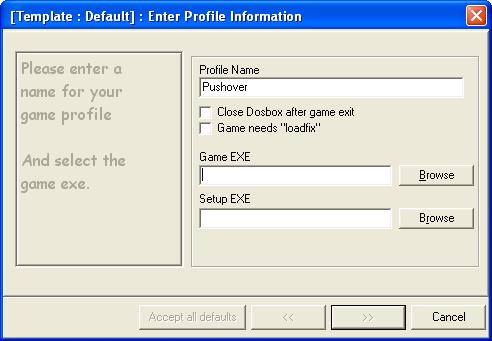
8. Click on "Browse" next to Game EXE to find the dos game exe file (for running the game).
|
|
|
|
|
|
|
|
|
|
|
|
|
|
|
|
|
|
| Pictorial Guide to using Dosbox (cont'd) | |||||||||||||||||
| 7. Under Profile Name, enter the game name. 8. Click on "Browse" next to Game EXE to find the dos game exe file (for running the game). |
|||||||||||||||||
|
|||||||||||||||||
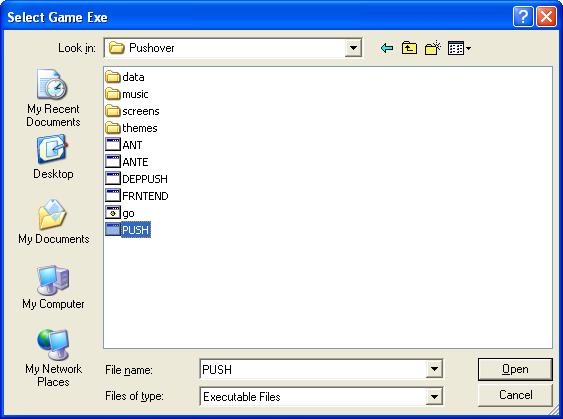
| 9. Go to the folder of the game you wish to run and click on the game exe file. Then click "Open". | |||||||||||||||||
|
|||||||||||||||||
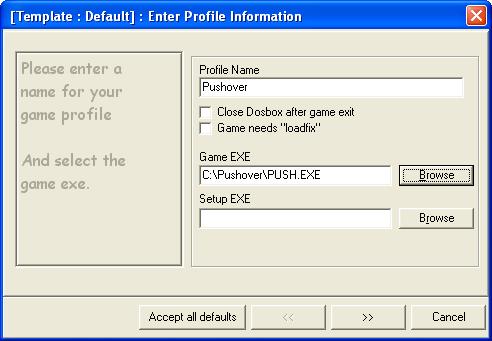
| 10. The screen below will appear showing the location of the game exe file. Click ">>" to continue. | |||||||||||||||||
|
|||||||||||||||||
| Back | Next Page | ||||||||||||||||