 . . . . . . . . . .
When ordering a case for my custom PC back in Feburary I was looking for a case that was both good looking and easy to work with.
After several weeks of delibaration I finally settled on Thermaltake Xaser III V1000A. Costing a total of �135.55 it was by far and away
most expensive case I have ever had. So was it worth it?
Specification wise this is an impressive machine as you would expect (for the money it would want to be). The first thing to note is it
comes with a Thermaltake Hardcano 9 fan controller and cpu tempreture recorder. Backed up by 7 80mm fans providing the cooling.
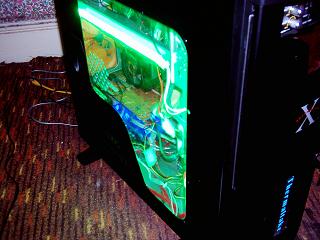
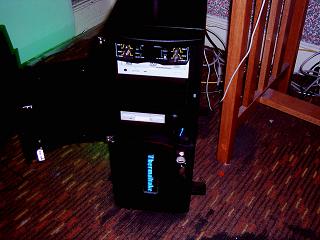
On the front panel a elegant Blue Thermaltake LED as well as a key lock. The left hand side has an L shaped window while the top
of the case has an air duct combined with a pop up sound and micraphone jacks, two USB ports and a single firewire port.
The first thing I noticed when this baby arrived was the size. Its a full 20.9in by 8.1in which made it the largest case I had ever seen
for a home computer. The next thing that grabbed my attention was its weight a full 17kg before anything was added. Hardly surprising
considering its made entirely from steel. If you need a bomb raid shelter this case will do the job nicely. If you attend alot of lans I hope
you have a strong back or spare mule as when fully loaded this is really awkard to carry.(speaking from experience). At last the monitor
takes second fidel to the weight of my computer. Asides from this it really is a good looking machine. Sitting on top of 4 adjustable
feet its almost entirely black but for the thermaltake logo and red strips on the front panel. One minor complaint at this stage must go
towards the Hardcano controller at the top of the case. The thermltake logo on this case is a nice blue LED. I have seen from other
thermaltake cases which feature Hardcano's that use a blue led digital display. The Hardcano on my machine was a slightly dissapointing
unlit digital display.
Moving on to opening her up. The first stop was opening the front panel. A quick anti-clockwise 90 degree turn of the key allows the opening
of the dvd/cd/floppy drive door. I do not have matching drives colour wise but this top panel allows me to hide it from casual observers.
A 90 degree turn further anti-clockwise and the entire front panel opens to reveal several features. First up is a lock for the side window
panel on the case. As a security feature this really won't stop someone determined getting into your case but it will force to apply alot of
effort to do so. At the very bottom is 2 of the 7 included 80mm fans complete with dust fitlers. At the top you have access to 3 hard drive
bays (4 if you include the Hardcano bay) and also access to 2 floppy bays. So far so good. But alas I ran into no less than 3 area's of
incovience here. Firstly the clip areas of the panel are poorly attached and tend to come off. I came close to losing at least one of them
on more than one occasion. Secondly although this really has to do with the case internals I found that motherboard panel on the case
cover the entire right hand side of the case. Hence its nigh on impossible to screw a floppy drive in correctly. As a result when I tried to
close the case the floppy drive tended to block its path.Luckly you can hold the drive by hand to avoid this. *Finally and most annoying
was the power connection button. Having to attached the wire to a small hole directly behind the power button I found myself constantly
knocking the power connection out. This required me to open the case and replace back in its place (it happened so often that I had to
leave the side panel off for 2 days. I eventaully bypassed the problem with a little bit of glue. i had no such problems with the reset button.
*Note I believe the root of the problem with the power connecter was cased by a missing clip that cased the door panel to be at an angle
and therefore the power button to be at an angle.
Okay moving into the case at last. First thing to note was the use of thumb nails which allow for quick removal of the side panels. Inside
there is room for a two story villa, possible two. The remaining 5 fans are instantly viewable two at the rear under the psu area as well
as the case ceiling fan. The 6th and 7th come attached on a removable semi clear blue panel both of which have dust filters.(A note here
the two rear and one ceiling fan won't fit dust filters) The 7 pci slots covers are also removable and replaceable by hand which is a nice
touch. Next up is the outward facing hard drive bays which come with 16 plastic sliders (2 per drive) leaving storage space for 8 drives.
Installing hard drives in this machine is childplays. They slot in and out with almost no effort. The 2 fans at the front are also aimed in
at the hard drives to provide cooling. In this enterprise there only partly successful as most of the airfloor is blocked.(Still better than
nothing) The CD/DVD rom drives use the same sliding method as the hard drives only with slightly bigger slider. A small note here if your
planning on remove the hardcanno controller to install a 4th hard drive beware there is only enough sliders for 3 drives.
The floppy drives
proved a whole different kettle of fish.While its easy to screw on the screws on this side of the case the panel at the back prevents you from
properly attaching the screws on the other side which as I mention above caused problem with opening the front panel. After this you have
oceans of room to play with that 20.5in of room top to bottom right?. Well yes and no. The fans in this case are a blessing and a curse. They
provide excellent cooling and are also nice and quite. One of the reasons I bought the case was I wanted a well cooled case and in that
respect its fine. Looking at the case temp now I'm running at 28.4 degrees and that with 2 side fans removed. But alas 7 fans mean 7 molex
connections and a further 6 running from the Hardcanno controller. On top of this tangle of wire you can throw in three more wires running
from the top panel (USB, Firewire, sound and mic). A final case wire can connect to your motherboard as an alarm if your case is opened.
(not all motherboards feature this). Overall this mean't several attempts at trying to hide wires made all the more difficult by the inclusion of
neon lights and the use of all 7 pci slots. But if you spend the time sorting and hiding your wires you will find you still have plenty of room for
modding.
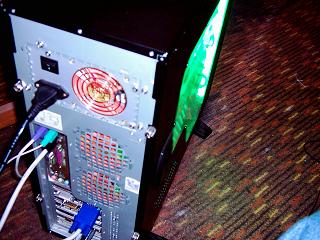
Finally I would like to point out two more areas of note. I was orignally determined to buy a black psu to go with this case but due to
unavailability I had to settle for silver. The back panel of this case just so happened to be silver so all in all it worked out well.
The second area to note is the Hardcano controller. I was not suprised to learn it was not compatable with AMD 64. The temp
probes wires where two big to fit throught its pins but I was shocked to learn its the same for Intel chips. Only the Athlon XP
chips are compatable. As a result my hardcano is measuring case temperatures. The fan control really makes little
difference as the fans are very quiet even on max speed.
Pros
Well built.Sturdy
Spacious.
Excellent cooling.
Easy to access hard drives.
Easy to install cd/dvd roms.
Thumb screws.
Lockable.
Easy to remove PCI slots.
Attractive case.
Easy access to mic and sound jacks as well as usb and firewire ports.
Cons
Expensive.
Awkard Floppy drive installtion.
Alot of wires(optional).
Hardcano compatability issues.
Loose power connection.
Heavy not LAN friendly.
Conclusion.
Alot of pro and a quite a few cons. But overall I'm a happy camper with this purchase. The niggles with it are small and the pro's well
outweigh them. Two thumbs just about up.
|