Home

  Networks

  Internet

  Glossary

  Links

Topologies

The term topology, or more specifically, network topology, refers to the arrangement or physical layout of computers, cables, and other components on the network. "Topology" is the standard term that most network professionals use when they refer to the network's basic design.

A network's topology affects its capabilities. The choice of one topology over another will have an impact on the:

  > Type of equipment the network needs.

  > Capabilities of the equipment.

  > Growth of the network.

  > Way the network is managed.

Topology can also determine how computers communicate on the network. Different topologies require different communication methods, and these methods have a great influence on the network.

Standard Topologies

  > Bus Network

  > Star Network

  > Ring Network

  > Mesh Network

Bus Network

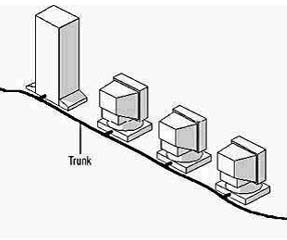
The bus topology is often referred to as a "linear bus" because the computers are connected in a straight line. This is the simplest and most common method of networking computers. The adjacent picture shows a typical bus topology. It consists of a single cable called a trunk (also called a backbone or segment) that connects all of the computers in the network in a single line.

Star Network

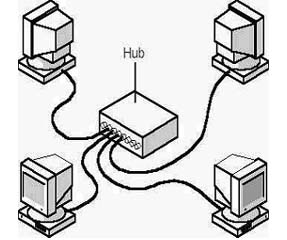
In the star topology, cable segments from each computer are connected to a centralized component called a hub. The adjacent pricture shows four computers and a hub connected in a star topology. Signals are transmitted from the sending computer through the hub to all computers on the network. This topology originated in the early days of computing when computers were connected to a centralized mainframe computer.

Ring Network

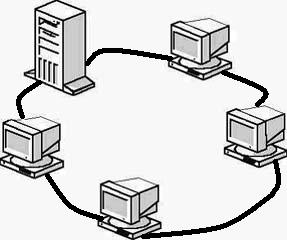
The ring topology connects computers on a single circle of cable. Unlike the bus topology, there are no terminated ends. The signals travel around the loop in one direction and pass through each computer, which can act as a repeater to boost the signal and send it on to the next computer. They adjacent picture shows a typical ring topology with one server and four workstations. The failure of one computer can have an impact on the entire network.

Mesh Network

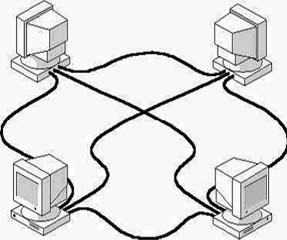
A mesh topology network offers superior redundancy and reliability. In a mesh topology, each computer is connected to every other computer by separate cabling. This configuration provides redundant paths throughout the network so that if one cable fails, another will take over the traffic. While ease of troubleshooting and increased reliability are definite pluses, these networks are expensive to install because they use a lot of cabling. Often, a mesh topology will be used in conjunction with other topologies to form a hybrid topology.

Different types of Networks


What is a network?


  Feedback

  Sitemap

  Disclaimer

Hosted by www.Geocities.ws

1