Latest Tech News
Gimp 2.4
Posted on January 24, 2008 by Erwin Barrios
GIMP is an acronym for GNU Image Manipulation Program. It is a freely distributed program for such tasks as photo retouching, image composition and image authoring.
It has many capabilities. It can be used as a simple paint program, an expert quality photo retouching program, an online batch processing system, a mass production image renderer, an image format converter, etc.
GIMP is expandable and extensible. It is designed to be augmented with plug-ins and extensions to do just about anything. The advanced scripting interface allows everything from the simplest task to the most complex image manipulation procedures to be easily scripted.
GIMP is written and developed under X11 on UNIX platforms. But basically the same code also runs on MS Windows and Mac OS X.
Features and Capabilities
- Painting
1. Full suite of painting tools including Brush, Pencil, Airbrush, Clone, etc.
2. Sub-pixel sampling for all paint tools for high quality anti-aliasing
3. Extremely powerful gradient editor and blend tool
4. Supports custom brushes and patterns - System
1. Tile based memory management so image size is limited only by available disk space
2. Virtually unlimited number of images open at one time - Advanced Manipulation
1. Full alpha channel support
2. Layers and channels
3. Multiple Undo/Redo (limited only by diskspace)
4. Editable text layers
5. Transformation tools including rotate, scale, shear and flip
6. Selection tools including rectangle, rounded rectangle, ellipse, free, fuzzy
7. Foreground extraction tool
8. Advanced path tool doing bezier and polygonal selections.
9. Transformable paths, transformable selections.
10. Quickmask to paint a selection. - Extensible
1. A Procedural Database for calling internal GIMP functions from external programs as in Script-fu
2. Advanced scripting capabilities (Scheme, Python, Perl)
3. Plug-ins which allow for the easy addition of new file formats and new effect filters
4. Over 100 plug-ins already available - Animation
1. Load and save animations in a convenient frame-as-layer format
2. MNG support
3. Frame Navigator (in GAP, the GIMP Animation Package)
4. Onion Skin (in GAP, the GIMP Animation Package)
5. Bluebox (in GAP, the GIMP Animation Package) - File Handling
1. File formats supported include bmp, gif, jpeg, mng, pcx, pdf, png, ps, psd, svg, tiff, tga, xpm, and many others
2. Load, display, convert, save to many file formats
3. SVG path import/export
Read More Visit Site
iTornado
Posted on January 24, 2008 by Erwin Barrios
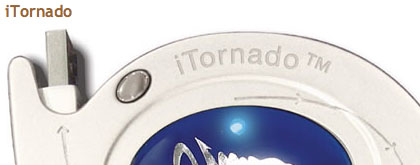
The iTornado is a clever and useful little USB device that was displayed at CES 2008 last week and at the MacWorld Expo this week.
The product combined with the included software makes it very easy to transfer files between Mac and Windows based computers.
When connected to the USB ports of two computers, iTornado immediately initiates a peer-to-peer network via its patented No Software To LoadTM, or NSTL TechnologyTM, which auto-loads and auto-runs the software and drivers needed to move the data bi-directionally from one computer to another via a user-friendly split-screen display that within seconds appears on the monitor of both machines showing the contents of each machine. From this interface, files can be dragged and dropped from one machine to another at speeds of up to 25 Mb/sec. The iTornado also can be used to quickly create back-up files and is compatible with most Apple® and Microsoft® operating system programs.
iTornado, which retails for $79.95 will start shipping in March and will be available at TheTornado.com and at computer products retailers nationwide.
Read More Visit Site
Carl Freer
"I'm going to resurrect Gizmondo"
Posted on January 24, 2008 by Erwin Barrios

We've been in contact with Hans Sandberg, the Swedish journalist who quoted Carl Freer saying unequivocally, "I'm going to resurrect Gizmondo." This, plus yesterday's teaser, is the source of the Gizmondo mongering lighting up the Intertubes yesterday. Fortunately, all the important bits from Hans' interview are now translated from Swedish into English for some good ol' fashioned global scrutiny. As unthinkable as the proposition might sound, we bring you the highlights for your morning amusement and trepidation:
- Carl believes there is a still a market for Gizmondo and is "ashamed" of his failure -- he hopes the resurrection can pay back early investors
- Florida-based Tiger Telematics will formally own the new Gizmondo
- Gizmondo v2 could be up and running by May 2008 -- by Christmas 2008 we'll see "a more advanced version with widescreen"
- 35 titles will be available at launch, 6 are new, more on the way
- An "easy to use program" will allow kids to create games, save them to SD, and play them on their Gizmondo
- Price: $99, possibly free if Carl can work a deal with a cellular provider
- Unfortunately, he doesn't offer any explanation of the "exciting psychic worlds" in this interview snippet
Our personal favorite has to be this, though. Carl says he has a deal in place with a Chinese company in Shenzhen which will manufacture the device "on credit" on condition that they will be the sole reseller in China. Oh, that sounds like a deal alright.
Carl Freer hasn't given up on Gizmondo, and a Chinese
manufacturer has promised to help him restart his venture.
Photo: Hans Sandberg
This is a quick translation of the the first part of a five-part series about Gizmondo, which was published on November 12-15, 2007 by Realtid.se, a Swedish business news site. My original intention was to translate the entire 60,000 character series into English, but other work has so far prevented me from doing that.
The realease of Stefan Eriksson and a couple of articles in Swedish business press has generated a smatter of blog comments on English blogs, and some refer to my interview with Carl Freer, which is the only interview he has given to media so far.
Here it is!
“I’m Going to resurrect Gizmondo,” Carl Johan Freer says in an exclusive interview for Realtid’s U.S. Correspondent Hans Sandberg. He does it because he still believes that Gizmondo can stand up to the competition, and in order to give the investors who lost money in the Gizmondo crash a chance to get some of their money back.
“There is still life in this product. Two products dominate the market and there is a vacuum to fill. The Gizmondo was the first real handheld game system capable of delivering several types of entertainment, and we have not seen any other products with similar capabilities,” Carl Freer tells Realtid’s correspondent. “If all goes well, we will be up and running by May of 2008. I intend to do this version inexpensive and work with open source code.“
“By Christmas 2008, I’m planning to launch a more advanced Gizmondo with a wide screen. We’re also talking to a cellular provider about offering Gizmondo for free to customers who subscribe to a data service,” he says.
Carl Freer says that he already has an agreement with a Chinese company in Shenzhen. They will set up a production line and manufacture Gizmondo on credit, on the condition that they will become the sole reseller of Gizmondo in China.
You need deep pockets to set up a factory, acquire components and start the production, something Gizmondo’s owner, the Florida-based company Tiger Telematics never had.
“The credit means that I don’t need to purchase components, and that I don’t need to pay until the day I get the product from the manufacturer’s warehouse,” Carl Freer says.
The dilemma of Gizmondo was, and is, to bridge the time span from when the product is made and when it is placed on the shelves of the retailer. The manufacturer normally wants at least a part of the payment in advance to get started, but the retailers and superstores usually don’t pay until they have received the product, unless they demand credit from the seller. It’s a long bridge to build, and very costly, especially for a newcomer.
Carl Freer told me in a follow-up call after our meeting in New York that Plextek, the British design house in Cambridge has given him green light for their cooperation on the new project.
“I was nervous about rebuilding the relationship with Plextek, but we have now built very close ties to them. It also turned out that some of the components we thought we had to redesign completely are still holding up. That is true for the graphics accelerator SE-10 that nVidia custom designed for us. This will save us five months of development work.”
We have learned that nVidia is willing to restart the production of the graphic card for the Gizmondo (the GoForce 3D 4500 wireless media processor).
The reason for why Gizmondo made such a big splash in the media when it was first launched was that it really was a new and exciting product. It got a lot of attention, especially in the gaming community, but it was also severely criticized for being too expensive and having too few games. This is however a criticism that most newcomers face, unless your name is Sony or Nintendo. The original Gizmondo cost $399.00 for the ad-free version and $229.00 if you agreed to view ads delivered by Carl Freer’s clever SmartAdds technology. The lack of game titles was however a tough problem, but one that they share with other products that were initially declared dead on arrival by the critics, f. ex. Microsoft’s Xbox. But Microsoft could afford to ride out the skeptics’ resistance and the product got its boost once Halo was released.
Tiger Telematics and it’s subsidiary Gizmondo could however not afford to wait, and Carl Freer’s own investments in new development tools and new titles through his company Nordic Light was not enough. But today, he has a number of titles to show, including games that take advantage of Gizmondo’s built-in gyroscope. The Agaju game combines the gyroscope function with the built-in camera to deliver ”augmented reality” in the form of 3D-figures that pop-up on the screen if you point Gizmondo’s camera towards an object that has a special code embedded. Carl Freer says that he would love to develop games for McDonald’s, games where customers can point their Gizmondo’s at Happy Meal-cards encoded for Gizmondo.
Carl Freer says that they have 35 titles, of which 6 are new Gizmondo games, and that more are under development.
But the biggest surprise must be the price. At first he hesitates to give a figure, but by the end of my seven hour long interview, he says that he is pretty confident that he will be able to sell the revived Gizmondo for $99.00.
Carl Freer says that he never believed that he would be able to push Sony or Nintendo aside, but that it is possible to capture a niche of the market, and that it could be a profitable venture because the market is so large. He says that he also hopes to be able to build an alliance with independent game developers and open-source programmers.
”The market for handheld games has stagnated and there is too much status quo, but I think the consumers want to see more innovation. One of the great opportunities with Gizmondo was that we opened the door to open source code, and that is a huge issue among game developers today. Normally you have to buy expensive Software Development Kits and pay expensive royalties to the hardware manufacturers, but as Gizmondo runs on Windows CE, and the games are delivered on a regular SD-card, both amateurs and pros can join in and develop everything from simple games to complex games that fully uses Gizmondo’s technical capacity with its 3D-graphics,” he says.
”We are also going to bring out an easy to use program that allows kids that doesn’t have any experience at all to create their own games on a PC, save them to a SD-card and play them on their Gizmondo. I think many teenagers will love this concept,” he says.
Florida-based Tiger Telematics will formally own the new Gizmondo.
“My plan is to elect a new board, assign new … and appoint a new management. Mike Carrender is still CEO, but the company doesn’t run any business at this point. The shareholders have nothing to loose, and it won’t cost them anything, but without their support I can’t do it,” Carl Freer says, indicating that he is talking to at least one of the company’s institutional shareowners.
He has also come to an agreement with the British liquidation firms regarding his plan to restore Gizmondo.
“The only other example of anything like this is Canary Wharf,” says James Hunt, who performed an investigation into Gizmondo on behalf of the liquidation firms Begbies Taylor and David Rubin. Canary Wharf was restored six years after having been declared bankrupt.
It’s not hard to understand why the liquidators like the idea of getting more resources for those that the company owes money, but wouldn’t the institutional investors hesitate before working with one of the key men behind Gizmondo.
“Not at all! Everybody doing business with me has done their due diligence. And if you do that, you will see that the Gizmondo crash was a tragic event. I didn’t cause it, and I haven’t profited from it, or done anything contrary to my fiduciary responsibility towards the company. No large company will work with you if you’ve done something bad, it doesn’t matter if you have discovered a new vaccine against AIDS! Of course I have missed opportunities because of Gizmondo, and there are companies we ought to have worked with, but that has nothing to do with any guilt on my part,” he says.
But why not simply start a new company instead of working with Tiger?
”I feel a responsibility towards the smaller investors who lost money on Gizmondo. I regret that I wasn’t stronger, that I didn’t do more to save Gizmondo, and that is what I am trying to do now. The large institutional investors often did all right. They had departments that read our 10K reports to the SEC. I would like to bring our product to the market so that those who invested in me will get some of their money back. It has to do with my self-respect. I feel like have an unfinished business, and I am ashamed over that a company with such a great potential crashed when I was in charge. I want to make that right, but I also want to be able to be heard, to answer back to the smearing that has been going on against me personally.”
“I know that I’m not perfect, and that I’ve done made some rotten decisions in my life, but I take responsibility for them. I’ve never had anybody else suffer for decisions I’ve made personally. Those who I let down are the people who bought shares in the company, who believed in the opportunity. They must of course have realized that Tiger was a high-risk project, but I still feel that I let them down. More than anything, I regret that I resigned as CEO during the crisis,” Carl Freer says.
Will you lead the company?
”I’m not sure. My instinct says no. Ideally I would just get it started and then let it continue under new management. I intend to work hard with Blowfish Works, but I’m ready to take charge of Gizmondo if needed. But that’s one of those questions I’m trying to avoid.”
Hans Sandberg
Copyright 2007, 2008: Hans Sandberg
Read More Visit Site
Windows watch starts to point to 7
Posted on January 23, 2008 by Erwin Barrios
Windows 7 (previously codenamed Blackcomb, then Vienna) is scheduled to be the next major client version of Microsoft Windows, expected to be the successor of Windows Vista. Sources indicate that Windows 7 should be finished in the second half of 2009, three years after Windows Vista. The client versions of Windows 7 will ship in both 32-bit and 64-bit versions, even though the server counterpart (which will succeed Windows Server 2008) will be exclusively 64-bit.
Microsoft is maintaining a policy of silence concerning discussion of plans and aspirations for Windows 7 as they focus on the release and marketing of Windows Vista, though some early details of various core operating system features have emerged. As a result, very little is known about the feature set, though public presentations from company officials have disseminated information about some features.
Officially, Microsoft has very little to say about Windows 7.
But since nature abhors a vacuum, and tech enthusiasts like them even less, the rumor mills are starting to crank into high gear.
Postings in the last week suggest that Windows 7 may arrive in 2009, not 2010, as had become the conventional wisdom. Meanwhile, a poster at enthusiast site Neowin, claims to have played with an early development build of the software.
I've long been skeptical of the notion that Microsoft would wait until 2010 to try to update Vista. It just doesn't fit well with CEO Steve Ballmer's promise that Microsoft would speed up Windows releases.
Plus, Vista has gotten only a modest reception from reviewers and other critics. And while Microsoft is bringing out a service pack update this year, the company has said it will contain virtually no new features. As such, it is unlikely to boost consumer enthusiasm.
That said, Windows 7 won't necessarily be a major architectural overhaul. If I were Microsoft, I'd spend nearly all my time fixing Vista annoyances and adding features that don't touch the core of Windows, particularly in areas that consumers really care about, such as photos, music, video, and Web browsing.
I'd make connecting to digital photo frames and flat-screen TVs a snap. And I'd make multi-touch a standard option. (It sounds like that's already happening.)
Apple has really created the playbook on how to have just enough in an operating system release to make it interesting without making it a project that takes several years to complete.
But my wants aside, the real question is what is on Redmond's to-do list for Windows 7. A blogger purporting to be on the Windows 7 team has made several postings on the new OS.
Among the revelations: at least one feature on Microsoft's list is something that made its debut in Leopard. (The blogger notes that the feature was on Microsoft's road map prior to Apple's announcement that it was part of Leopard.) He or she wouldn't say which feature it is, but said it is in this list of 300 Leopard changes.
Microsoft folks have said a few things here and there about Windows 7. Last fall, distinguished engineer Eric Traut gave a university lecture in which he talked about a slimmed-down Windows core, dubbed MinWin, that was part of the Windows 7 development process.
Read More Visit Site