how to 3D - "Lion Dancers"
Return to:

Set-up Page - set-up and animation controls
|
|
|
Return to:
|
Set-up Page - set-up and animation controls |
||
 |
|
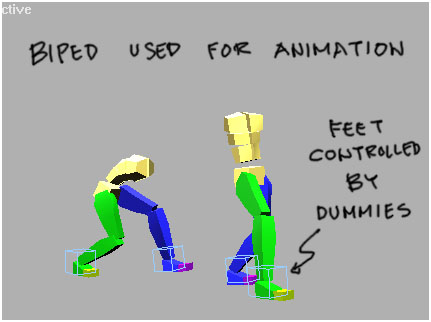
1. Two biped skeletons are used for the dancers. Arms and head hidden as these would not be animated. The 2 biped move independently from each other. The feet were constrained to follow dummy objects.
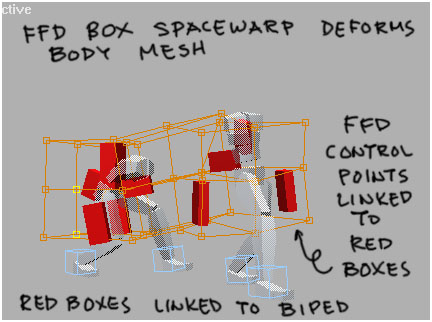
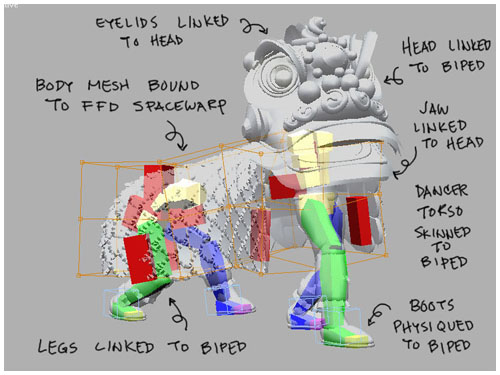
2. The red boxes are simply box geometry linked to the biped skeletons at the 1st spine bone (the one nearest the waist). A 3x3x4 FFD spacewarp was then created. It's control points were strategically linked to the red boxes using the "link xform" modifier. The FFD is used to deform the body mesh, the red boxes allow fine tuning of this deformation.
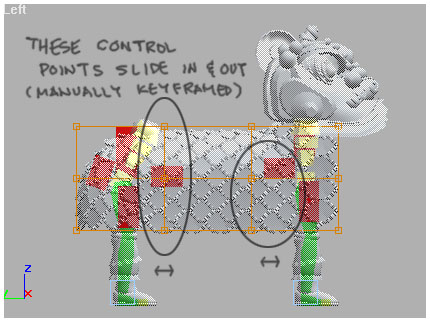
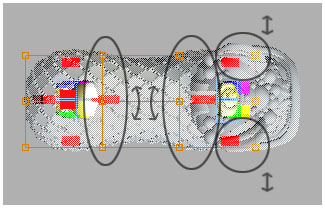
3. The side and top view of the setup shows which control points are controlled by the boxes. These boxes were manually keyframed (transform or rotate) as needed to ensure the mesh does not sink into itself.
4. A look at the completed setup. The legs are linked via heirarchy to avoid having to deal with messy knee and groin deformations. The dancers' body 1 piece each and need to be deformed using "skin", alternatively you could use physique on this as well. I had to use physique on the boots, "skin" wasn't giving the right weighted deformation I needed. The head is very straightforward, using link heirarchies for eyelids and the jaw. These were animated using simple rotation.
|
 |
 |