Tutorial to LLR
(Lucas Lehmer Riesel) and PRP:
LLR is a
program used to prove primality of numbers. It can be
rather slow (but faster if you support SSE2), and
that’s why it’s a good idea to sieve first. It speeds up the process.
Also note
that you operate PRP that exact same way as LLR (and that’s why I’ve
only shown LLR-pictures) except that it only finds numbers that are probable
primes.
LLR proves
primes of the forms k*2^n+1 and k*2^n-1, it does a probable prime test
on all other kinds of numbers.
The projects PSP and Rieselsieve
also uses LLRNET,
which is recommended for people with a permanent connection to the Internet
1. Download
the newest zip-file here
2. Unzip
the program
3. Move the
.txt-file from NewPGen, containing the k/n
combinations you wish to test, to the same folder as LLR
4. Start LLR
by double-clicking on LLR.exe
5. Choose
Test and then Input Data
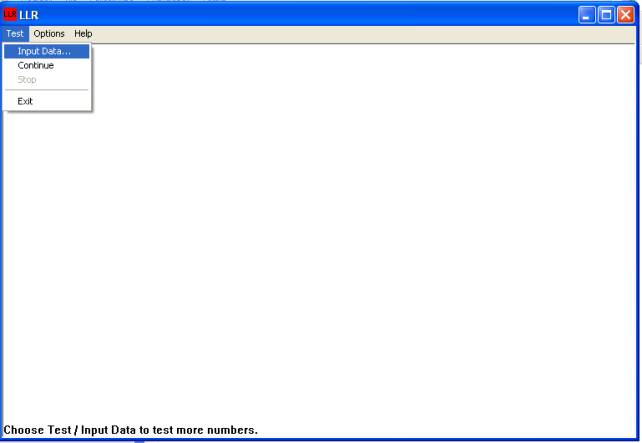
Main window of
LLR (and PRP)
6. Enter
the name of the NewPGen-file in Input file and choose
a name for the Output file (where the primes are reported)
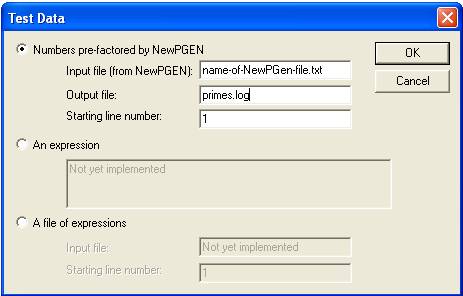
Input
window
7. Click ”OK” and the program goes to work (the icon changes
from red to green). You can check the primes.log for
new primes if you want.
8. When the
program is finished testing, the icon turns red again.
9. Then you’ll have to report the results
Questions?
Where do I get a NewPGen-file?
Sieved NewPGen-files
are available for the projects PSP and 321 (remember to reserve the range
you choose).
Regarding Sierpinski/Riesel
Base 5 you’ll have to sieve with NewPGen yourself
Can I run multiple NewPGen-files at once?
Yes. If you reserve
multiple files you can make them one big: Just take the numbers from one of the
files and paste them below the numbers in the other file. However, line 1 must
not be copied.
Index
– Mersenneforum Projects