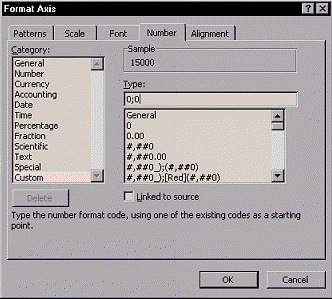
- Move the cursor over the horizontal axis.
- Right-click on it, and select Format Axis... from the pop-up
menu. You will find a dialogue box titled Format Axis.
- Left-click on the Number tab and do the following:
- Category:
 Select the Custom option. Select the Custom option.
- Type:
Type in 0;0 in the appropriate text box. (This will
take care of the negative numbers on the male-side axis.)
- Left-click
 to exit. to exit.
|