Once you are done with the chart wizard, you will find a crude
population pyramid.
- Move the cursor over the vertical axis.
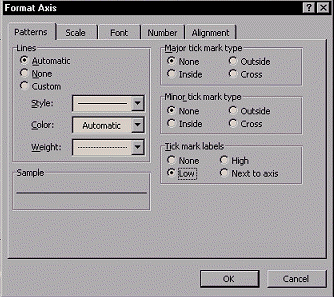
- Right-click and choose Format Axix... from the pop-up
menu. You will find a dialog box titled Format Axis.
- Left-click on the Patterns tab and do the following.
- Major tick mark type
 Select None. Select None.
- Minor tick mark type
Select None.
- Tick mark labels
Select Low.
- Left-click
 to exit. to exit.
|