next up previous home.gif
Next: Step 4: Arrange the vertical axis. Up: Creating a Population Pyramid with Excel Previous: Step 2: Selecting the data

Step 3: Insert Chart ...

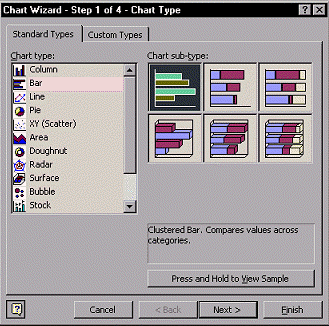
From the draw-down menu Insert, choose the option Chart... A chart wizard will appear. You need to do the following:
  1. Standard Types $ \Rightarrow$ Bar
  2. Chart sub-type $ \Rightarrow$ Clustered Bar
  3. Left-click \fbox{Next$>$}
  4. Go through the subsequent steps until you finish the chart wizard. You can customize your chart if you feel appropriate, of course.

insert_chart.gif


next up previous home.gif
Next: Step 4: Arrange the vertical axis. Up: Creating a Population Pyramid with Excel Previous: Step 2: Selecting the data
Copyright © 2002, Naoya Kaneko
Hosted by www.Geocities.ws

1