 If not,
click back or next within your FU project until you are.
If not,
click back or next within your FU project until you are.
Having said that, after adding more encodes, the diff threshold usually only decreases slightly.� That drives the importance of adding encodings way down.� One important step that is outlined on this page has to do with the fact that final size of DivX's with VBR mp3 audio is hard to predict even if the average bitrate of the audio is known.� As this is a more important issue than adding encodings to decrease the diff threshold slightly, I will cover that issue first.
Allowing for VBR overhead
It seems that whenever I made a DivX with VBR mp3 audio, it ends up slightly too large (500KB to 3.5MB).� The solution is simple, after making the final AVI, check the filesize.� In my example I wanted it to come out to 702MB, but it ended up 705 instead.� So I just went back to the second to last window of the Fair Use Wizard and decreased my final size by 3MB.� Then recalculate and mux in the audio again.� It has been said that this filesize difference is due to the overhead needed to process the VBR mp3 and that this overhead is well worth it for the increased audio quality over CBR mp3's.
First I would recommend Allowing for VBR overhead before adding more
encodings.� Having said that, you are probably looking at a screen such
as this one:
If not,
click back or next within your FU project until you are.
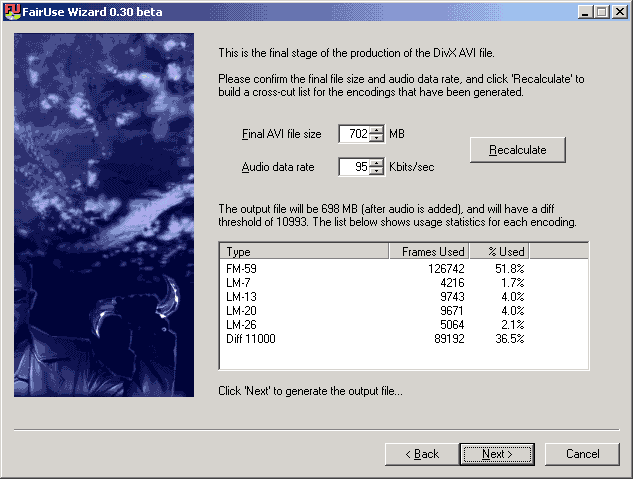
You have just completed a set of encodings and wish to add more for slightly higher quality.� There have been a few suggestions in the forum as to how to add additional encodings.� Adding a few higher bitrate LM encodings is one of the better ideas, but I think it's best to look at each project individually.� Sometimes you will see that a certain LM encoding has been used over 60% of the time, while another may only be used 4% of the time.� Now I think you'll agree that the final AVI should benefit from adding encodings closer to the first encoding since it is being used to much.� Maybe adding one encoding at 3 or 4 higher and one at 3 or 4 lower would be a good idea.
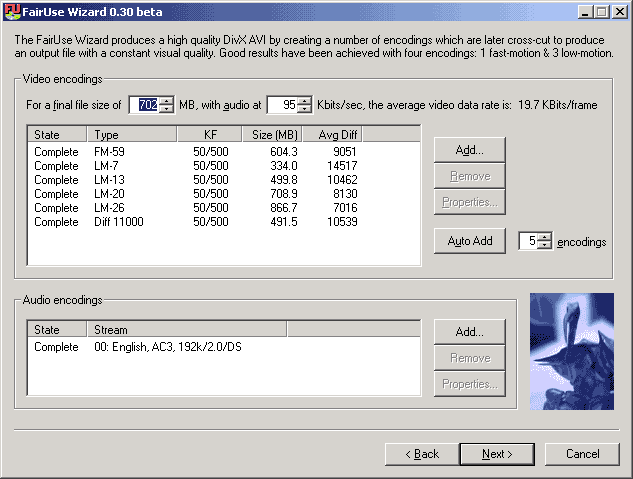
To add these encodings, you'll need to press the back button to get to the screen below.� You'll notice the bitrates are slightly different, but that's just because these are separate sessions.� Also, after your encodings are complete, pressing the back button will result in the screen below with the 2 extra columns filled out, (Size and Ave Diff).� Now since these 2 screens cannot be viewed simultaneously, I usually write down the bitrates that I want to use while looking at the above screen, then move to the one below and add them all in.
There may also be something to be said about adding another Fast-motion encoding.� As you can see in my example above, the FM encoding is used for more than half the file.� When I see this, I usually add another Fast motion encoding at a much higher data rate.� For example, I might add one at 100 or 130 in this case.� I mean, if Fair Use is going to use the Fast-Motion Codec a lot, it might as well have the choice of a higher bitrate encoding.
Another encoding that you might want to add is a really low data rate one and here is why: by using lower data rate in parts that don't need it, higher data rates can be used in more complicated parts of the film.� In this case, I might add another LM encoding at 3 or 4.
In the case above, I was also trying out a Diff Tracking encoding, which seems to have regulated the diff threshold in this case. Having seen this, I might add another DT encoding at 9000 or 10000 to see if I can get the diff threshold down a bit. For more info see my Diff Tracking guide.
This method of analyzing completed encodings can be repeated until there are 30 total encodings.� If you want to feel more involved in the creation, you might want to do 3 auto-added encodings first, then maybe 3 or 4 of your own, and so on, analyzing your encoding usage at each step. There are many different ways you can go about this.� Just play around with it and you will start to get a feel for it.