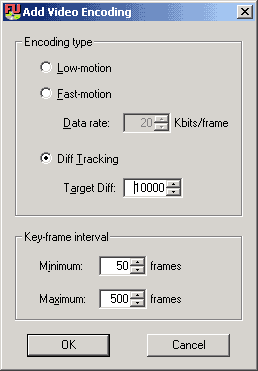
Diff Tracking - Still Experimental!!!

Quote from the ReadMe: "The new encoding mode: "diff tracking" adjusts the DivX quantization levels on a frame by frame basis to make the quality level as even as possible."

It is based on ideas used in Nandub, and add a whole new dimension to Fair Use encoding.  The upside is having constant, definable, quality throughout the encoding.  The downside is lack of final size control.  Keep in mind that this method is experimental and we are all still learning.

Ok, now you know what it is, so how do you use it?  There are really 2 main ways to use DT encodings.

Method 1 (Constant Quality)
 

Add a diff encoding, preferable under 10000 (lower means better quality, ie DIFFerence from the original), but it seems that ok quality has been achieved at 11000 or 12000(as always, do your own testing and proceed with whatever you are happy with).

Press encode. Yes, that's it, just one encoding.  When it's done, you'll have a video with whatever size was necessary to maintain your chosen diff value and as you can guess, size and diff value are inversely related.  Now you can add the audio as you see fit, but if you're like me, you like to use all the space on blank CD's, especially with DivX's.  Here's a method I use that aims at utilizing the entire CD(s).


Let's say your video came out to 600 MB, this means you have 100MB left for audio.  Similarly, if your final video comes out to 1250MB, you then have 150MB left for audio.  This is assuming that you have 700MB CD's.  The idea is that whatever your video file size arrives at, use the remaining space on your CD's for the audio.  ABR (Average BitRate) seems to be the right way to go about this to achieve best quality for the given size.  Use Lame's ABR (bottom of the VBR tab on RazorLame) to get an mp3 of this size.

Now, to computer your target bitrate for ABR:  Play your video first and look at the total time.  Bitrate is in kbps, that is kbits/sec, so use the ABR Calculator to figure out the target bitrate from the size and length.  Here is a forum thread where I describe how this program works.  Note that it is better to use the size in KB than in MB, and likewise best to use it in bytes.  Also note that after testing LAME's ABR mode, I found it to always give me bitrates that are too low, so I just kept re-encoding the audio until I got it to the right bitrate.

Method 2 (Predictable size)

This method is  completely guess and check as of now, though FU2K is working on automating the encoding process and interpolating to find a correct target diff for a given size.
Ok, here we go:

  1. Add a DT encoding at the highest setting that you are comfortable with (12000 or so) and press encode.
  2. When it's done, go back and look at the size.
  3. If it's bigger than you wanted, you'll need to raise the DT setting on the next encode. (If the AVI is too big at 12000, I'd recommend making this a 2 CD rip instead of 1)
  4. If it's too small, you can lower the DT setting for the next encode.
  5. Repeat this process until you get an encode that is close to your desired size (within 50MB or so).
  6. Once you've got this "good encoding" added to your list of completed encodings, add one more to "mirror" it.
  7. If the step 5 encoding is slightly too big, try to generate step encoding to be slightly too small. and visa versa.
  8. You can then use the cross-cutter to create your final AVI for you at your specified size.
Method 3 (Predicting Diff Value)

Diff Calculator
I wrote this program based on discussions in the Fair Use Forum and FU2K's comments on the relationship between diff value and size.  Hopefully the program is pretty self-explanatory; there is a readme included in the program itself so I will just make a few notes here.


Use this guide in conjunction with the main guide and you should be fine.
Hosted by www.Geocities.ws

1