
Temel donanım bilgileri
© Copyright Brian Brown, 1992-2001. All rights reserved.


GİRİŞ/ÇIKIŞ AYGITLARI
The objective of this section is to
At the end of this section, you should be able to
 Input
Devices
Input
Devices
The following section discusses the functioning of a number of
input devices. Input devices allow the user to input information
(data) into the computer for analysis or storage, as well as give
commands to the computer. Examples of input devices are
keyboards, scanners, mice, bar-wands, and touch screens.
Keyboards
The keyboard is the most widely used means of entering
information into a computer. Pressing a key on the keyboard
generates a code that represents the character associated with
the key.
The two main codes associated with computers are ASCII and EBCDIC. ASCII is a seven bit code, so characters generated by the keyboard are made available as a seven bit code (a total of 128 different combinations). ASCII stands for American Standard Code for Information Interchange. EBCDIC stands for Extended Binary Coded Decimal Interchange Code, and is used primarily by IBM.
| 00 | 10 | 20 | 30 | 40 | 50 | 60 | 70 | |
| 00 | NULL | DLE | space | 0 | @ | P | ` | p |
| 01 | SOH | DC1 | ! | 1 | A | Q | a | q |
| 02 | STX | DC2 | " | 2 | B | R | b | r |
| 03 | ETX | DC3 | # | 3 | C | S | c | s |
| 04 | EOT | DC4 | $ | 4 | D | T | d | t |
| 05 | ENQ | NAK | % | 5 | u | |||
| 06 | ACK | SYN | & | 6 | F | V | f | v |
| 07 | BEL | ETB | ' | 7 | G | W | g | w |
| 08 | BS | CAN | ( | 8 | H | X | h | x |
| 09 | HT | EM | ) | 9 | I | Y | i | y |
| 0A | LF | SUB | * | : | J | Z | j | z |
| 0B | VT | ESC | + | ; | K | [ | k | { |
| 0C | FF | FS | , | < | L | \ | l | | |
| 0D | CR | GS | - | = | M | ] | m | } |
| 0E | SO | RS | . | > | N | ^ | n | ~ |
| 0F | SI | US | / | ? | O | _ | o | DEL |
The ASCII table (values show in hexadecimal)
Control codes are used to control devices like printers and modems, and to position the cursor. For instance, FF stands for form feed, and HT stands for horizontal tab. Control codes are generated on a standard keyboard by holdng down the Ctrl key, and whilst it is depressed, pressing another key.
For example, pressing the key combination CTRL-A generates the code sequence SOH, and pressing CTRL-R generates the code sequence DC2.
QUESTION: What ASCII value is generated by pressing the ESC key?
Keyboard Interface
The majority of keyboards interface to the computer system using
a serial interface. The typical connections are
Basic Keyboard Types
The basic keyboard used in computers today is the QWERTY
keyboard. It gets it name from the key arrangement (note the
diagram below). It is very similar to the type-writer keyboard
layout used on most type-writers.
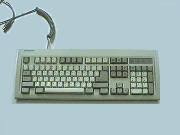
Fig 6.1: PC Keyboard
Ergonomically, the QWERTY keyboard has been found to be slow and possibly contribute to repetitive strain injuries (RSI). There have been some attempts to revise the keyboard layout. An alternative is the DVORAK keyboard.
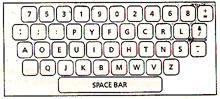
Fig 6.2: Dvorak Keyboard
Another attempt is the Microsoft Ergonomic Keyboard.
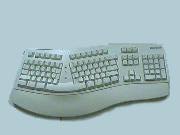
Fig 6.3: Microsoft Ergonomic Keyboard
PC Klavyeleri
There are two main types of keyboards used with the IBM-PC and
compatible computers. The standard keyboard is found on PC and XT
machines, and the extended keyboard found on 286-486 machines.
The extended keyboard has the function keys aligned along the
top.
Şekil 6.4: Genişletilmiş PC klavye
Keyboard Switch Types
The following discusses the key switch types commonly used to
implement keyboards.
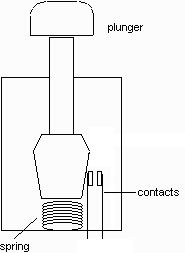 Fig 6.5: Contact switch |
Contact switches suffer from contact
bounce. This is where the contacts vibrate
upon closure for a short period (a few
milli-seconds). Circuitry is often used to eliminate this effect, else false readings are obtained. |
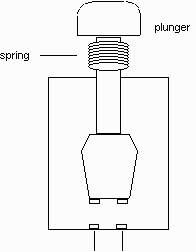 Şekil 6.6: Capacitive switch |
An AC signal is applied to one fixed plate and is sensed on the other fixed plate when the plunger is depressed and completes the circuit. |
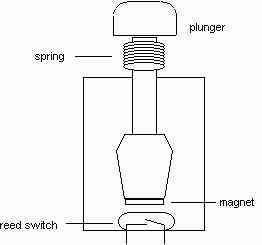 Fig 6.7: Magnetic Reed switch |
A reed switch comprises a pair of
contacts enclosed in sealed glass envelope. The
contacts are forced together or apart by applying
an external magnetic field. The magnetic field can be generated by a small permanent magnet attached to the plunger. |
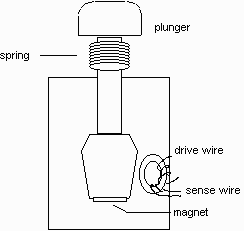 Fig 6.8: Ferrite Core switch |
A small ferrite core, mounted on
the base of the switch, has two wires (a drive
and sense wire) attached through its centre. A current pulse is applied to the drive wire, which is sensed on the sense wire. |
The ferrite core is held in a state of saturation by a small magnet attached to the plunger. This prevents the current pulse from being transferred to the sense wire.
When the plunger is depressed, the magnet moves away
from the ferrite core, bringing the core out of
saturation and allowing the sense wire to pick up the
current pulse on the drive wire. This type of switch is
non-contacting, zero bounce and has a long life.
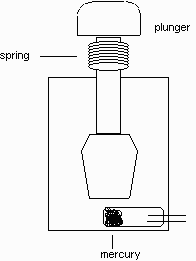 Fig 6.9: Mercury switch |
Two contacts are enclosed in a
small flexible tube, which is filled with a small
amount of mercury. When the plunger is depressed, the flexible tube is compressed and causes the mercury to short with the two contacts, completing the circuit. |
They have low contact resistance and less contact
bounce than contact switches.
Keyboard Encoders
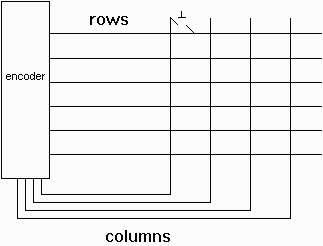 Şekil 6.10: Keyboard Encoder |
The keyboard encoder controls the
keyboard switches and generates a unique code for each
key. It is an integrated circuit or small processor, and handles the key switches in a matrix of rows and columns. The encoder has the task of detecting when a key has been depressed, identifying the key, and generating the code for the key. |
The encoder enables each row in turn, and checks for a change in state in the column lines. If there is a change in state, this means a key has been depressed. The row and column values are used to look up a table which returns the key value.
The encoder continually repeats the scanning cycle for all the rows in the matrix. Problems occur when more than one key in a column is depressed simultaneously. These situations are handled in the following manner,
If more than one key is depressed during the same scanning cycle, the first scanned key is returned, then ignored till it is released. The second key is picked up on the next scanning cycle, then ignored till it is released.
n key roll-over is essential for handling multiple
simultaneous key presses.
Summary
The standard PC has a QWERTY keyboard which uses ASCII codes.
Control codes are used to control devices like printers and
modems and are generated using the CTRL key.
A keyboard encoder is a device which handles the key presses and converts them to an ASCII code.
Ana sayfa | Other Courses | Notlar
| Tests | Videos
© Copyright Brian Brown, 1992-2001. All rights reserved.