Temel donanım bilgileri
© Copyright Brian Brown, 1992-2001. All rights reserved.


INPUT/OUTPUT
DEVICES CONTINUED
 Optical Readers (character, page,
bar code, MICR etc)
Optical Readers (character, page,
bar code, MICR etc)
- convert printed or hand written information to computer
data
- information is read in one three ways
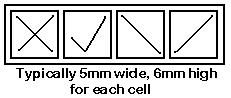
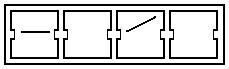
- OMR
marks which are placed in predefined areas of the
document
- OCR
printed or typewritten characters
- OCR
handprinted characters
- pre-printed paper is normally used for hand-printed marks
or characters
- an example of OMR is LOTTO
- readers are designed to read marks or characters
positioned in a matrix pattern
- colored printing is used in pre-printing, which is
insensitive to the reader
MARK READERS
PRINTED TYPE/CHARACTER READERS
- OCR-A
- machine readable fonts are used
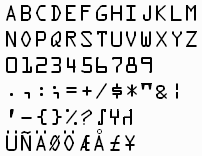
Fig 6.13: OCR-A font
- first to be produced, originated in USA
- characters designed for machine recognition
- OCR-B
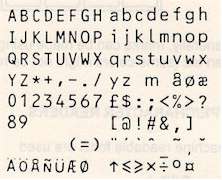
Fig 6.14: OCR-B font
- originated in Europe
- less stylized, more characters than OCR-A
- by reducing the number of characters in the
character set, recognition is made quicker,
easier and more reliable
- hand printed characters
- differences in individual writings make this
difficult
- many OCR machines restrict to numeric digits
- often shows desired input on pre-printed form
- Performance
- typical speeds 300cps-800cps
- error rate depends on quality of input and size
of character set used
- typical reject rates on hand printed characters
of 1%
- software often uses intelligent substitution
- Applications
- alternative to keying in data
- opinion polls, market surveys
- tests, stock control, lotto
Optical
Character Recognition [OCR]
OCR is the scanning of text documents into graphic images,
then using software to decode the graphic picture elements back
into text.
- When the scanner scans the document, it is read as a
series of black and white pixel (dots) elements. This
process often tends to degrade the edges of the text
characters, and is more pronounced when the characters on
the original are too small. Edge degradations makes it
harder for the OCR software to convert the pixel elements
back into text later on.
- The OCR software reads the bitmap of pixels created in
step 1 and averages out the white spaces on the page,
effectively identifying paragraphs and eliminating
graphics. The white spaces between each line of text is
used as a baseline reference for recognizing the
characters on that line.
- First, the OCR software tries to match each character on
a line in the bitmap against character templates that it
knows about.
- The remaining unidentified characters have a technique
known as feature extraction applied to them. The
OCR software calculates the characters height, lines,
curves and other features. It can then make close guesses
as to the characters value.
- For the remaining characters the OCR software cannot
recognize, the software can either apply contextual
analysis, which basically means looking at the syntax
and construction of the words and making a guess (for
example, changing thi5 to this), or give up and
substitute the unknown character with a distinctive
symbol such as ~ or @.
- The finished information is normally able to be saved in
a number of different formats, text or Rich Text Format
(RTF). OCR software which support RTF can also recognize
bold, italics, retain tabs and whitespace, as well as
recognize a limited number of different fonts.
Bar
Codes
Typical
Connections for a Bar-Code Reader
The following diagram shows the bar-code reader inserted
between the keyboard and the base unit of the computer. The
bar-code unit converts the information on the bar code
information read by the pen presents it to the computer as a
series of ASCII characters. The computer thinks that the
characters came from the keyboard. This simplifies writing
software to read bar-codes.
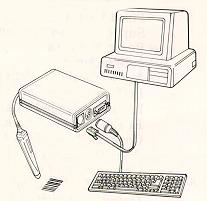
Fig 6.18: Bar-Code Connections
Typical Bar-Code Reader for
a PC
The following diagram shows a typical bar code reader unit for a
Personal Computer.
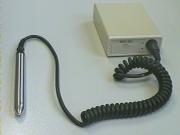
Fig 6.19: Bar-Code reader and pen
Summary
Optical readers consist of OMR and OCR. An example of OMR is
LOTTO.
Optical Character Recognition is achieved by scanning the
image is as graphics, and then uses a series of comparisons to
try to convert each detected character area to a known character.
Problems occur when the font is too small, it is skewed at an
angle, or insufficient contrast exists between the background and
the characters.
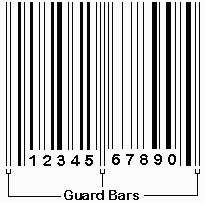
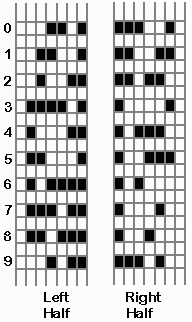
Bar codes are in extensive use today. They are primarily used
for identifying products. They are easily scanned and stored in a
computer.
Home | Other Courses | Notes
| Tests | Videos
© Copyright Brian Brown, 1992-2001. All rights reserved.