
- Welcome!
- The Three Games
- Game Functions
- Strategy Tips
- More Tips
- Links
- The Community
- Subscribe!

Game Functions
I'll try to explain the basics of the different functions that you can use in the game. Most of this can be found in the Help menu that is in the game itself, but repeating such important basics is always good.


Movement

There are three different movement settings that units can have. This determines how their movement is affected by sighting a new unit. A new unit is a unit that wasn't seen at the beginning of the turn.

Continue on Sighting: The unit simply continues on sighting without stopping if it sees an enemy. A unit with this order could run straight through a nest of enemies without taking note of them unless you've ordered it to stop in the middle.

Halt on Sighting: This is a very useful order in some cases. This means that your unit will stop if it sees an enemy unit that wasn't previously sighted. When it stops, it will most likely begin to fire at the unit.

You need to use this carefully, however. If an enemy suspects that your units are on Halt on Sighting, he might pop a unit out behind a corner at the beginning of the turn to stop them. This means that when your units see the unit that was popped out, they just stop and sit there for the rest of the turn!

So, as with the rest of the movement orders, this isn't the way to go in all situations.

Retreat on Sighting: If your unit has this order, it will run back the way it came if it sees a unit. Once it has stopped, it will no longer move. This is useful if you're unsure where the enemy is. So you can send a unit with this order out to investigate. When it sees something it runs back (hopefully) unharmed.


Shall I Fire Or...?
There are two different settings you can have for units if they shall shoot or not shoot at will. This is pretty basic. Generally, units that can do splash damage and kill your own units should have Hold Fire, the rest should be Fire at Will.

Fire At Will
: The unit will fire at will if it sees an enemy unit.

Hold Fire: The unit will hold fire if it sees another unit. Some unit has this by default, for example the Grenadier. If the Grenadier has Fire at Will, he might kill your own units by shooting grenades at impossible places!


Different Ways To Fire

Combat. This can be really confusing at first. Most units can fire in some way (exception are for example Scanners). Most of those who can fire, can fire in four different ways. I'll try to explain them here.

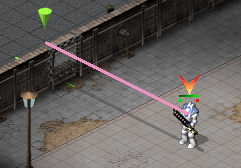
Direct Fire (PINK): Direct Fire will tell the unit to shoot in a direction. The direction is defined by the line you see when you right click somewhere on the map. The units will just fire and the shots will hit whatever is in the way. This is marked by a PINK line. Grenadiers mainly use this way of firing. If you use Grunts or Commanders to fire like this, you should be more or less sure that the target you're firing at is stationary.

Direct Fire

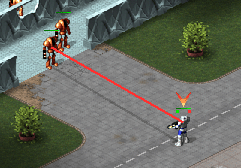
Direct Fire (RED): If you have Direct Fire selected for your unit, and right click directly on an enemy unit, the line will turn RED. This means the unit will shoot right at the enemy unit. This is greatly useful for a few reasons:

1) The firing time is slightly faster. Do not understand this wrong. The unit will stand still and aim for it's entire firing time (represented by the time indicator that rises when you order the unit), but the actual shot will go off faster. This therefore be used fighting corner dancing snipers with your own snipers for example.

2) It works a bit like Terrain Fire. If the enemy unit goes out of sight, your unit will continue with his regular orders. In the scenario in the picture below, you could for example give the Grunt 10 RED Direct fire orders, and then a pursuit order (left click on the enemy unit). This means that IF the Exterminator stays still for 10 seconds, the Grunt will shoot him ten times, but if at any time the Exterminator tries to escape, the Grunt will immediately chase after it.


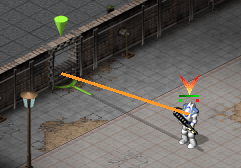
Terrain Fire (ORANGE): Some units can destroy terrain. If you select this type of firing, you will be able to issue firing orders targeting the terrain. You will also se a % of how big the chance is for the terrain to be destroyed.

As a Marine player, you can destroy walls with Commanders, Snipers and Grenadiers.

You can destroy walls or terrain with Direct Fire too. However, Terrain Fire has a major benefit. The unit will stop shooting at the wall or terrain if it has been destroyed, saving lots of time.

As you can see the shot is aligned so it will actually hit the wall instead of passing through. This is because terrain fire was used.

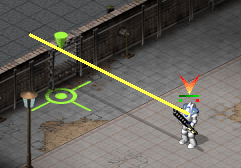
Opportunity Fire (YELLOW): This is something you will use a lot, and is perhaps the hardest concept to understand. If you order a unit to Opportunity Fire (Opp fire), it will:
1) Aim along the way you ordered the shot to be made
2) If an enemy comes along, it will shoot it
3) If there's no enemy, the unit will stop aiming without firing and carry on orders

This is crucial in the actual game play. It means you can order your units to fire at any units in a certain area for a certain time and then do something else. Note that with Direct Fire you need to SEE the unit to be able to get a sure hit (the RED line). With Opp Fire, the unit will shoot anything that comes along, and not shoot if nothing comes along.

It will also save shots for units with low ammo, such as Commanders and Snipers. If you always used Direct Fire, the units would run out of ammo within the first few turns.

The bad thing about Opportunity Fire is that the actual shot is fired always at the end of the aiming time. So in a way, it's a slow way of firing, but also a fast way (you'll understand what I mean when you get accustomed to using it).


There's something called Corner Dancing, that used Opp Fire. Read about it in the More Tips section.


Useful Game Functions
Here are some things that are really useful:
1) Pressing U will undo the latest order. Without it, planning orders would take ages.

2) Pressing H will make the unit hold for 1 second. This might be useful in many situations. You will develop a feel for it when you play more.

3) Pressing P will bring up the 2D map view. You won't have to be bothered by walls or such. Will make tight movements easier to plan.

4) Pressing V will turn on the Vision Tool. If you have a unit selected you will see his line of vision. What he can see will be overpainted in a blueish color. Something that a unit can't see, he can't fire at! Remember this if you try to use your Grunts to fire at enemy Snipers.
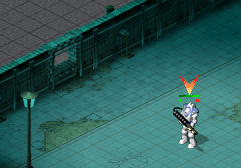
Using the Vision Tool. The Commander can't see the insides of the room-

5) CTRL-LMB will force a movement order. This is useful if you want a unit to move to the positon of another unit. Without holding CTRL before issuing the movement order, you would just select the other unit instead of telling the first unit to move there.


A Few Questions Answered
Q: How long does it take for my unit to fire?
A: You can check how long it takes by issuing any of the fire commands described above. The unit will always stay still for the same amount of time, but the shot might go off faster depending on which firing mode you use. If you use Opportunity Fire, the unit will aim for the entire firing time and then shoot anything that appears during that time (this means that if a Grunt pops out behind a corner 0.2 seconds before the unit will stop aiming, it will shoot it! If you hadn't put it on opportunity fire, the unit would have to have aquired the Grunt first and then shot, taking the full firing time).

Q: Is standing still the fastests way to fire?
No! This is the slowest way to fire of all ways. You should almost always use opportunity fire or any of the other firing modes. Generally, the only time the units are allowed to fire by their own is when they stop due to a unit sighted when they have the Halt On Sighting movement order. If you don't fully understand the concept of the different firing modes, try it out in hot seat!

Q: How do I avoid Grenades and such?
You just run! Try to spot the Grenadier. Make sure you know where he can fire or where he can't fire. A Grenadier can fire a grenade each 2,5 seconds. This means that if you can kill him before that, you're safe.

Grenadiers only have 8 grenades, Missile Tanks only have 5 missiles. Use this to your advantage. A unit without ammo is harmless (until it reloads).

Q: How does Hold for 1 Second Work?
The unit will stand still for 1 second. It will not try to shoot or anything like that! So keep that in mind when you use it.


Hosted by www.Geocities.ws

1