 |
is
a Tagalog/Filipino phrase HOW-TO |
|
is
a Tagalog/Filipino phrase HOW-TO |
Playing music in chat
Perhaps the easiest way to play music in chat is to pipe the music from the speakers to the microphone. All you have to do is point the mic to one of the speakers and start playing the song using your favorite media player. Of course, there are at least two issues using this method:
a. You may get a loud and annoying feedback if the mic is placed too near the speakers. But that can be easily solved by following the procedure described in this link.
b. The audio quality may be less than optimal because the music has to "bounce back" from the sound card, to the speakers, to the microphone, back to the soundcard and out the chat room. And during the transit from the speakers to the mic, it introduces additional background noise like hisses, static, and/or electromagnetic interference, not to mention coughs, sneezes, "ehem's" or people talking in the background, etc.
Another way of playing music in chat besides piping it from the speakers to the mic is to pipe it directly from the sound card. The audio quality is a bit better and this method applies if you are one of those who use a headset to chat or those who don't have a microphone in the first place.
Here are the steps:
1. Double-click the  icon by the System Tray.
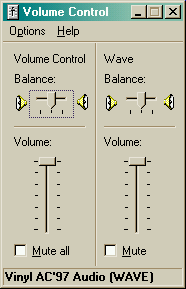
2. The Volume Control properties box will show up on your desktop. From the menu, click Options > Properties.
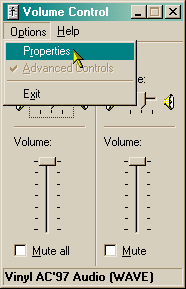
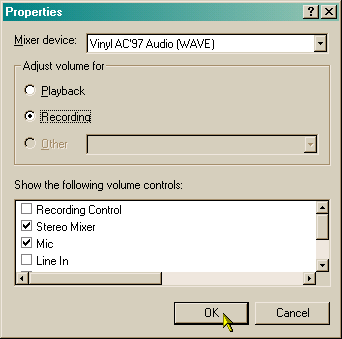
3. In the Properties box, select Recording under the "Adjust volume for" section. Under the "Show the following volume controls" section, make sure you have check marks on at least two items: Stereo Mixer and Mic. Click the Ok button.
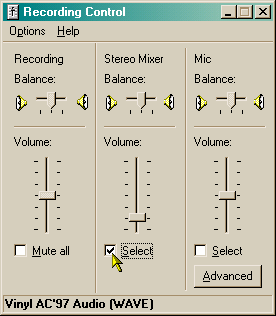
4. Volume Control will be replaced by Recording Control. Click the Select box under Stereo Mixer. Depending on your sound card and/or version of Windows, it may appear as Wave Mixer or Wave Output or Mixed Output, etc.
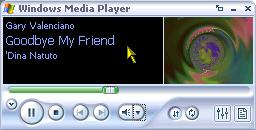
5. Load your favorite media player, start playing the song and hold down the Talk button. Alternatively, you can tick Hands-Free if you want to type in the chatroom while playing the song.
6. Once you're done, click the Select box under Mic.
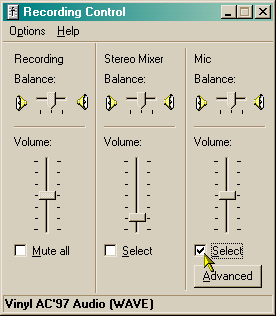
7. Close the Recording Control box.
Did this page help you solve
your problem?
| Tell me what
you think | What
others have to say | Back
to main page |
 TIPS AND TRICKS