 |
is
a Tagalog/Filipino phrase HOW-TO |
|
is
a Tagalog/Filipino phrase HOW-TO |
Getting rid of microphone feedback
If you're hearing your own voice echoing through the speakers or you're getting loud feedback when your microphone is near the speakers and want to get rid of it, follow these steps.
1. Double-click the  icon by the System Tray.
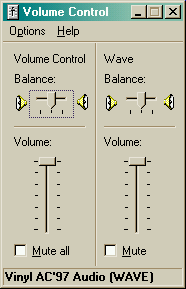
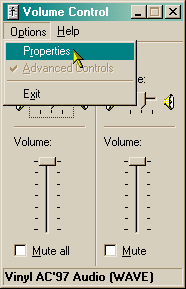
2. The Volume Control dialog box will show up on your screen. If you see a device called Mic, skip step 3 and go to step 4. Otherwise, click Options > Properties from the menu then proceed to step 3.
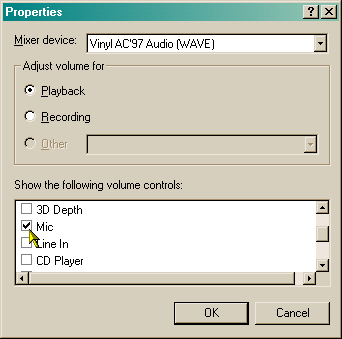
3. Make sure you have a check mark beside the box labeled Mic as shown in the picture below. Then click the Ok button.
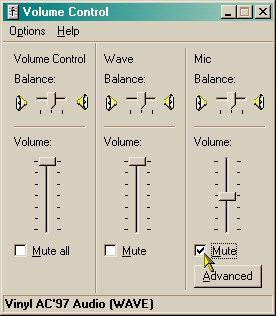
4. Click the box labeled Mute under Mic then close the dialog box. You shouldn't hear any more feedback from now on.
Did this page help you solve
your problem?
| Tell me what
you think | What
others have to say | Back
to main page |
 TIPS AND TRICKS