 Hyrule Magic Guide
The world maps contains the maps which you can access in the game in the overworld with the x button... editing the tiles sure is easy, just make sure that "draw" button is on, and left click to select (on the wide range which you can select from) and right click to paste that tile where you want.
You can also draw by using the select option (default), use it to select an area, and drag it to wherever you want that area to go. Also note that Dark world map uses the same surrounding clouds as the light world one.
That's that. Drawing is easy, but what happens if you have some really nice gfx you want to put on the map?
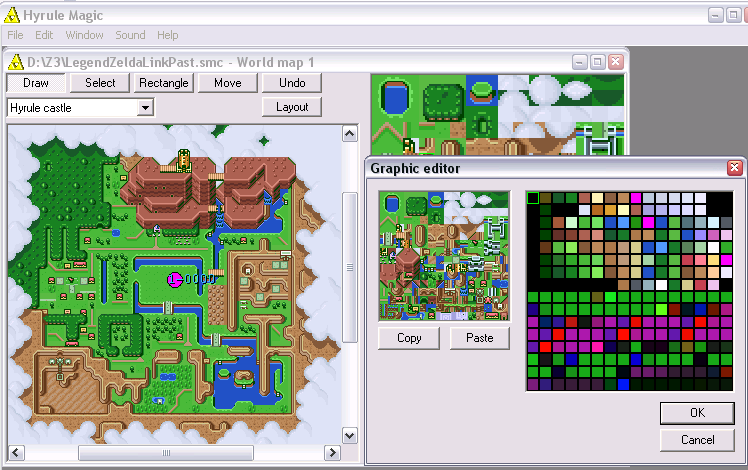
Double clicking on the 'tiles list' on the rights will give you a big chunk of colours on the right and the 'tile list' on the left (see above). The Copy and paste button there can be used to import/export gfx to say.. bmp image and edit them as you like. Note though that you need to be careful not to use colours which the SNES doesn't use (which means just stick to those colours you have there). If you're wondering what's up with that big chunk of colours on the right, what i think is just colours used on the overworld... some palette.
Now to that pink dot. That dot is the 'event' signal which you see on the map. Remember at the start of the game you have to head to Hyrule Castle and there's this X thing on the castle? That's it. Yes you can move it, just select the 'move' button up the top and move it to wherever it pleases you. You can also remove it by right click -> remove or insert it back by right click -> insert icon #. You can also select which event by that combo box up there which should say "hyrule Castle" at the moment (those event should be pretty self explainatory). NOTE: you should try to insert icons which the game doesn't use, for example, trying to put 2 icons at the start, try putting 5 icons on the one which shows sword and the 3 pendants. The gfx may be glitched, and it might look weird... so... try not to do that.
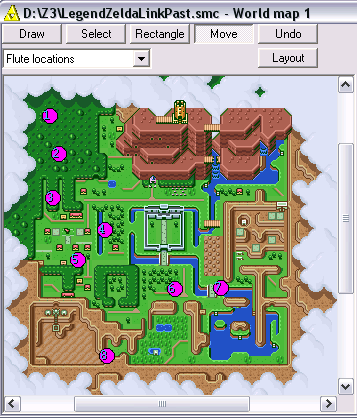
On the left is what you can do to the flute locations, but remember changing these only affect how it's showed on the world map, not the actual dropping spot.
There's one more function in this area which is very dangerous to use, it has the potential to forever stuff up your game and you can't do anything about it unless you restore from your backup (it did on mine.. i have to go back like 50 version -- which is a lot -- to fix that problem). It is the layout button. You'll see lots of rectangle squares in the map with hex numbers in them. They represent the overworld and how they're joined up together. Clicking on say... the big 00 square in the forest will split the screens! Clicking on one of the small screens will make it merge into one big screen! Why this is dangerous you want to ask? It is because if something (eg/ item, sprite etc) is right in the middle of say... the big Area 00 square, it will cause Hyrule Magic to crash and something funny will be written to the rom instead. NOTE: sometimes Hyrule Magic doesn't crash in that situation, but it has a high chance that something in your rom is stuffed up.
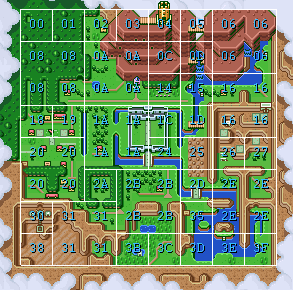
There is only one safe way of splitting/joining the overworld pieces, it is to remove any items/sprites of the screens you're trying to join/split, then do it.
That's it for the World Maps editor. Enjoy.