|
Understanding the Guild Tab
|
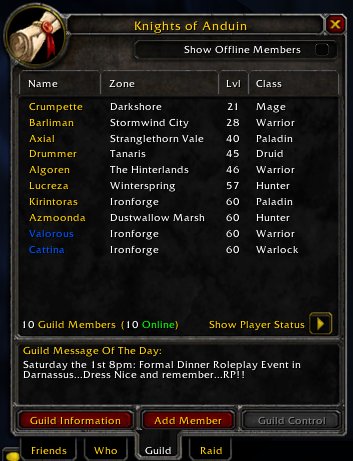
There is
a button at the top of the tab that allows you to view just the
members online or to view the offline members. You can check
the box next to "Show Offline Members".
I also have mine arranged by
level. This is done by clicking on the word "Lvl"
at the top. You can also chose other options, like Name
(alphabetically) or Zone or Class.
Shows 10 members that are online at
this time. |
|
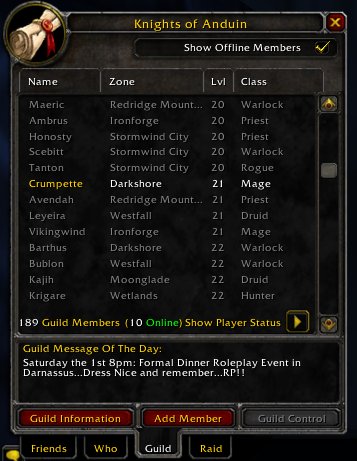
This is
the Guild Tab with the box checked to "Show Offline
Members".
As you can see, at this time, we
have 189 Guild Members but 10 are Online at this time. |
|
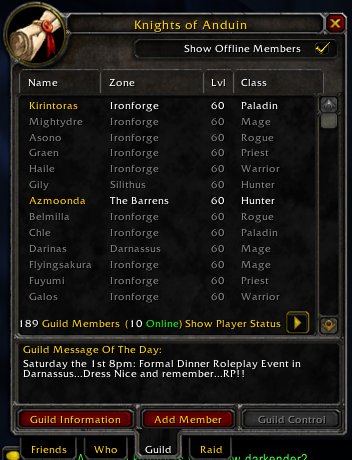
This is
the view of the Guild Tab with it arranged by Level of members.
Notice at the bottom I have showing
"Show Player Status" arrow selected. |
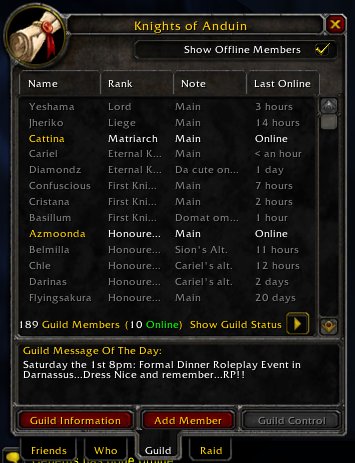 |
Notice
that this is the Guild Tab with the "Show Guild Status"
selected.
On this window, I have it selected
in order of Rank.
As you can see, only one Officer is
on at this time, Cattina (myself).
Also at this time you can see we
have 8 Officers in the Guild. |
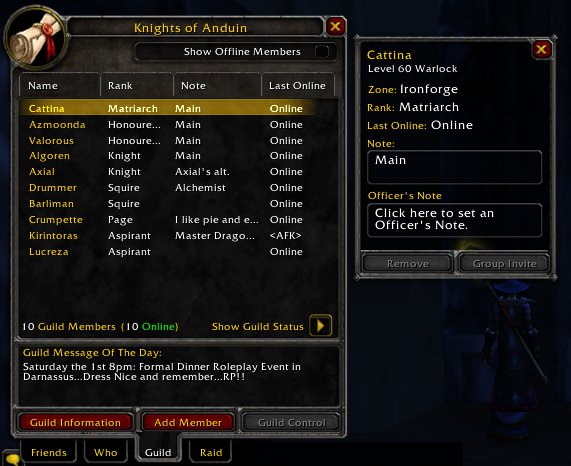
I will use this window to
explain some Do's and Don'ts. Forgive me if I use you as an example here,
I am not trying to embarrass anyone. The first four members have
their notes set correctly. If I was logged in with Tinyone, her note
would read "Cattina's Alt". If it is your "Main"
then on your note write Main. If it is your Alt then write (example)
"Someone's Alt". Your
profession should be listed on the Forum and not on personal note.
Please put either "Main" or "Someone's Alt" so that
the Officers will be able to see who is on and we can get to know and
recognize you.
~ The KoA Staff ~


|